In writing this I thought of some tech with similar vibes for containers.
I self host an RSS feed reader called commafeed. When I started working on this I just sort of assumed they had an API and thankfully they did... It just wasn't a conventional REST API! It's something called a "fever" API.
Commafeed gives you an "API Url" but that's about it as far as documentation goes for it.
I had absolutely 0 idea what a fever API was so I did a bit of searching. Turns out, once upon a time, there was a RSS feed aggregator called "fever" and their API spec seems to have become a defacto unwritten standard for interacting with a feed aggregator.
On this wild gooes chase, I found a myriad of github pages, README's, and other applications documenting their own fever API integrations. In that mess of pages, I found this. It claims to include a complete copy of the API spec from fever's site (which is now timing out; making this a surviving copy of that lost info).
It looks like to "authenticate" against a fever API, you have to put your username and password together in the format of ${user}:${pass} then md5 hash them. You then POST that string over in the body labelled as api_key.
With authentication figured out, I had to figure out how to get some posts. Thankfully, the docs we have on hand make that pretty obvious as well. It seems all we had to do was slightly alter the URL in our code above from https://rss.tbx.sh/rest/fever/user/3?api_key=${authHash} to https://rss.tbx.sh/rest/fever/user/3?api_key=${authHash}&feeds aka just add &feeds to the end 😎
It seems fever APIs mostly return objects based on the query parameters on the URL and usually all live at a singular "path".
Awesome, so now we know how to authenticate and get feeds, let's move it into the blog.
Now that I had some data on the page, I realized it would probably be nice to have each blog's favicon besides the name. Thankfully, the fever API exposes an endpoint to fetch all the favicons as well.
In testing, it looks like the favicon endpoint returns all the favicons in a raw base64 string and takes around 5-6 seconds to return a response (yikes). With that in mind I
With that, we've got the page pre-rendering once per build, got some types in place, and have favicon's beside the feed titles and links.
Right now the page is super basic. The images are huge, all my follows are just in a big boring list, so let's do some stuff to clean it up:
That being said, I had some time off for the holidays this year and wanted to do some learning! What better way than to build a project centered around AI. One of my first ideas was to use an LLM to summarize my notes. I take notes in Obsidian for my work and personal life everyday so I have literally hundreds of documents outlining my daily work, current projects, personal research, interests, etc that I can feed into an LLM for context.
I learned that finding and feeding relevant information into an LLM in your prompt so it can generate answers based on that specialized knowledge is generally known as "Retrieval Augmented Generation" or RAG for short[^1]. I also learned that there are a lot of projects out there that already do this. They can range from pretty minimal[^2] to massive undertakings in collecting, formatting, normalizing, ingesting, and indexing data for a specific use-case[^3].
With that in mind, I decided to start simple and build up as needed.
Here's a brief overview of the tools I used to build MDChat, and some thoughts on how they all tie together.
While I am happy with what I have so far, there are a few more things I'd like to do with MDChat. I think a few changes could make it more useful and more adaptable to people's specific needs:
I'm sure more will come up as I use the tool and continue to learn as well.
If you have python v3.10+ installed, at least one markdown file, and an OpenAI API key, you can try mdchat out right now!
I just watched this talk by Andrej Karpathy, "Intro to Large Language Models". Large Language Models (or LLMs) being the AI systems that power tools like ChatGPT.
I'm not neccesarily a stranger to LLMs. I've been exposed to the barage of AI news and watched a few small talks on them. I use tools like GitHub Copilpot and ChatGPT daily and I've even started building some toy/proof-of-concept projects with them (If intersted, see[^1] these[^2] links[^3])
That said, I'm by no means an expert. This talk served as a good all-around intro and seems to cover a lot of foundational content I've not found covered elsewhere (at least not in a format that stuck with me).
Watching the talk brings me back to interesting lectures from excited profs back during my CompSci program. if you're into that, or just want to learn about how LLMs work, I would recommend giving it a watch!
Look at this photo I took at the grocery store a few days ago.
All I wanted to know was the BIN number so I could easily pay for a pastry at checkout.
But... why did I do this? I have a notes app on my phone; why not use that?
I took a photo because it was extremely low friction. Taking a note would have taken "too long".
While in reality this is probably a 5-15 second deference, do you see how many more steps are involved in taking a note? Just think about verifying that the note I've taken is error free. Imagine fat-thumbing it and writing down the wrong BIN code; that note becomes almost useless. A photo doesn't really have that problem.
There's probably some diatribe in me about how this is an example of how convenience will always win over efficiency. I'll skip that and just say that this seemed to be a great example of how just a little friction can take something from "I will use this every day" to "I never use this", even in the case of an arguably worse or very inefficient solution.
Getting your stuff (app, tool, game, whatever) in the hands of the people you're building it for as early as possible is a great way to sort this out; they're not afraid to hurt your feelings and tend to pick up on this really early. Even if they don't identify it by name, you can usually sus it out by watching them use your thing.
I would love to hear if any of you have novel examples of friction guiding how you act. What do y'all use that's arguably worse or at-least suboptimal, just cause it's easier?
I feel like this "why do I use photos for notes" thing has been stuck in my head for a week and mind mapping it tied it to work, dev, and UX in general; I'm sure that I'm not the first to make this connection.
[^1]: I think "use the tool you know" is, in general, good advice. Especially when you're just sussing out an idea or getting started.
"}},{"id":"bun-vs-deno","url":"https://mykal.codes/posts/bun-vs-deno","meta":{"title":"Bun vs. Deno","pubDate":"2023-09-11T00:00:00.000Z","type":"note","draft":false,"tags":["development","javascript","deno","bun"],"description":"Bun and Deno seemed mostly the same to me, so I wrote this post to sort out my thoughts."},"content":{"md":"\n[Bun](https://bun.sh/) [v1.0](https://bun.sh/blog/bun-v1.0) just launched, and I've been very surprised by how hyped people seem to be with the release. [Deno](https://deno.com/) (currently on v1.36) has been around for quite awhile, has seen pretty heavy adoption in certain circles and by certain companies (especially in edge environments like with [Netlify Edge Functions](https://docs.netlify.com/edge-functions/overview/) and [Cloudflare Workers](https://workers.cloudflare.com/)).\n\nI spent the afternoon digging around both Deno and Bun's sites, and talking to a few people, so thought I would solidify my thoughts by writing something up.\n\n## What they have in common\n\nBun and Deno have a lot in common. This is why I was so surprised by all the hype I've seen online for Bun's 1.0. _Why are people so excited about Bun, when Deno seemingly does so much of the same things?_\n\nHere's a quick list of things I've noticed the projects have in common:\n\n- Alternate JavaScript runtimes that run in a server/desktop context.\n- Claim to improve upon than the prototypical server/desktop JS runtime, Node.js. This includes actual runtime and startup improvements.\n - note: While both Deno and Bun are faster than Node.js, Bun seems to be considerably faster but time will tell if that's true at scale.\n- Provide a number of runtime-native solutions that are typically solved by third-party tools (i.e. bundler, package manager, dev server, test runner, etc.)\n- Provide their own \"standard lib\" of tools that claim to be equivalent, simpler, or faster than the Node.js standard options through better APIs or optimization in their respective languages.\n - [Bun is built on Zig + JavaScriptCore (Webkit)](https://bun.sh/docs#what-is-a-runtime)\n - [Deno is built on Rust + V8 (Chrome's JS engine)](https://deno.land/manual@v1.36.4/introduction#introduction)\n- Managed by for-profit, VC-backed, companies, as opposed to Node.js which is in the hands of the [The OpenJS Foundation](https://openjsf.org/), a not-for-profit company.\n - This isn't necessarily a bad thing, just something to be aware of.\n- Natively support Typescript, JSX, top-level await and a number of other \"developer experience\" goodies.\n- Are open-source.\n\n## Where they're different\n\nThere are a _lot_ of tit-for-tat feature-level differences between Bun and Deno. That said, after reading through their respective sites, **I think the differences all come down to a fundamental difference in how they attempt to answer the same question.** **_How do we replace Node.js_?**\n\n### Bun's approach\n\nBun aims to replace node.js with a drop-in replacement that focusses on improved performance and developer experience without straying to far from the core principles of node. It does this by focusing on optimizing and improving upon existing node.js paradigms while still providing non-breaking changes that improve developer experience.\n\nHere are some examples of this approach in their features:\n\n- Faster install time for packages via [`bun install`](https://bun.sh/docs/cli/install) that uses your existing `package.json` file.\n- Direct replacement for `npx`, [`bunx`](https://bun.sh/docs/cli/bunx) that relies on the optimizations in `bun install`.\n- [Top-level await](https://bun.sh/docs/runtime/modules#top-level-await), [native typescript](https://bun.sh/docs/runtime/typescript) and [JSX](https://bun.sh/docs/runtime/jsx) support in the runtime itself.\n- [A test runner](https://bun.sh/docs/cli/test) and [bundler](https://bun.sh/docs/bundler) as part of Bun's standard library and [more DX features](https://bun.sh/docs/runtime/hot).\n\nNotice how these features enable developers to swap over to bun without changing any of their existing configuration? You can just use your existing `package.json`, dependencies, and scripts with bun. You can just run `bun install` and `bun run start` and see the improvements _instantly_. You can incrementally adopt the other goodies over time.\n\n### Deno's approach\n\nDeno aims to replace node with a bit more of a deviation from the tracks that node.js laid. Deno is taking a more holistic approach, and is aiming to solve the issues present in Node.js at a fundamental level. It offers new solutions to old problems and attempts to rethink node.js from the ground up, avoiding all of the (perceived) mistakes it's made.\n\nHere are some more features, from Deno this time, that justify my thinking:\n\n- Preferring direct [ESM imports](https://deno.land/manual@v1.36.4/basics/modules#overview) and [a `deno.json` file](https://deno.land/manual@v1.36.4/getting_started/configuration_file) instead of `package.json`\n- Having [their own third-party package hosting platform](https://deno.land/x)\n- [Supporting both node.js built-ins and npm packages](https://deno.land/manual@v1.36.4/node), but doing so after v1.0.\n- While Deno is faster than Node.js, [they only mention performance _once_ in their intro](https://deno.land/manual@v1.36.4/introduction). They focus more on DX, better defaults, browser compatibility, better tooling, [etc.](https://deno.land/manual@v1.36.4/introduction#goals)\n\nNotice how Deno pitches itself as more of a wholistic, alternate approach to a JavaScript runtime? Chances are you can't just run your existing node.js app with Deno the same way you could with bun, _and I think that's intentional._ The Deno team seems to believe that the benefits Deno offers are worth changing things up a bit; it's ultimately up to you decide if the tradeoffs are worth the benefits.\n\n_Fun fact: [Deno's development and company are lead by the original developer of Node.js](), [Ryan Dahl](https://en.wikipedia.org/wiki/Ryan_Dahl?useskin=vector). Imo, if anyone gets to definitively claim node.js has made some mistakes, it's the person who designed the runtime in the first place. [Deno was even announced in a talk about that topic.](https://www.youtube.com/watch?v=M3BM9TB-8yA)_\n\n## My closing thoughts\n\nI've already been using Deno for scripts, automations, and little CLI apps ([Deno compile](https://deno.land/manual@v1.36.4/tools/compiler) is amazing for this btw) for around a year, and have been increasingly happy with it for that. I could see myself starting to adopt it in production systems eventually if it stays as stable as it's been recently. As far as Bun goes, I think it's too early to bet on it for work. I will be keeping my eye it though. I'm sure they'll [sort out some of the issues they're facing](https://github.com/oven-sh/bun/issues/3218), and I'm interested to see how they continue to differentiate themselves from both Node.js and Deno after v1.0.\n\nAs it stands right now, I think I'll probably still be sticking to node.js for most production workloads. Boring I know, but it's proven, and I don't want segfaults to take down prod just because I wanted to run my tests faster 😉\n","html":"Bun v1.0 just launched, and I've been very surprised by how hyped people seem to be with the release. Deno (currently on v1.36) has been around for quite awhile, has seen pretty heavy adoption in certain circles and by certain companies (especially in edge environments like with Netlify Edge Functions and Cloudflare Workers).
I spent the afternoon digging around both Deno and Bun's sites, and talking to a few people, so thought I would solidify my thoughts by writing something up.
What they have in common
Bun and Deno have a lot in common. This is why I was so surprised by all the hype I've seen online for Bun's 1.0. Why are people so excited about Bun, when Deno seemingly does so much of the same things?
Here's a quick list of things I've noticed the projects have in common:
- Alternate JavaScript runtimes that run in a server/desktop context.
- Claim to improve upon than the prototypical server/desktop JS runtime, Node.js. This includes actual runtime and startup improvements.
- note: While both Deno and Bun are faster than Node.js, Bun seems to be considerably faster but time will tell if that's true at scale.
- Provide a number of runtime-native solutions that are typically solved by third-party tools (i.e. bundler, package manager, dev server, test runner, etc.)
- Provide their own "standard lib" of tools that claim to be equivalent, simpler, or faster than the Node.js standard options through better APIs or optimization in their respective languages.
- Managed by for-profit, VC-backed, companies, as opposed to Node.js which is in the hands of the The OpenJS Foundation, a not-for-profit company.
- This isn't necessarily a bad thing, just something to be aware of.
- Natively support Typescript, JSX, top-level await and a number of other "developer experience" goodies.
- Are open-source.
Where they're different
There are a lot of tit-for-tat feature-level differences between Bun and Deno. That said, after reading through their respective sites, I think the differences all come down to a fundamental difference in how they attempt to answer the same question. How do we replace Node.js?
Bun's approach
Bun aims to replace node.js with a drop-in replacement that focusses on improved performance and developer experience without straying to far from the core principles of node. It does this by focusing on optimizing and improving upon existing node.js paradigms while still providing non-breaking changes that improve developer experience.
Here are some examples of this approach in their features:
Notice how these features enable developers to swap over to bun without changing any of their existing configuration? You can just use your existing package.json, dependencies, and scripts with bun. You can just run bun install and bun run start and see the improvements instantly. You can incrementally adopt the other goodies over time.
Deno's approach
Deno aims to replace node with a bit more of a deviation from the tracks that node.js laid. Deno is taking a more holistic approach, and is aiming to solve the issues present in Node.js at a fundamental level. It offers new solutions to old problems and attempts to rethink node.js from the ground up, avoiding all of the (perceived) mistakes it's made.
Here are some more features, from Deno this time, that justify my thinking:
Notice how Deno pitches itself as more of a wholistic, alternate approach to a JavaScript runtime? Chances are you can't just run your existing node.js app with Deno the same way you could with bun, and I think that's intentional. The Deno team seems to believe that the benefits Deno offers are worth changing things up a bit; it's ultimately up to you decide if the tradeoffs are worth the benefits.
Fun fact: Deno's development and company are lead by the original developer of Node.js, Ryan Dahl. Imo, if anyone gets to definitively claim node.js has made some mistakes, it's the person who designed the runtime in the first place. Deno was even announced in a talk about that topic.
My closing thoughts
I've already been using Deno for scripts, automations, and little CLI apps (Deno compile is amazing for this btw) for around a year, and have been increasingly happy with it for that. I could see myself starting to adopt it in production systems eventually if it stays as stable as it's been recently. As far as Bun goes, I think it's too early to bet on it for work. I will be keeping my eye it though. I'm sure they'll sort out some of the issues they're facing, and I'm interested to see how they continue to differentiate themselves from both Node.js and Deno after v1.0.
As it stands right now, I think I'll probably still be sticking to node.js for most production workloads. Boring I know, but it's proven, and I don't want segfaults to take down prod just because I wanted to run my tests faster 😉
"}},{"id":"npkill","url":"https://mykal.codes/posts/npkill","meta":{"title":"npkill","pubDate":"2023-06-09T09:30:00.000Z","type":"link","draft":false,"tags":["node","npm"],"description":"easily delete all your old node_modules folders","url":"https://www.npmjs.com/package/npkill"},"content":{"md":"\nI just deleted 8gb of old `node_modules` folders for inactive projects! \n\nJust run `npx npkill` in your terminal, and `npkill` will scan your hard drive for all your `node_modules` folders, display the last time they were accessed, and let you delete them. \n\nside note, `npx` is great for running node applications in a one-off context; Underappreciated NPM feature in my opinion. ","html":"I just deleted 8gb of old node_modules folders for inactive projects!
Just run npx npkill in your terminal, and npkill will scan your hard drive for all your node_modules folders, display the last time they were accessed, and let you delete them.
side note, npx is great for running node applications in a one-off context; Underappreciated NPM feature in my opinion.
"}},{"id":"markdown-images-are-an-antipattern","url":"https://mykal.codes/posts/markdown-images-are-an-antipattern","meta":{"title":"Markdown Images are an anti-pattern","pubDate":"2023-05-25T20:00:00.000Z","type":"link","draft":false,"tags":["webdev"],"description":"Thank you, Dave Rupert.","url":"https://daverupert.com/2023/05/markdown-images-anti-pattern/"},"content":{"md":"\n[Thank you for saying it, Dave.](https://daverupert.com/2023/05/markdown-images-anti-pattern/)\n\nMy Markdown linter gets mad whenever I use `![]() ` tags. It drives me nuts. Either add proper image formatting to the spec, or let me use my HTML tags! ","html":"
` tags. It drives me nuts. Either add proper image formatting to the spec, or let me use my HTML tags! ","html":"Thank you for saying it, Dave.
My Markdown linter gets mad whenever I use <img /> tags. It drives me nuts. Either add proper image formatting to the spec, or let me use my HTML tags!
"}},{"id":"systems-analyst-ii-at-ufv","url":"https://mykal.codes/posts/systems-analyst-ii-at-ufv","meta":{"title":"Systems Analyst II at UFV","pubDate":"2023-05-21T01:38:00.000Z","type":"post","draft":false,"tags":["personal"],"description":"Moving on up as a Systems Analsyt 🎉","heroImage":{"src":"/_astro/systems-analyst-II-at-UFV.-y0eGL5j.avif","width":1200,"height":800,"format":"avif","fsPath":"/app/src/assets/posts/systems-analyst-II-at-UFV.avif"}},"content":{"md":"\n[I started as a Systems Analyst I at UFV on May 10th, 2021](/garden/posts/starting-at-ufv) and am stoked to be moving on up into a Systems Analyst II role as of May 17th, 2023.\n\n## What I've been up to\n\nHonestly, it's hard to believe that it's been 2 years since I started at UFV. I've grown a lot in the role. I can't talk too much about what I've been up to but I can give a brief summary of the _type_ of things I'm working on.\n\nI've had a real taste of legacy-enterprise-land. I'm happy to say I've had the opportunity to modernize quite a few dinosaurs, document a lot of undocumented systems, automate a lot of complexity away, and help our team pick up some DevOps, testing, and cloud chops. I've also written a _lot_ of Docker-powered Python apps and worked extensively in React & Typescript apps in Javascript land. Hopefully, all that work has made our students, staff, and faculty's lives better bit by bit.\n\n## What this promotion means\n\nThe biggest difference between a Systems Analyst I → Systems Analyst II (SA II) role on paper is that SA II is more of a leadership position on the team. I'll be working across the team more and enabling others while working on larger impact and more complex projects.\n\nThat said, I'm excited to take on more responsibility, get more say in how we move forward, and continue to drive our team deeper into sustainable software and systems development practices.\n\n## Thanks, everyone\n\nThere are so many people that I could not have gotten here without. You all know who you are (my wife, friends, coworkers, family, and mentors) and I've thanked you all individually so I won't put you on blast in public 😉\n\nIf the next 2 years are anything like the previous 2, I'm sure it will take me lots of places I never would have expected.\n","html":"I started as a Systems Analyst I at UFV on May 10th, 2021 and am stoked to be moving on up into a Systems Analyst II role as of May 17th, 2023.
What I've been up to
Honestly, it's hard to believe that it's been 2 years since I started at UFV. I've grown a lot in the role. I can't talk too much about what I've been up to but I can give a brief summary of the type of things I'm working on.
I've had a real taste of legacy-enterprise-land. I'm happy to say I've had the opportunity to modernize quite a few dinosaurs, document a lot of undocumented systems, automate a lot of complexity away, and help our team pick up some DevOps, testing, and cloud chops. I've also written a lot of Docker-powered Python apps and worked extensively in React & Typescript apps in Javascript land. Hopefully, all that work has made our students, staff, and faculty's lives better bit by bit.
What this promotion means
The biggest difference between a Systems Analyst I → Systems Analyst II (SA II) role on paper is that SA II is more of a leadership position on the team. I'll be working across the team more and enabling others while working on larger impact and more complex projects.
That said, I'm excited to take on more responsibility, get more say in how we move forward, and continue to drive our team deeper into sustainable software and systems development practices.
Thanks, everyone
There are so many people that I could not have gotten here without. You all know who you are (my wife, friends, coworkers, family, and mentors) and I've thanked you all individually so I won't put you on blast in public 😉
If the next 2 years are anything like the previous 2, I'm sure it will take me lots of places I never would have expected.
"}},{"id":"erosion-of-ownership","url":"https://mykal.codes/posts/erosion-of-ownership","meta":{"title":"No one owns their own video games anymore","pubDate":"2023-05-20T00:00:00.000Z","type":"note","draft":false,"tags":["personal"],"description":"Why I still buy physical media in 2023"},"content":{"md":"\nI just bought a physical copy of [Legend of Zelda: Tears of the Kingdom](https://en.wikipedia.org/wiki/The_Legend_of_Zelda:_Tears_of_the_Kingdom?useskin=vector). _Why?_ because I want to be able to play it in 4-5 years when Nintendo inevitably retires the Nintendo Switch online store.\n\n**But why would Nintendo shut down their digital shop?** Doesn't this mean everyone who bought digital copies won't be able to re-download their games? Yeah! it does! but check out what [Nintendo did to their 3DS & WiiU store this March](https://en-americas-support.nintendo.com/app/answers/detail/a_id/57847/~/wii-u-%26-nintendo-3ds-eshop-discontinuation-q%26a), or [what they did to their Wii store back in January of 2019](https://en-americas-support.nintendo.com/app/answers/detail/a_id/27560/~/wii-shop-channel-discontinuation).\n\nFrom a business perspective I could see why they can't host their digital library _forever_. Managing all the infrastructure, support, and person-power to keep these things up and running is no small feat; It doesn't make sense to burn money on these services forever if they aren't making money._But at least send out an email and be like \"hey, you can download a copy of that game you bought here along with your save data!\"_ but nope. nothing. Thanks for your money, bye!\n\n## Not just Nintendo\n\nIt's not just Nintendo. I've also noticed a bunch of movies, TV shows, games, and other digital \"things\" just sort of evaporating into thin air. A lot of these shows and movies were never even distributed outside of streaming platforms. What happens to all those Netflix Original shows that get taken down? Are they just gone forever? _really?_\n\nIt makes me pretty sad thinking about all the good art that's going to be lost to data rot and poor preservation over the next x years because of all this.\n\n## My solution for now\n\nOver the last few years I've been doing a few of the following to try and avoid this:\n\n1. Buying physical copies of my favourite games, movies, and tv shows.\n2. Backing up game save data, game images, movies, and tv shows.\n\nThe gaping hole in this strategy is for games, movies, and tv shows that can't be downloaded and don't have physicals. The only option for backup and preservation in those cases is piracy which is absolutely ridiculous, and not something I would recommend.\n\n## TLDR\n\nBuy physical copies of your favourite digital media, take care of them, back them up, and preserve them because their creators sure aren't!\n","html":"I just bought a physical copy of Legend of Zelda: Tears of the Kingdom. Why? because I want to be able to play it in 4-5 years when Nintendo inevitably retires the Nintendo Switch online store.
But why would Nintendo shut down their digital shop? Doesn't this mean everyone who bought digital copies won't be able to re-download their games? Yeah! it does! but check out what Nintendo did to their 3DS & WiiU store this March, or what they did to their Wii store back in January of 2019.
From a business perspective I could see why they can't host their digital library forever. Managing all the infrastructure, support, and person-power to keep these things up and running is no small feat; It doesn't make sense to burn money on these services forever if they aren't making money.But at least send out an email and be like "hey, you can download a copy of that game you bought here along with your save data!" but nope. nothing. Thanks for your money, bye!
Not just Nintendo
It's not just Nintendo. I've also noticed a bunch of movies, TV shows, games, and other digital "things" just sort of evaporating into thin air. A lot of these shows and movies were never even distributed outside of streaming platforms. What happens to all those Netflix Original shows that get taken down? Are they just gone forever? really?
It makes me pretty sad thinking about all the good art that's going to be lost to data rot and poor preservation over the next x years because of all this.
My solution for now
Over the last few years I've been doing a few of the following to try and avoid this:
- Buying physical copies of my favourite games, movies, and tv shows.
- Backing up game save data, game images, movies, and tv shows.
The gaping hole in this strategy is for games, movies, and tv shows that can't be downloaded and don't have physicals. The only option for backup and preservation in those cases is piracy which is absolutely ridiculous, and not something I would recommend.
TLDR
Buy physical copies of your favourite digital media, take care of them, back them up, and preserve them because their creators sure aren't!
"}},{"id":"google-collab","url":"https://mykal.codes/posts/google-collab","meta":{"title":"Google Colab","pubDate":"2023-04-21T00:00:00.000Z","type":"link","draft":false,"url":"https://colab.research.google.com/notebooks/intro.ipynb"},"content":{"md":"\nI was just reading through [Maggie Appleton's post on \"Computational Notebooks\"](https://maggieappleton.com/computational-notebooks)[^1], and came across Google Colab which provides free cloud compute for Jupyter Notebooks. The notebooks are just saved in your google drive account, and it's dead simple to get up and running. Just open the link above, click \"file\" then \"new notebook\" and you're off to the races. \n\nI've used them for prototyping functions, data visualization, and as interactive documentation for little packages I was working on at the time. If you work with Python regularly, and have not came across these notebooks yet, I'd definitely recommend giving them a try! \n\nI first ran into Python's \"Jupyter Notebooks\" in an AI/ML course I was taking in university. I was a bit hesitant at first, but after going through a few labs where the notebook explained the code and theory we were going to explore, then had executable, editable code examples inline, I was hooked. \n\n[^1]: This is a great intro to computational notebooks in general, definitely a recommended read. Maggie also explores other notebook solutions like Observable which is basically Jupyter Notebooks but for Javascript developers.\n","html":"I was just reading through Maggie Appleton's post on "Computational Notebooks"[^1], and came across Google Colab which provides free cloud compute for Jupyter Notebooks. The notebooks are just saved in your google drive account, and it's dead simple to get up and running. Just open the link above, click "file" then "new notebook" and you're off to the races.
I've used them for prototyping functions, data visualization, and as interactive documentation for little packages I was working on at the time. If you work with Python regularly, and have not came across these notebooks yet, I'd definitely recommend giving them a try!
I first ran into Python's "Jupyter Notebooks" in an AI/ML course I was taking in university. I was a bit hesitant at first, but after going through a few labs where the notebook explained the code and theory we were going to explore, then had executable, editable code examples inline, I was hooked.
[^1]: This is a great intro to computational notebooks in general, definitely a recommended read. Maggie also explores other notebook solutions like Observable which is basically Jupyter Notebooks but for Javascript developers.
"}},{"id":"blog-to-mastodon-automation","url":"https://mykal.codes/posts/blog-to-mastodon-automation","meta":{"title":"Blog to Mastodon automation","pubDate":"2023-04-06T00:00:00.000Z","type":"note","draft":false,"tags":["webdev","devops","javascript"],"description":"I used pipedream to automatically cross-post my content out to Mastodon."},"content":{"md":"\nI just built a little \"job\" or \"process\" that monitors this site's RSS feed, and posts all new entries to my Mastodon account. So when I make a post here, it automatically gets syndicated out to Mastodon! \n\nTypically, I would build this all out from scratch (in the name of learning, of course!) and spend a whole afternoon on it, maybe even two or three afternoons if I'm being honest with myself. This time, I wanted to take it easy on myself, and try using a tool I heard about awhile ago in the Shop Talk show discord, [Pipedream](https://pipedream.com/).\n\n## What's Pipedream\n\nPipedream is an integration platform, that seems to be targeting the developer crowd. Think of Zapier with all of it's pre-built third-party connections (Facebook, Twitter, SendGrid, Postgres...) and it's easy drag and drop interface. Now imagine that _again_ with a developer slant, and the ability to add in Node.js/Python/Go \"middleware\", proper error logging, and more developer goodies. That's pipdeream! \n\nI've been sold this type of tool a lot before and was honestly pretty skeptical at first. That said, after messing around with it for awhile, it seems pretty solid for your basic workflows and jobs.\n\n## How does the integration work.\n\nAll things considered, it's a pretty simple process. I created a new \"Workflow\" in pipdeream and selected the \"RSS\" trigger. A \"workflow\" in pipedream maps to a job or process, and a trigger is what, well, \"triggers\" that job to run. I choose the \"RSS\" trigger, and pointed it at my RSS feed so it can to listen for new items and trigger the workflow when it detects them. \n\n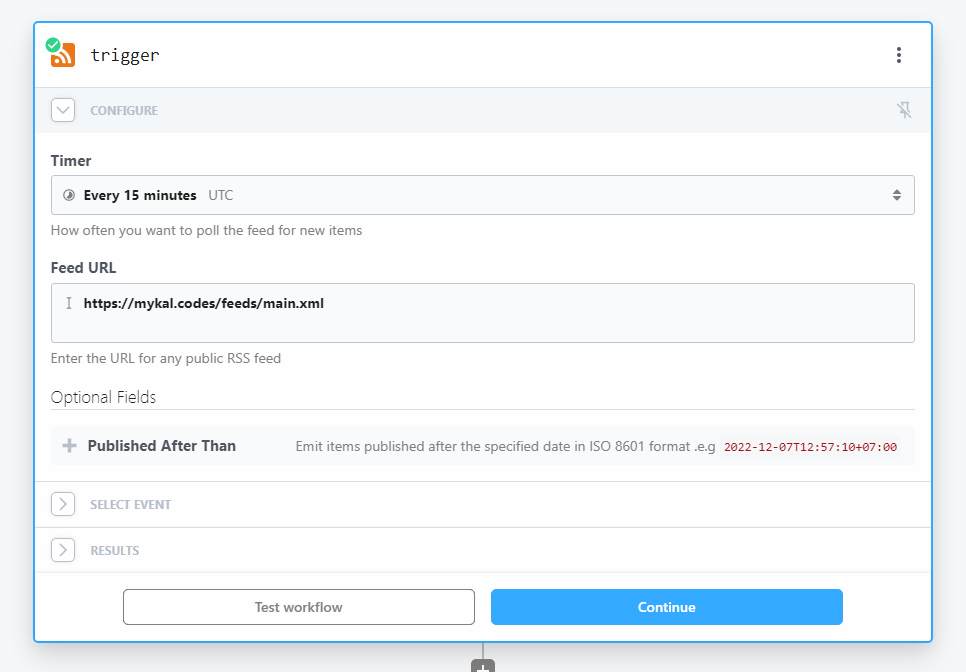\n\nThen I added a \"Node.js\" step: this reads in some data from new item that triggered the workflow, and determines the post \"type\" based on the URL. It then returns that \"type\" so I can use it later in my post.\n\n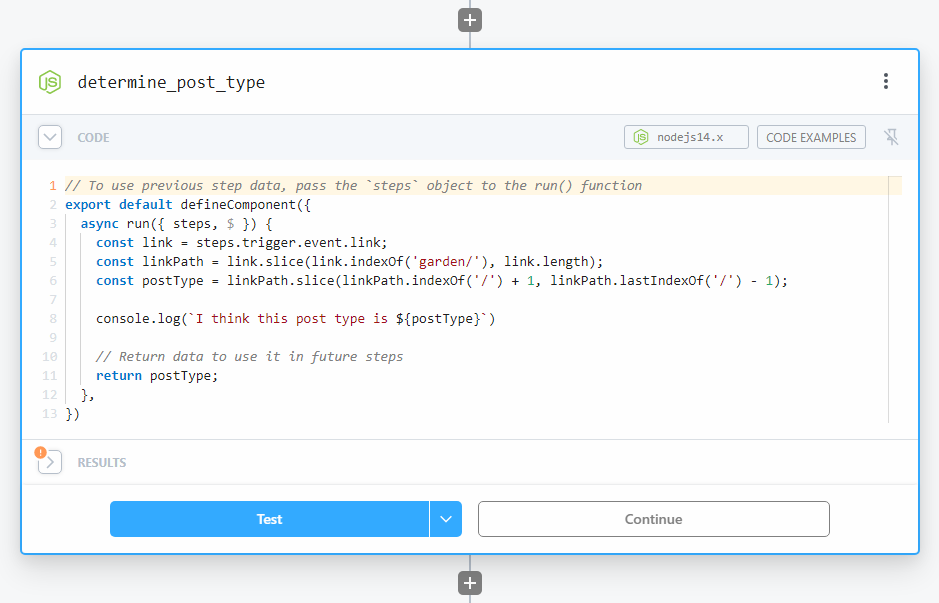\n\nFinally you've got a \"Mastodon\" step that handles authenticating into my Mastodon instance, and sending the \"toot\" for me.\n\n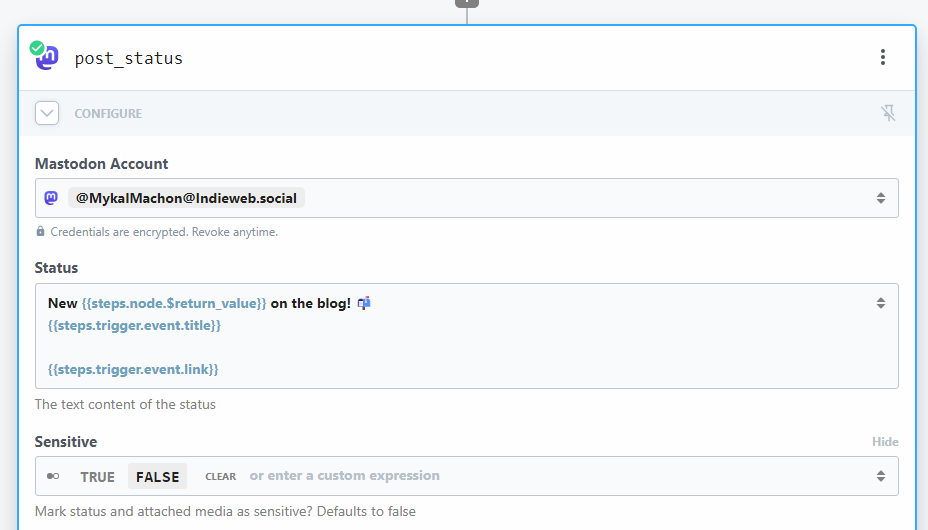\n\nAfter you've got that configured, all you need to do is click a little \"test\" or \"deploy\" button and you're done! easy as that.\n\n## Aside: Tentative pipedream review and other ideas\n\nFrom what I can tell, that's sort of _all_ I have to do to get blog to mastodon cross posting working.\n\n_and I did it in like... 20 minutes? maybe?_ including testing, signing in, reading docs for the node middleware, everything. From a time perspective it seems like a huge win over rolling your own solution. **Pretty sweet deal compared to the 2-3 afternoons I would have spent rolling my own bespoke solution.**\n\nI'll probably keep messing around with Pipedream even if it's just for experiments like this. it seems to remove a lot of the groundwork typically involved in shipping tools like this one. You just write your business logic. No worrying about writing integrations, storing credentials, managing deploys, provisioning infra, etc, etc. All signs of a great tool.\n\nThis would also be great for a bunch of other stuff and I've got a few ideas in my head already:\n\n* handling form submissions from sites: just have your site POST to a webhook trigger, and then send out an email/slack/discord with the contents.\n \n* building out MVPs for APIs; want a bare bones version of a feature built out? just do it here first with those code steps. did I mention you can import packages and manage secrets in there too?\n \n* Doing basically any small easily automated task on a schedule: with their CRON trigger this can replace a crontab on a raspberry pi in your house, or a job server in your cluster.\n","html":"I just built a little "job" or "process" that monitors this site's RSS feed, and posts all new entries to my Mastodon account. So when I make a post here, it automatically gets syndicated out to Mastodon!
Typically, I would build this all out from scratch (in the name of learning, of course!) and spend a whole afternoon on it, maybe even two or three afternoons if I'm being honest with myself. This time, I wanted to take it easy on myself, and try using a tool I heard about awhile ago in the Shop Talk show discord, Pipedream.
What's Pipedream
Pipedream is an integration platform, that seems to be targeting the developer crowd. Think of Zapier with all of it's pre-built third-party connections (Facebook, Twitter, SendGrid, Postgres...) and it's easy drag and drop interface. Now imagine that again with a developer slant, and the ability to add in Node.js/Python/Go "middleware", proper error logging, and more developer goodies. That's pipdeream!
I've been sold this type of tool a lot before and was honestly pretty skeptical at first. That said, after messing around with it for awhile, it seems pretty solid for your basic workflows and jobs.
How does the integration work.
All things considered, it's a pretty simple process. I created a new "Workflow" in pipdeream and selected the "RSS" trigger. A "workflow" in pipedream maps to a job or process, and a trigger is what, well, "triggers" that job to run. I choose the "RSS" trigger, and pointed it at my RSS feed so it can to listen for new items and trigger the workflow when it detects them.

Then I added a "Node.js" step: this reads in some data from new item that triggered the workflow, and determines the post "type" based on the URL. It then returns that "type" so I can use it later in my post.

Finally you've got a "Mastodon" step that handles authenticating into my Mastodon instance, and sending the "toot" for me.

After you've got that configured, all you need to do is click a little "test" or "deploy" button and you're done! easy as that.
Aside: Tentative pipedream review and other ideas
From what I can tell, that's sort of all I have to do to get blog to mastodon cross posting working.
and I did it in like... 20 minutes? maybe? including testing, signing in, reading docs for the node middleware, everything. From a time perspective it seems like a huge win over rolling your own solution. Pretty sweet deal compared to the 2-3 afternoons I would have spent rolling my own bespoke solution.
I'll probably keep messing around with Pipedream even if it's just for experiments like this. it seems to remove a lot of the groundwork typically involved in shipping tools like this one. You just write your business logic. No worrying about writing integrations, storing credentials, managing deploys, provisioning infra, etc, etc. All signs of a great tool.
This would also be great for a bunch of other stuff and I've got a few ideas in my head already:
handling form submissions from sites: just have your site POST to a webhook trigger, and then send out an email/slack/discord with the contents.
building out MVPs for APIs; want a bare bones version of a feature built out? just do it here first with those code steps. did I mention you can import packages and manage secrets in there too?
Doing basically any small easily automated task on a schedule: with their CRON trigger this can replace a crontab on a raspberry pi in your house, or a job server in your cluster.
"}},{"id":"kurzgesagt","url":"https://mykal.codes/posts/kurzgesagt","meta":{"title":"Kurzgesagt - In a Nutshell","pubDate":"2023-03-28T09:00:00.000Z","type":"link","draft":false,"tags":["personal"],"description":"One of my favourite YouTube channels.","url":"https://www.youtube.com/@kurzgesagt"},"content":{"md":"\n[This is one of my favourite YouTube channels](https://www.youtube.com/@kurzgesagt). They really capture the _wonder_ of learning in a way I find really rare. Their videos always bring on a sense of nostalgic learning for me. I remember being a kid and reading books about robotics or space in my Oma's basement and just being _stoked_ about the future.\n\nTheir videos on [space sciences](https://www.youtube.com/watch?v=xAUJYP8tnRE&t=361s) and [future-earth](https://www.youtube.com/watch?v=W93XyXHI8Nw&) are always favorites of mine. As a reluctant pessimist, I've always appreciated their realistic optimism; they find ways to highlight how we as humans _can_ band together [to solve problems like climate change](https://www.youtube.com/watch?v=LxgMdjyw8uw), not all hope is lost, _yet_.\n\nThey also just released [a video on how they finance their business](https://www.youtube.com/watch?v=1x-i9z617z4) and their goals which lead me to their shop, and left me with an urge to buy a few of their posters for my office. I always appreciate when businesses are open about their process like this.\n\nCheck them out!\n","html":"This is one of my favourite YouTube channels. They really capture the wonder of learning in a way I find really rare. Their videos always bring on a sense of nostalgic learning for me. I remember being a kid and reading books about robotics or space in my Oma's basement and just being stoked about the future.
Their videos on space sciences and future-earth are always favorites of mine. As a reluctant pessimist, I've always appreciated their realistic optimism; they find ways to highlight how we as humans can band together to solve problems like climate change, not all hope is lost, yet.
They also just released a video on how they finance their business and their goals which lead me to their shop, and left me with an urge to buy a few of their posters for my office. I always appreciate when businesses are open about their process like this.
Check them out!
"}},{"id":"putting-ai-back-in-the-bag","url":"https://mykal.codes/posts/putting-ai-back-in-the-bag","meta":{"title":"Putting AI back in the bag","pubDate":"2023-03-26T11:30:00.000Z","type":"note","draft":false,"tags":["ai","thoughts"],"stage":"seed","description":"Humans suck at putting things down when they feel like there's potential for good or profit. AI is a great example."},"content":{"md":"\nI wrote a very \"stream-of-conciousness\" thread on AI and how we probably can't put it back in pandoras box on Mastodon. You can read it as a primer below:\n\n\n\nI wanted to elaborate a bit in a longer format where I didn't have to worry about splitting up my posts.\n\n## Generative AI as a power for good\n\nI don't believe that the people working on generative AI aren't doing it out of malice. It's very easy to see there are huge possibilities for _good_ to come from it.\n\nHere's a few things I can think of off the top of my head:\n\n* Automate away and assist in generating written communications\n \n* Making otherwise inaccessible services accessible to this with different abilities (think of grocery shopping using something [like Chat-GPT plugins](https://openai.com/blog/chatgpt-plugins)).\n \n* Solid \"chat\" style interfaces for customer support, brainstorming, etc.\n \n* Generating a rough creative output with nothing but words as a starting point.\n \n* A completely autonomous \"assistant\" that can work through a todo list of digital tasks for you.\n \n* Writing, maintaining, and fixing code with a loose guide ([GitHub Copilot X](https://github.com/features/preview/copilot-x))\n \n* Providing a plain English \"API\" to more complicated systems ([Microsoft 365 Copilot](https://www.youtube.com/watch?v=S7xTBa93TX8))\n \n\n## Generative AI as a power for evil\n\nWhile these are great, when you look at the list of unarguably terrible things AI can do without proper guard rails, they lose their sheen.\n\nHere's a few of the things I've been thinking about recently:\n\n* Anyone can now make an automated, self-replying, convincing, phishing scam that responds by itself and doesn't \"believe\" it's phishing. [This already exists](https://www.csoonline.com/article/3685488/how-ai-chatbot-chatgpt-changes-the-phishing-game.html)\n \n* Propagandists can realistically make the \"dead-internet\" a reality and fill faux social media sites with propaganda that will defend it's position automatically like a real person.\n \n* Anyone can generate completely fake photos and videos of _whoever_ (politicians, celebrities, a family member with lots of photos online) saying and doing _whatever they want._ **This already exists and isn't hard to find;** I'm not linking to it for hopefully obvious reasons.\n \n* Objective truth on the digital internet will effectively be dead once these generative AI tools get sufficiently indistinguishable from reality\n \n\nAll very fun and very fresh ✌️\n\nThis really feels like a digital equivalent to CFCs burning a hole in our o-zone layer; luckily we were able to regulate their use and prevent the earth from crisping itself.\n\nHopefully we learn to get our collective minds out of the clouds and start regulating this, before we lose the internet as we know it today.\n","html":"I wrote a very "stream-of-conciousness" thread on AI and how we probably can't put it back in pandoras box on Mastodon. You can read it as a primer below:
<iframe src="https://indieweb.social/@mykalmachon/110090905453454176/embed" class="mastodon-embed" style="max-width: 100%; border: 0" width="400" allowfullscreen="allowfullscreen"></iframe><script src="https://indieweb.social/embed.js" async="async"></script>
I wanted to elaborate a bit in a longer format where I didn't have to worry about splitting up my posts.
Generative AI as a power for good
I don't believe that the people working on generative AI aren't doing it out of malice. It's very easy to see there are huge possibilities for good to come from it.
Here's a few things I can think of off the top of my head:
Automate away and assist in generating written communications
Making otherwise inaccessible services accessible to this with different abilities (think of grocery shopping using something like Chat-GPT plugins).
Solid "chat" style interfaces for customer support, brainstorming, etc.
Generating a rough creative output with nothing but words as a starting point.
A completely autonomous "assistant" that can work through a todo list of digital tasks for you.
Writing, maintaining, and fixing code with a loose guide (GitHub Copilot X)
Providing a plain English "API" to more complicated systems (Microsoft 365 Copilot)
Generative AI as a power for evil
While these are great, when you look at the list of unarguably terrible things AI can do without proper guard rails, they lose their sheen.
Here's a few of the things I've been thinking about recently:
Anyone can now make an automated, self-replying, convincing, phishing scam that responds by itself and doesn't "believe" it's phishing. This already exists
Propagandists can realistically make the "dead-internet" a reality and fill faux social media sites with propaganda that will defend it's position automatically like a real person.
Anyone can generate completely fake photos and videos of whoever (politicians, celebrities, a family member with lots of photos online) saying and doing whatever they want. This already exists and isn't hard to find; I'm not linking to it for hopefully obvious reasons.
Objective truth on the digital internet will effectively be dead once these generative AI tools get sufficiently indistinguishable from reality
All very fun and very fresh ✌️
This really feels like a digital equivalent to CFCs burning a hole in our o-zone layer; luckily we were able to regulate their use and prevent the earth from crisping itself.
Hopefully we learn to get our collective minds out of the clouds and start regulating this, before we lose the internet as we know it today.
"}},{"id":"the-end-of-fe-dev","url":"https://mykal.codes/posts/the-end-of-fe-dev","meta":{"title":"The End of Front-End Development","pubDate":"2023-03-21T22:00:00.000Z","type":"link","draft":false,"tags":["ai"],"description":"A great blog post that sums up how I feel about GPT models.","url":"https://www.joshwcomeau.com/blog/the-end-of-frontend-development/"},"content":{"md":"\nJosh's post on AI, large language models like GPT3/GPT4, and what they mean for the future of Front-End Development (well, really work in general) is great. It sums up a lot of the feelings I have about the topic and is written much better than the mess of point-form notes I've been working on for the past few weeks.\n\nI would be lying if I said I was a little afraid about what a world with these AI models in it looks like, but I think like with every other obstacle in human history we'll probably be okay.\n\nProbably 😅","html":"Josh's post on AI, large language models like GPT3/GPT4, and what they mean for the future of Front-End Development (well, really work in general) is great. It sums up a lot of the feelings I have about the topic and is written much better than the mess of point-form notes I've been working on for the past few weeks.
I would be lying if I said I was a little afraid about what a world with these AI models in it looks like, but I think like with every other obstacle in human history we'll probably be okay.
Probably 😅
"}},{"id":"containers-and-the-enterprise-vendor-feedback-loop","url":"https://mykal.codes/posts/containers-and-the-enterprise-vendor-feedback-loop","meta":{"title":"Containers and The Enterprise-Vendor Feedback Loop","pubDate":"2023-03-07T00:00:00.000Z","type":"post","draft":false,"tags":["docker","enterprise"],"description":"Enterprise and Enterprise Vendor's both improve at a glacial pace; why?"},"content":{"md":"\nI love containers. _I think they're cool_. Like any tech they have their issues[^1], but when done right enable automated deploys, self-repairing systems, and a direct programmatic \"source of truth\" interface for infrastructure. All of which can be a _huge_ asset in an organization with a significant number of server-based applications, jobs, daemons, and systems.\n\n**Despite all the benefits, and our teams success with containers in certain contexts[^2], I've noticed there seems to be a bit of a feedback loop that prevents containers from reaching wide-spread adoption at work.** I've attributed this to something I've been calling the \"enterprise-vendor feedback loop\". Here's an example of what I mean:\n\n- Enterprise wants to move forward with container technology (Docker, K8s, etc.)\n- Niche enterprise vendors don't offer a solution compatible with container technology\n- Enterprise is not able to get enough buy in to move forward in a meaningful way.\n- Enterprises technological growth stagnates.\n\nNow imagine the same thing from the vendor's perspective\n\n- Team within vendor co wants to better their offering by adding containers as a build target.\n- Clients are not \"ready\" for containers because most other vendors aren't offering it\n- Vendor doesn't have enough buy-in from customers to move forward with containers.\n- Vendor's technological growth stagnates.\n\nThis feedback loop seems to keep both enterprise companies and enterprise vendors in a glacial state of continuous improvement. Neither organization will make a substantial change in underlying technology until there is an absolute need for the change. The challenge of moving forward without buy-in from the other group is often above either organization's pain threshold for change.\n\n## Why not just containerize vendor applications?\n\nI've thought about just containerizing vendor applications quite a bit as well. In theory an org could containerize vendor applications as they're on-boarded. Just write up a Docker file + a Docker compose file for each new application during the onboarding process!\n\nWhile that might be fine initially, there are some maintenance risks in doing so:\n\n- The vendor may no longer support the application with a custom container layer on-top. Some vendors just don't support any customizations, and by putting that layer on top of the whole app you've potentially put the whole app out-of-support.\n- Windows server apps often have issues when containerized from what I've seen. Especially so when a custom GUI is involved for setup and configuration tasks in the software.\n- Upgrades become significantly more complicated if the vendors application is heavily refactored and the vendor is not comfortable with containers.\n\n## Not just containers, unfortunately\n\nThis applies to more than just containerization technology though. That feedback loop can prevent a number of advances in a large enterprise organization. Here are some other examples I've seen:\n\n- Desktop virtualization\n- CI/CD pipelines\n- non-conventional environments (server-less, cloud, hybrid)\n\n## Anyone have any ideas?\n\nMaybe I'm missing an obvious solution here, but would be open to any ideas you have around how we can get out of this continuous improvement rut. It may just be that things are moving slower than I'd like and that's the way of the world...\n\n[^1]: Containers are hard to do right. I've spent the better part of the last 3 years learning about them and still feel like I'm just scratching the surface. I've got the dockerfile and docker-compose.yml workflow down, and love how they make deploying in the cloud easy across platforms. That said, after setting up a [K3s envrionment](https://k3s.io/) with some raspberry pi 4's in my office I was absolutely lost. In trying to make a system that can account for every usecase, containers and container orchestration tools end up very complicated™.\n\n[^2]: We containerize most of our in-house developed applications at this point, as well as almost all of the open-source software that we use. Deploys and updates become as easy as `docker-compose up`. Most open source software also has publicly available containers like [redis](https://hub.docker.com/_/redis), [uptime kuma](https://hub.docker.com/r/louislam/uptime-kuma), etc.\n","html":"I love containers. I think they're cool. Like any tech they have their issues[^1], but when done right enable automated deploys, self-repairing systems, and a direct programmatic "source of truth" interface for infrastructure. All of which can be a huge asset in an organization with a significant number of server-based applications, jobs, daemons, and systems.
Despite all the benefits, and our teams success with containers in certain contexts[^2], I've noticed there seems to be a bit of a feedback loop that prevents containers from reaching wide-spread adoption at work. I've attributed this to something I've been calling the "enterprise-vendor feedback loop". Here's an example of what I mean:
- Enterprise wants to move forward with container technology (Docker, K8s, etc.)
- Niche enterprise vendors don't offer a solution compatible with container technology
- Enterprise is not able to get enough buy in to move forward in a meaningful way.
- Enterprises technological growth stagnates.
Now imagine the same thing from the vendor's perspective
- Team within vendor co wants to better their offering by adding containers as a build target.
- Clients are not "ready" for containers because most other vendors aren't offering it
- Vendor doesn't have enough buy-in from customers to move forward with containers.
- Vendor's technological growth stagnates.
This feedback loop seems to keep both enterprise companies and enterprise vendors in a glacial state of continuous improvement. Neither organization will make a substantial change in underlying technology until there is an absolute need for the change. The challenge of moving forward without buy-in from the other group is often above either organization's pain threshold for change.
Why not just containerize vendor applications?
I've thought about just containerizing vendor applications quite a bit as well. In theory an org could containerize vendor applications as they're on-boarded. Just write up a Docker file + a Docker compose file for each new application during the onboarding process!
While that might be fine initially, there are some maintenance risks in doing so:
- The vendor may no longer support the application with a custom container layer on-top. Some vendors just don't support any customizations, and by putting that layer on top of the whole app you've potentially put the whole app out-of-support.
- Windows server apps often have issues when containerized from what I've seen. Especially so when a custom GUI is involved for setup and configuration tasks in the software.
- Upgrades become significantly more complicated if the vendors application is heavily refactored and the vendor is not comfortable with containers.
Not just containers, unfortunately
This applies to more than just containerization technology though. That feedback loop can prevent a number of advances in a large enterprise organization. Here are some other examples I've seen:
- Desktop virtualization
- CI/CD pipelines
- non-conventional environments (server-less, cloud, hybrid)
Anyone have any ideas?
Maybe I'm missing an obvious solution here, but would be open to any ideas you have around how we can get out of this continuous improvement rut. It may just be that things are moving slower than I'd like and that's the way of the world...
[^1]: Containers are hard to do right. I've spent the better part of the last 3 years learning about them and still feel like I'm just scratching the surface. I've got the dockerfile and docker-compose.yml workflow down, and love how they make deploying in the cloud easy across platforms. That said, after setting up a K3s envrionment with some raspberry pi 4's in my office I was absolutely lost. In trying to make a system that can account for every usecase, containers and container orchestration tools end up very complicated™.
[^2]: We containerize most of our in-house developed applications at this point, as well as almost all of the open-source software that we use. Deploys and updates become as easy as docker-compose up. Most open source software also has publicly available containers like redis, uptime kuma, etc.
"}},{"id":"cabin-on-an-island","url":"https://mykal.codes/posts/cabin-on-an-island","meta":{"title":"Cabin on an Island","pubDate":"2023-02-22T00:00:00.000Z","type":"photo","draft":false,"tags":["personal"],"location":"an Island","photos":[{"url":"https://res.cloudinary.com/mykalcodes/image/upload/v1677125240/Mykal%20Codes/PXL_20230218_211945534.jpg","alt":"A landscape showing the ocean, blocked from view by some trees. taken from a wooden balcony overlooking the ocean."},{"url":"https://res.cloudinary.com/mykalcodes/image/upload/v1677125240/Mykal%20Codes/PXL_20230220_200449938.jpg","alt":"A landscape from within a reading nook. The ocean and other islands are visible from the reading nook. A tree blocks the way."},{"url":"https://res.cloudinary.com/mykalcodes/image/upload/v1677125240/Mykal%20Codes/PXL_20230220_221250627.jpg","alt":"A landscape of a stony beach, with beach + trees on the left side, and ocean on the right side. Other islands are visible in the background."}]},"content":{"md":"\n\n\n\n\nI spent this past weekend at a cabin on an island. It was great.\nI wrote around 2000 words about this cabin on an island, and how it gave me some much needed perspective on life.\n\nI'm not going to share what I wrote though; it was a bit too personal. I'm just going to post some phone photos (forgot the real camera at home, whoops!) of views around said cabin instead.\n\n_Let this post act as a quick reminder to:_\n\n- Treasure your people: They're probably pretty great.\n- Spend time away from screens: Computers are cool but not all the time.\n- Recharge your batteries: Do things that make you happy.\n- Take time to reflect: Sometimes just writing out how you feel helps.\n","html":"


I spent this past weekend at a cabin on an island. It was great.I wrote around 2000 words about this cabin on an island, and how it gave me some much needed perspective on life.
I'm not going to share what I wrote though; it was a bit too personal. I'm just going to post some phone photos (forgot the real camera at home, whoops!) of views around said cabin instead.
Let this post act as a quick reminder to:
- Treasure your people: They're probably pretty great.
- Spend time away from screens: Computers are cool but not all the time.
- Recharge your batteries: Do things that make you happy.
- Take time to reflect: Sometimes just writing out how you feel helps.
"}},{"id":"hot-dog-renaissance","url":"https://mykal.codes/posts/hot-dog-renaissance","meta":{"title":"Hot Dog Renaissance","pubDate":"2023-02-04T00:00:00.000Z","type":"photo","draft":false,"tags":["personal"],"location":"University of the Fraser Valley"},"content":{"md":"\n\n\nThe painting above is titled \"The Realm of Convenience II\" and was painted by [Chris Woods](https://www.instagram.com/chris_woods_emporer/) in 1990.\nIt's maintained by and on display in the UFV Permanent Art Collection[^1]\n\n## My history with the painting\n\nThis painting was on display between a bunch of classes I had at UFV and I would see it in passing regularly.\nAs a busy student, I always liked the painting, but never engaged with it more than a 30 second stare and a\n\"huh, that's a cool painting\" on my way to somewhere else. Nevertheless, it left an impression on me as a cool piece of art.\n\nIt was moved closer to my office[^2] a few weeks ago and a friend/coworker asked if I'd seen the \"Hot Dog Renaissance\" painting yet.\nI knew what they meant instantly. **Tell me that _doesn't_ look like a painting titled Hot Dog Renaissance**. We talked about it a bit and it got me wondering about the artist and the painting's background.\n\nI walked down to the painting and took a look at the nameplate to the right of it which displayed the title, year painted, and artist's name;\n_The Realm of Convenience II, 1990, Chris Woods._\n\nThe \"II\" at the end of the painting's name implies that there is at least a \"I\" in this series; [a quick google search proved that to be true](https://i0.wp.com/petleyjones.com/wp-content/uploads/2013/05/Woods-Chris-The-Realm-of-Convenience-I.jpg?ssl=1). After that search I sorta fell down a rabbit hole of Chris's art.\n\n## Keeping record\n\n**I was surprised to find no trace of \"The Realm of Convenience II\" anywhere on the internet.**\n\nGiven I couldn't find any other information about the painting, I figured I'd share a picture and a little writeup of my personal history with the painting here.\nIt's a great painting that I think deserves it's own little spot on the internet even if it's just for me and some friends.\n\nedit: [a crunchy n' crusty scan of the photo exists on the SELIYEMETAXWTEXW art gallery wesbite](https://sag.ufvsoca.ca/sag/1994/05/15/chris-woods/). \n\n## Thanks Chris\n\nThanks to Chris Woods for making good art. \n\n[Check out his Instagram](https://www.instagram.com/chris_woods_emporer/) if you like the painting, he's got a pretty large body of work and appears to still be active. Some personal favourite's are [\"Behold the King\"](https://www.instagram.com/p/Bv2N4cHHju6/) and the [\"Fast Food Nation\" collection](http://www.pondly.com/2013/06/fast-food-nation-illustrations-by-chris-woods/).\n\n[^1]: TIL that my workplace / graduating university has an art collection.\n[^2]: I graduated with a Bachelor of Computer Information Systems from UFV in 2021; Post-grad I got a job in IT as a systems analyst.\n","html":"
The painting above is titled "The Realm of Convenience II" and was painted by Chris Woods in 1990.It's maintained by and on display in the UFV Permanent Art Collection[^1]
My history with the painting
This painting was on display between a bunch of classes I had at UFV and I would see it in passing regularly.As a busy student, I always liked the painting, but never engaged with it more than a 30 second stare and a"huh, that's a cool painting" on my way to somewhere else. Nevertheless, it left an impression on me as a cool piece of art.
It was moved closer to my office[^2] a few weeks ago and a friend/coworker asked if I'd seen the "Hot Dog Renaissance" painting yet.I knew what they meant instantly. Tell me that doesn't look like a painting titled Hot Dog Renaissance. We talked about it a bit and it got me wondering about the artist and the painting's background.
I walked down to the painting and took a look at the nameplate to the right of it which displayed the title, year painted, and artist's name;The Realm of Convenience II, 1990, Chris Woods.
The "II" at the end of the painting's name implies that there is at least a "I" in this series; a quick google search proved that to be true. After that search I sorta fell down a rabbit hole of Chris's art.
Keeping record
I was surprised to find no trace of "The Realm of Convenience II" anywhere on the internet.
Given I couldn't find any other information about the painting, I figured I'd share a picture and a little writeup of my personal history with the painting here.It's a great painting that I think deserves it's own little spot on the internet even if it's just for me and some friends.
edit: a crunchy n' crusty scan of the photo exists on the SELIYEMETAXWTEXW art gallery wesbite.
Thanks Chris
Thanks to Chris Woods for making good art.
Check out his Instagram if you like the painting, he's got a pretty large body of work and appears to still be active. Some personal favourite's are "Behold the King" and the "Fast Food Nation" collection.
[^1]: TIL that my workplace / graduating university has an art collection.[^2]: I graduated with a Bachelor of Computer Information Systems from UFV in 2021; Post-grad I got a job in IT as a systems analyst.
"}},{"id":"starting-a-garden","url":"https://mykal.codes/posts/starting-a-garden","meta":{"title":"Starting a Garden 🍅","pubDate":"2023-01-30T00:00:00.000Z","type":"post","draft":false,"tags":["update","meta"],"description":"I redid my site again; this post goes over why, and what's changed this time around."},"content":{"md":"\nI redid my site! ... again!\n\nI've been messing around with the look and feel of this site on a dev branch for a few months,\nand started a dedicated feature branch for the overhaul a few weeks ago. I'm pretty happy with the\n_look_, but I made more than just stylistic changes. **I added some content types, ripped out some features,\nand moved all my old content over to `/garden/posts`**\n\nSo what gives? what is a digital garden anyways? when's the next redesign 😉?\n\n## What's a Digital Garden\n\nI won't spend too much time digging in, but I stand on the shoulder's of dev giant's here.\n[Maggie Appleton](https://maggieappleton.com/about) has a [great post going over the concept](https://maggieappleton.com/garden-history), and so does [Joel Hooks](https://joelhooks.com/digital-garden). With their explanations in mind, I have a few other things that I think feel _garden-like_ in the way I've designed the site this time around:\n\n### Keep it messy\n\nI don't want everything on this site to have the implicit pressure that a \"Blog Post\" does. Believe it or not, I don't want everything I write to be pristine.\nSometimes I just want to put my thoughts out into the aether, without a lot of formality. See if they stick. Use them as a reference point. See what others think. You know?\n\nWith that in mind, I've added a bunch of new content types: [notes](/garden/notes), [photos](/garden/photos), and [links](/garden/links) to de-stress posting here.\n\nA lot of my ethos for this site was inspired by something from one of Rach Smith's note's:\n\n> I dropped the baggage around “blog post” ... started thinking about my notes as works in progress, learning in public rather than complete pieces of work. The mental shift helped me quit overthinking about what I published.\n>\n> - [Rach Smith - How I wrote more](https://rachsmith.com/how-i-wrote-more/)\n\n_She also calls her site a digital garden... what a coincidence!_\n\n### Keep it simple\n\nI've kept the site architecturally simple by design. There aren't a lot of super-complex features. The post likes and comments I had on here before were great, but were examples of features that had heavy vendor lock-in and just kind of felt \"heavy\".\n\n**This site could realistically live on a 11 year old computer in a basement, but tools like Netlify add goodies on top without weighing things down.**\n\nin 5-10 years, I don't want to lose a bunch of photos, ideas, and little pieces of my personal history because a billion-dollar baby blew up my website. This site is all `.astro` files, markdown, and open-source packages with a little progressively enhanced sugar on top.\n\n### Be a good steward\n\nI see posting to my own site as an act of Internet stewardship. An independent and individual internet is a healthy internet. By [keeping it simple](#keep-it-simple) I've pretty much minimized my barrier of entry to hanging out on the internet and helping take care of it.\n\nThis doesn't just mean posting on this little hermit island of a website, it means sharing and consuming RSS feeds, cross-posting, experimenting with new and equitable internet tech (ActivityPub?) and generally making content accessible and shareable across the internet and for all people. It also means building relationships through the web, which I'm very grateful to say that I've been doing for awhile, Digital Garden or not.\n\nThe IndieWeb page for [POSSE](https://indieweb.org/POSSE) got me thinking about this awhile ago; it's a good read if you're interested in this concept.\n\n## What else has changed\n\nNow that you know what a Digital Garden is, here's a some of the other things that have changed:\n\n### Things added\n\n- Fancy new design with a focus on improved readability (colors, font-size, etc.)\n - Upgraded CSS variables for styling thanks to [some new variables in Open-Props](https://open-props.style/)\n- Content types: checkout the [garden home page](/garden/) for more on this.\n- Hashed low-res images embedded into HTML `![]() ` tags to improve image lazy loading.\n - Considering writing a post on this one. Was a fun experiment.\n- [Astro 2.0 content collections](https://docs.astro.build/en/guides/content-collections/) for better authoring and type safety.\n- [Multiple RSS feeds](/feeds/) so you can subscribe to what you like and leave the rest\n- WebMentions for comments, likes, boosts, etc on all posts.\n - _Still more work to do here_; I may enable SSR on content pages to enable dynamic fetching of this data.\n- I'm sure there's more I'm forgetting about.\n\n### Things removed\n\n- GitHub comments via Utteranc.es: easy to setup, didn't like the look.\n - ✨ Replaced with Webmentions!\n- Custom reactions via Cloudflare: was fun to build, but didn't love how much baggage was attached.\n - ✨ Replaced with Webmentions!\n- Dark/Light/Custom Themes: These worked great but I was seeing some [FART](https://css-tricks.com/flash-of-inaccurate-color-theme-fart/).\n - 🤔 These are coming back eventually; I want to solve the flashing theme once and for all and add more themes\n\n## More coming soon!\n\nI've you've made it this far, **thanks for reading.**\n\nI'm going to be posting here more and more so if you're subscribed I'm sure you'll be hearing from me real soon.\n\nHave a great day!\n","html":"
` tags to improve image lazy loading.\n - Considering writing a post on this one. Was a fun experiment.\n- [Astro 2.0 content collections](https://docs.astro.build/en/guides/content-collections/) for better authoring and type safety.\n- [Multiple RSS feeds](/feeds/) so you can subscribe to what you like and leave the rest\n- WebMentions for comments, likes, boosts, etc on all posts.\n - _Still more work to do here_; I may enable SSR on content pages to enable dynamic fetching of this data.\n- I'm sure there's more I'm forgetting about.\n\n### Things removed\n\n- GitHub comments via Utteranc.es: easy to setup, didn't like the look.\n - ✨ Replaced with Webmentions!\n- Custom reactions via Cloudflare: was fun to build, but didn't love how much baggage was attached.\n - ✨ Replaced with Webmentions!\n- Dark/Light/Custom Themes: These worked great but I was seeing some [FART](https://css-tricks.com/flash-of-inaccurate-color-theme-fart/).\n - 🤔 These are coming back eventually; I want to solve the flashing theme once and for all and add more themes\n\n## More coming soon!\n\nI've you've made it this far, **thanks for reading.**\n\nI'm going to be posting here more and more so if you're subscribed I'm sure you'll be hearing from me real soon.\n\nHave a great day!\n","html":"I redid my site! ... again!
I've been messing around with the look and feel of this site on a dev branch for a few months,and started a dedicated feature branch for the overhaul a few weeks ago. I'm pretty happy with thelook, but I made more than just stylistic changes. I added some content types, ripped out some features,and moved all my old content over to /garden/posts
So what gives? what is a digital garden anyways? when's the next redesign 😉?
What's a Digital Garden
I won't spend too much time digging in, but I stand on the shoulder's of dev giant's here.Maggie Appleton has a great post going over the concept, and so does Joel Hooks. With their explanations in mind, I have a few other things that I think feel garden-like in the way I've designed the site this time around:
Keep it messy
I don't want everything on this site to have the implicit pressure that a "Blog Post" does. Believe it or not, I don't want everything I write to be pristine.Sometimes I just want to put my thoughts out into the aether, without a lot of formality. See if they stick. Use them as a reference point. See what others think. You know?
With that in mind, I've added a bunch of new content types: notes, photos, and links to de-stress posting here.
A lot of my ethos for this site was inspired by something from one of Rach Smith's note's:
I dropped the baggage around “blog post” ... started thinking about my notes as works in progress, learning in public rather than complete pieces of work. The mental shift helped me quit overthinking about what I published.
She also calls her site a digital garden... what a coincidence!
Keep it simple
I've kept the site architecturally simple by design. There aren't a lot of super-complex features. The post likes and comments I had on here before were great, but were examples of features that had heavy vendor lock-in and just kind of felt "heavy".
This site could realistically live on a 11 year old computer in a basement, but tools like Netlify add goodies on top without weighing things down.
in 5-10 years, I don't want to lose a bunch of photos, ideas, and little pieces of my personal history because a billion-dollar baby blew up my website. This site is all .astro files, markdown, and open-source packages with a little progressively enhanced sugar on top.
Be a good steward
I see posting to my own site as an act of Internet stewardship. An independent and individual internet is a healthy internet. By keeping it simple I've pretty much minimized my barrier of entry to hanging out on the internet and helping take care of it.
This doesn't just mean posting on this little hermit island of a website, it means sharing and consuming RSS feeds, cross-posting, experimenting with new and equitable internet tech (ActivityPub?) and generally making content accessible and shareable across the internet and for all people. It also means building relationships through the web, which I'm very grateful to say that I've been doing for awhile, Digital Garden or not.
The IndieWeb page for POSSE got me thinking about this awhile ago; it's a good read if you're interested in this concept.
What else has changed
Now that you know what a Digital Garden is, here's a some of the other things that have changed:
Things added
- Fancy new design with a focus on improved readability (colors, font-size, etc.)
- Content types: checkout the garden home page for more on this.
- Hashed low-res images embedded into HTML
<img /> tags to improve image lazy loading.- Considering writing a post on this one. Was a fun experiment.
- Astro 2.0 content collections for better authoring and type safety.
- Multiple RSS feeds so you can subscribe to what you like and leave the rest
- WebMentions for comments, likes, boosts, etc on all posts.
- Still more work to do here; I may enable SSR on content pages to enable dynamic fetching of this data.
- I'm sure there's more I'm forgetting about.
Things removed
- GitHub comments via Utteranc.es: easy to setup, didn't like the look.
- ✨ Replaced with Webmentions!
- Custom reactions via Cloudflare: was fun to build, but didn't love how much baggage was attached.
- ✨ Replaced with Webmentions!
- Dark/Light/Custom Themes: These worked great but I was seeing some FART.
- 🤔 These are coming back eventually; I want to solve the flashing theme once and for all and add more themes
More coming soon!
I've you've made it this far, thanks for reading.
I'm going to be posting here more and more so if you're subscribed I'm sure you'll be hearing from me real soon.
Have a great day!
"}},{"id":"peanut-bowl-recipe","url":"https://mykal.codes/posts/peanut-bowl-recipe","meta":{"title":"Spicy Peanut Bowl 🥜","pubDate":"2023-01-28T00:00:00.000Z","type":"note","draft":false,"tags":["recipe"],"description":"A recipe for one of my favourite feel-good meals."},"content":{"md":"\nI've had a few friends ask for this recipe so thought I'd write it up on the blog. Commonly served after a hard day at work or when fighting off the cold; spice tends to clear out my sinuses.\n\n- 🧑❤️👩 Typically serves 2 people\n- ⏲️ Takes around 25-30 minutes to prepare\n\n_I don't have exact measurements for a lot of things so you'll have to do some experimenting; I've been sort of keen to the \"put sh\\*t in a pot\" method of cooking lately._\n\n## Ingredients\n\nAs with most cooking adventures, feel free to add and subtract from this list as you see fit.\n\n- Onion\n- Red and Yellow Bell Peppers\n- Shelled Unsalted Peanuts\n- Edamame\n- Chili pepper\n- Sesame Seeds\n- Fresh Ginger\n- Beyond Ground Beef / Ground beef\n- Udon noodles: Bucatini or lo mein noodles will also work.\n- Olive oil\n- Soy Sauce\n- Sriracha\n- For peanut sauce: can also just use store bought\n - Smooth PB sauce\n - Soy Sauce\n - Chili oil\n - Sesame Oil\n - 2 garlic cloves\n - Hoisin sauce\n - Fresh Ginger\n - Rice vinegar\n\n## Recipe\n\nRough steps; feel free to add your own twists and turns in as we go\n\n### Preparation\n\nBefore starting with anything else I find it useful to cut things up\n\n- Cut up the onion and bell peppers and put them aside.\n - cut diced or into strips depending on preference.\n- Roughly chop the chili pepper up and put it aside.\n- Roughly chop a few cloves of garlic and put them aside.\n- Mince or finely chop the fresh ginger.\n- Take out a pot for boiling the pasta.\n- Take out a large non-stick pan for veggies and protein.\n- Take out a small bowl for the peanut sauce (only if you don't have store bought).\n\n### Cooking noodles\n\nThe noodles will likely take the longest time so I start that before anything else\n\n- add ~6-10 cups of water to the pot depending on the amount of noodles being made.\n- salt the water in the pot to your preference.\n- bring the pot to a boil.\n- add the noodles to the pan and set a timer for the suggested cook time of your noodles.\n- halfway through, add your edamame beans to the pasta water.\n- When the timer is done, strain pasta and edamame and set aside.\n\n### Preparing peanut sauce (optional)\n\n_If you have store bought peanut sauce ignore this step._\n\n- in a small bowl whisk together:\n - peanut butter (1/4 cup)\n - soy sauce (1/4 cup)\n - sesame oil (1 teaspoon)\n - chilli oil (1 teaspoon)\n - rice vinegar (1 tablespoon)\n - ginger (2 teaspoons or more)\n - garlic cloves (minced from before)\n - pasta water (1/4 cup: adds starch!)\n- Once it's well incorporated, set aside.\n\n### Preparing protein & veggies\n\nWhile your pasta is cooking, you can get stated with the protein and veggies.\n\n- put your pan on the stove and set it to medium high heat.\n- add olive oil and wait until the pan is hot.\n- when hot, add your preferred protein to the pan and break it up into small pieces.\n- cook protein until it looks close to complete (5-6 minutes).\n- Add peppers, onion, garlic, and chilli pepper to the pan.\n - you can add a lil' soy sauce / water at this point if it's sticking.\n- Cook and stir often until the veggies seem tender-crisp (2-3 minutes).\n\n### Putting it all together\n\nOnce all your components are done, you can mix everything in the large non-stick pan.\n\n- bring the pan down to medium heat.\n- incorporate the noodles and the edamame into the pan.\n- incorporate the peanut sauce into the pan.\n- Add salt, pepper, chili pepper, and other seasonings to taste.\n- Toss to coat the noodles evenly.\n- Taste test and adjust accordingly.\n\n### Serving\n\nSplit things out into 2 bowls and add the following toppings:\n\n- Peanuts.\n- Sesame seeds.\n- Sriracha (optional, but personally preferred).\n- Cilantro (optional, personally _not_ preferred).\n\nEnjoy 🌶️\n\n## P.S\n\nThe recipe is heavily inspired by a [HelloFresh](https://hellofresh.ca/) box we got ~2 years ago, but I've made some improvements since then. If you want a free HelloFresh box [I've accumulated a bunch of free boxes for friends, take one!](https://www.hellofresh.ca/pages/resolution?c=FIH-QA1IJKXJDZQH&utm_campaign=clipboard&utm_couponvalue=170&utm_invitername=Mykal&utm_medium=referral&utm_source=raf-share&discount_comm_id=1d7ed056-9e72-42f5-a0e0-d5dd12d17fc3).\n\n_Disclaimer, I get a $15 kickback if you sign up for more after your free box._\n","html":"I've had a few friends ask for this recipe so thought I'd write it up on the blog. Commonly served after a hard day at work or when fighting off the cold; spice tends to clear out my sinuses.
- 🧑❤️👩 Typically serves 2 people
- ⏲️ Takes around 25-30 minutes to prepare
I don't have exact measurements for a lot of things so you'll have to do some experimenting; I've been sort of keen to the "put sh*t in a pot" method of cooking lately.
Ingredients
As with most cooking adventures, feel free to add and subtract from this list as you see fit.
- Onion
- Red and Yellow Bell Peppers
- Shelled Unsalted Peanuts
- Edamame
- Chili pepper
- Sesame Seeds
- Fresh Ginger
- Beyond Ground Beef / Ground beef
- Udon noodles: Bucatini or lo mein noodles will also work.
- Olive oil
- Soy Sauce
- Sriracha
- For peanut sauce: can also just use store bought
- Smooth PB sauce
- Soy Sauce
- Chili oil
- Sesame Oil
- 2 garlic cloves
- Hoisin sauce
- Fresh Ginger
- Rice vinegar
Recipe
Rough steps; feel free to add your own twists and turns in as we go
Preparation
Before starting with anything else I find it useful to cut things up
- Cut up the onion and bell peppers and put them aside.
- cut diced or into strips depending on preference.
- Roughly chop the chili pepper up and put it aside.
- Roughly chop a few cloves of garlic and put them aside.
- Mince or finely chop the fresh ginger.
- Take out a pot for boiling the pasta.
- Take out a large non-stick pan for veggies and protein.
- Take out a small bowl for the peanut sauce (only if you don't have store bought).
Cooking noodles
The noodles will likely take the longest time so I start that before anything else
- add ~6-10 cups of water to the pot depending on the amount of noodles being made.
- salt the water in the pot to your preference.
- bring the pot to a boil.
- add the noodles to the pan and set a timer for the suggested cook time of your noodles.
- halfway through, add your edamame beans to the pasta water.
- When the timer is done, strain pasta and edamame and set aside.
Preparing peanut sauce (optional)
If you have store bought peanut sauce ignore this step.
- in a small bowl whisk together:
- peanut butter (1/4 cup)
- soy sauce (1/4 cup)
- sesame oil (1 teaspoon)
- chilli oil (1 teaspoon)
- rice vinegar (1 tablespoon)
- ginger (2 teaspoons or more)
- garlic cloves (minced from before)
- pasta water (1/4 cup: adds starch!)
- Once it's well incorporated, set aside.
Preparing protein & veggies
While your pasta is cooking, you can get stated with the protein and veggies.
- put your pan on the stove and set it to medium high heat.
- add olive oil and wait until the pan is hot.
- when hot, add your preferred protein to the pan and break it up into small pieces.
- cook protein until it looks close to complete (5-6 minutes).
- Add peppers, onion, garlic, and chilli pepper to the pan.
- you can add a lil' soy sauce / water at this point if it's sticking.
- Cook and stir often until the veggies seem tender-crisp (2-3 minutes).
Putting it all together
Once all your components are done, you can mix everything in the large non-stick pan.
- bring the pan down to medium heat.
- incorporate the noodles and the edamame into the pan.
- incorporate the peanut sauce into the pan.
- Add salt, pepper, chili pepper, and other seasonings to taste.
- Toss to coat the noodles evenly.
- Taste test and adjust accordingly.
Serving
Split things out into 2 bowls and add the following toppings:
- Peanuts.
- Sesame seeds.
- Sriracha (optional, but personally preferred).
- Cilantro (optional, personally not preferred).
Enjoy 🌶️
P.S
The recipe is heavily inspired by a HelloFresh box we got ~2 years ago, but I've made some improvements since then. If you want a free HelloFresh box I've accumulated a bunch of free boxes for friends, take one!.
Disclaimer, I get a $15 kickback if you sign up for more after your free box.
"}},{"id":"good-cappuccinos","url":"https://mykal.codes/posts/good-cappuccinos","meta":{"title":"Good Cappuccinos","pubDate":"2023-01-21T00:00:00.000Z","type":"photo","draft":false,"tags":["coffee"],"location":"Abbotsford, BC"},"content":{"md":"\n\n\nI was gifted an espresso machine over the weekend. I've been enjoying experimenting with it and have already seen pretty significant progress. *That said, I've still got a long way to go.*\n\nGetting the machine has me revisiting some of my favourite coffee spots and thinking about how damn good they are. As with all coffee, there's definitely a level of \"tuning\" you have to do to get \"good coffee\" (regardless of the method) but *man* there is really a bar between the stuff I'm pumping out and the cappuccino's from my favourite shops.\n\nThe cappuccino pictured above is from my favourite coffee shop (sorry, I'm gate keeping). I'm treating it as my bar for quality. I'll be happy when I can get a comparable cup at home.\n","html":"
I was gifted an espresso machine over the weekend. I've been enjoying experimenting with it and have already seen pretty significant progress. That said, I've still got a long way to go.
Getting the machine has me revisiting some of my favourite coffee spots and thinking about how damn good they are. As with all coffee, there's definitely a level of "tuning" you have to do to get "good coffee" (regardless of the method) but man there is really a bar between the stuff I'm pumping out and the cappuccino's from my favourite shops.
The cappuccino pictured above is from my favourite coffee shop (sorry, I'm gate keeping). I'm treating it as my bar for quality. I'll be happy when I can get a comparable cup at home.
"}},{"id":"2022-2023","url":"https://mykal.codes/posts/2022-2023","meta":{"title":"2022 → 2023","pubDate":"2023-01-03T04:20:00.000Z","type":"post","draft":false,"tags":["personal"],"description":"a retrospective on 2022 and some goals for 2023"},"content":{"md":"Happy New Year everyone!\n\nI've never written one of these \"end-of-the-year retrospective\" posts, and I've not been much of a new year's goals _guy_ in the past (you can set goals any day, really). That said, I've seen a bunch of friends post retrospectives and goals for the year, so I wanted to join in and see what all the fun is about. Maybe I'll keep myself accountable to some goals and have a bit of a payoff come this time next year.\n\n## Looking back on 2022\n\n\n\nLooking back, this year has gone by so damn fast but it's felt nice to go back and write up a list of the accomplishments and fun stuff that happened throughout the year:\n\n* My wife and I had our first Anniversary. 1 year of marriage and 5 years together have gone by so fast!\n* The family went on a few trips after being cooped up during the pandemic. We had a few notable camping trips, visited Vegas for the first time, and had a few weekend getaways as well.\n* Wrote 29 posts on [my blog](https://mykal.codes) (where you're probably reading this). I'd love to keep this pace up next year.\n* Read 8 books this year! I've [kept track via Goodreads](https://www.goodreads.com/review/list/141327631-mykal?ref=nav_mybooks&shelf=read) and you can check it out there.\n* [Tinybox](https://tinybox.dev) had its best year ever! I have a few stealth projects that I've had lots of fun working on this year and I'm hoping can publicize some of the work this year.\n* I got really into [making coffee](https://mykal.codes/tags/coffee) and have gone from knowing basically nothing to being a semi-proficient at-home coffee fiend.\n\nI didn't keep any goals for 2022 so this is mostly a highlights list. The year was not _all_ great unfortunately but it doesn't really feel emotionally productive to go over the lows here.\n\n## Moving forward into 2023\n\n it was a great time.\")\n\nHere are a few (mostly) [smart](https://www.smartsheet.com/blog/essential-guide-writing-smart-goals) goals I have for the year. I'm not sure if I'm going to keep the progress private or share it publicly but I don't see a problem with listing them out here:\n\n* Read 12 books or 1 book a month.\n* Open-source 1 functional and well-documented software project on GitHub.\n* Write 24 blog posts, or 2 blog posts a month.\n* Build moderate exercise (30-45 minutes, 3 times a week) and better eating into my life.\n* Get better at separating work time from relaxation/fun time (not sure how to measure that)\n* Go on more dates with my wife; find more casual ways to tell her I appreciate her.\n* Continue [indieweb-ifying](https://indieweb.org/) my presence on the internet.","html":"Happy New Year everyone!
I've never written one of these "end-of-the-year retrospective" posts, and I've not been much of a new year's goals guy in the past (you can set goals any day, really). That said, I've seen a bunch of friends post retrospectives and goals for the year, so I wanted to join in and see what all the fun is about. Maybe I'll keep myself accountable to some goals and have a bit of a payoff come this time next year.
Looking back on 2022

Looking back, this year has gone by so damn fast but it's felt nice to go back and write up a list of the accomplishments and fun stuff that happened throughout the year:
- My wife and I had our first Anniversary. 1 year of marriage and 5 years together have gone by so fast!
- The family went on a few trips after being cooped up during the pandemic. We had a few notable camping trips, visited Vegas for the first time, and had a few weekend getaways as well.
- Wrote 29 posts on my blog (where you're probably reading this). I'd love to keep this pace up next year.
- Read 8 books this year! I've kept track via Goodreads and you can check it out there.
- Tinybox had its best year ever! I have a few stealth projects that I've had lots of fun working on this year and I'm hoping can publicize some of the work this year.
- I got really into making coffee and have gone from knowing basically nothing to being a semi-proficient at-home coffee fiend.
I didn't keep any goals for 2022 so this is mostly a highlights list. The year was not all great unfortunately but it doesn't really feel emotionally productive to go over the lows here.
Moving forward into 2023

Here are a few (mostly) smart goals I have for the year. I'm not sure if I'm going to keep the progress private or share it publicly but I don't see a problem with listing them out here:
- Read 12 books or 1 book a month.
- Open-source 1 functional and well-documented software project on GitHub.
- Write 24 blog posts, or 2 blog posts a month.
- Build moderate exercise (30-45 minutes, 3 times a week) and better eating into my life.
- Get better at separating work time from relaxation/fun time (not sure how to measure that)
- Go on more dates with my wife; find more casual ways to tell her I appreciate her.
- Continue indieweb-ifying my presence on the internet.
"}},{"id":"new-years-2023","url":"https://mykal.codes/posts/new-years-2023","meta":{"title":"New Years 2023","pubDate":"2023-01-01T00:00:00.000Z","type":"photo","draft":false,"tags":["personal","party"],"location":"Chilliwack, BC, Canada"},"content":{"md":"\n\n\nMy Wife Kiya and I at my Father-In laws wedding.\n","html":"
My Wife Kiya and I at my Father-In laws wedding.
"}},{"id":"flipnote-hatena","url":"https://mykal.codes/posts/flipnote-hatena","meta":{"title":"Flipnote Hatena","pubDate":"2022-12-29T08:00:00.000Z","type":"post","draft":false,"tags":["personal"],"description":"A friend of mine shared a Flipnote Hatena archive site that sent me down a rabbit hole.","heroImage":{"src":"/_astro/flipnote-hatena.FHQjHenP.avif","width":1200,"height":600,"format":"avif","fsPath":"/app/src/assets/posts/flipnote-hatena.avif"}},"content":{"md":"Flipnote Hatena is a now-defunct online platform based on sharing digital \"Flipnotes\". These were drawn in an app called \"[Flipnote Studio](https://en.wikipedia.org/wiki/Flipnote_Studio)\" released on both the DS and 3DS. Here's an example of an early Flipnote created by one of the devs:\n\n\n\nI used this app pretty heavily. As a kid interested in art, animation, and video games who just happened to own a DS, this was a very fun overlap of interests. I created a bunch of little animations and drawings based on events in my life. The most notable in my memory is a small animation depicting me in the passenger seat while my uncle was pulled over for speeding; I remember thinking this was hilarious as a kid.\n\nI also viewed the \"popular flipnotes\" in the app almost daily, I remember there being lots of [stick fights](https://www.sudomemo.net/watch/CBEEA0_0A95B9C620081_000), [music videos](https://archive.sudomemo.net/watch/mg3io13c0czbyyvl24kwn2udpnac) with animated characters, [spooky loops](https://flipnot.es/5UL8E13), and other weird miscellaneous animations:\n\n\n\nlast night, I brought this up with a friend who also remembered the site and we talked about it a bit. This morning she sent over [a site that archived all of the original flipnotes on the app](https://archive.sudomemo.net/). Up until today, I had assumed that most of these flipnotes were lost to the sands of time and bitrot. \n\n## Quality and relevancy today\n\nI was, for some reason, surprised at how undeniably cringe so many of these flipnotes were (see [example](https://flipnot.es/MY2918D)), but given I was using the app in middle school, which was smack-dab in the middle of my \"awkward phase\" that checks out. Despite the cringe, there's still a bunch of [high](https://flipnot.es/91YE8FP)-[quality](https://flipnot.es/32XFCYA) [animation](https://flipnot.es/C9DZK64) [to](https://flipnot.es/GES6CZ4) [be](https://flipnot.es/4YRU3D9) [found](https://flipnot.es/5KQLF4A).\n\nIt's also surprising how so much of the content on there _feels a lot like what exists on TikTok today._ People could remix popular flipnotes by slightly editing the animation, or reusing the sound to make their own animations. \"Music Videos\" aka \"MV\" were also very popular, and feel a lot like fan cams or dance videos you'd find on TikTok today.\n\nMaybe what I did with my spare time as a kid isn't that different than what my little cousins are doing now 🤷\n\n## Efforts to keep Flipnote alive\n\nAfter spending some time reading through [the archive's history page](https://archive.sudomemo.net/history/) I found a link to a seemingly semi-active forum where people upload new or lost flipnotes today called \"[Sudomemo](https://www.sudomemo.net/?utm_source=flipnotearchive)\"\n\nThere's also a [GitHub organization](https://github.com/Flipnote-Collective) where fans have reverse-engineered a number of the Flipnote Studio systems to create an open-source and maintainable way to edit and interpret Flipnote files without a DS.\n\nIt's cool to see a semi-active community around something that was on the periphery of my nostalgia brain. It's also crazy to think that this huge repository of animated content was almost lost forever simply because the Flipnote Hatena online service was shut down. _+1 for federated, sustainable, and not-for-profit internet services!_ \n\nIf you're interested in keeping this nearly-lost piece of the internet alive you can [donate via Ko-fi](https://ko-fi.com/flipnotearchive) to cover some of the hosting and managerial costs. \n\n## TLDR\n\nAll Flipnotes created in Flipnote studio were preserved by a small community of passionate fans. The internet can be a cool place sometimes I guess! ","html":"Flipnote Hatena is a now-defunct online platform based on sharing digital "Flipnotes". These were drawn in an app called "Flipnote Studio" released on both the DS and 3DS. Here's an example of an early Flipnote created by one of the devs:
<iframe src="https://archive.sudomemo.net/watch/embed/mm3d05l2nc3bcftirpkwckwy1nvc" scrolling="no" frameborder="0" height="429" width="512"></iframe>
I used this app pretty heavily. As a kid interested in art, animation, and video games who just happened to own a DS, this was a very fun overlap of interests. I created a bunch of little animations and drawings based on events in my life. The most notable in my memory is a small animation depicting me in the passenger seat while my uncle was pulled over for speeding; I remember thinking this was hilarious as a kid.
I also viewed the "popular flipnotes" in the app almost daily, I remember there being lots of stick fights, music videos with animated characters, spooky loops, and other weird miscellaneous animations:
<iframe src="https://archive.sudomemo.net/watch/embed/mw21bqmammy40dtweuatavgl1jbc" scrolling="no" frameborder="0" height="429" width="512"></iframe>
last night, I brought this up with a friend who also remembered the site and we talked about it a bit. This morning she sent over a site that archived all of the original flipnotes on the app. Up until today, I had assumed that most of these flipnotes were lost to the sands of time and bitrot.
Quality and relevancy today
I was, for some reason, surprised at how undeniably cringe so many of these flipnotes were (see example), but given I was using the app in middle school, which was smack-dab in the middle of my "awkward phase" that checks out. Despite the cringe, there's still a bunch of high-quality animation to be found.
It's also surprising how so much of the content on there feels a lot like what exists on TikTok today. People could remix popular flipnotes by slightly editing the animation, or reusing the sound to make their own animations. "Music Videos" aka "MV" were also very popular, and feel a lot like fan cams or dance videos you'd find on TikTok today.
Maybe what I did with my spare time as a kid isn't that different than what my little cousins are doing now 🤷
Efforts to keep Flipnote alive
After spending some time reading through the archive's history page I found a link to a seemingly semi-active forum where people upload new or lost flipnotes today called "Sudomemo"
There's also a GitHub organization where fans have reverse-engineered a number of the Flipnote Studio systems to create an open-source and maintainable way to edit and interpret Flipnote files without a DS.
It's cool to see a semi-active community around something that was on the periphery of my nostalgia brain. It's also crazy to think that this huge repository of animated content was almost lost forever simply because the Flipnote Hatena online service was shut down. +1 for federated, sustainable, and not-for-profit internet services!
If you're interested in keeping this nearly-lost piece of the internet alive you can donate via Ko-fi to cover some of the hosting and managerial costs.
TLDR
All Flipnotes created in Flipnote studio were preserved by a small community of passionate fans. The internet can be a cool place sometimes I guess!
"}},{"id":"recovering-from-failed-nextcloud-updates","url":"https://mykal.codes/posts/recovering-from-failed-nextcloud-updates","meta":{"title":"Recovering from failed Nextcloud updates","pubDate":"2022-12-13T08:15:00.000Z","type":"post","draft":false,"tags":["self-hosting"],"description":"I've found that my nextcloud updates fail ~1/3 of the time. These steps usually save me."},"content":{"md":"> This is a highly specific post about recovering failed NextCloud updates that will only really be relevant if you're hosting your own NextCloud instance. Feel free to skip this one if you're not interested! \n>\n> In all honesty, I'm mostly writing this for my future self 😅\n\nAt around 11:00 pm tonight I started a NextCloud update on my home lab. I thought \"ehh, this will be fine!\". It was not fine. The update bricked itself and the container crashed right after deleting all the old program files. (aka \"Step 9\" according to \"nextcloud-update.log\"). \n\n```\n2022-12-12T23:38:54-0800 [info] startStep(\"9\")\n2022-12-12T23:38:54-0800 [info] deleteOldFiles()\n2022-12-12T23:39:20-0800 [info] config sample exists\n2022-12-12T23:39:20-0800 [info] themes README exists\n2022-12-12T23:40:07-0800 [info] end of deleteOldFiles()\n2022-12-12T23:40:07-0800 [info] endStep(\"9\")\n2022-12-12T23:40:36-0800 [info] request to updater\n2022-12-12T23:40:36-0800 [info] currentStep()\n2022-12-12T23:40:36-0800 [info] Step 9 is in state \"end\".\n2022-12-12T23:40:36-0800 [info] show HTML page\n2022-12-12T23:40:36-0800 [info] current version: 24.0.6 build time: \n```\n\nAs I'm writing this it's 12:15 am and I _just_ fixed things.\n\nI've had this happen 3-4 times now, and every time I have to rediscover the solution. Instead of doing that again in 3-4 months, I figured I'd write it down here.\n\n## The CLI updater\n\n[NextCloud has a built-in CLI tool for updating](https://docs.nextcloud.com/server/latest/admin_manual/maintenance/update.html#using-the-command-line-based-updater) that you can initialize at any time via PHP. if your update bricks itself, chances are you can restart the upgrade process by re-running that upgrade script. This has been my saving grace literally every time I've had an update process stall out or crash altogether. \n\nThe script seems remarkably good at recovering from whatever half-baked state your installation is in. That said, the solution is surprisingly simple. **Use the CLI updater, not the crash-prone web-based updater.** \n\nI'm sure that the CLI-based updater and the Web-based updater use the same code behind the scenes but when the web app becomes unresponsive or unreachable there literally isn't a way to kick the restart process. the CLI will always be there. \n\n### Using the CLI updater\n\nThe CLI updater is really easy to use, but since I have the [LinuxServer/NextCloud docker container](https://docs.linuxserver.io/images/docker-nextcloud) installed on my home lab the steps aren't exactly as defined in NextCloud's documentation. \n\nTo kick off the CLI Updater after a failed update, just run the following command from the container's bash console. \n\n```bash\n# for some reason, the container makes everything owned by abc\nsudo -u abc php /config/www/nextcloud/updater/updater.phar\n```\n\nOnce you type that in you'll see some prompts confirming that \"hey you were at step x, do you want us to resume from there?\" or something to that effect. hit a quick `y + enter` and you're on your way! ","html":"This is a highly specific post about recovering failed NextCloud updates that will only really be relevant if you're hosting your own NextCloud instance. Feel free to skip this one if you're not interested!
In all honesty, I'm mostly writing this for my future self 😅
At around 11:00 pm tonight I started a NextCloud update on my home lab. I thought "ehh, this will be fine!". It was not fine. The update bricked itself and the container crashed right after deleting all the old program files. (aka "Step 9" according to "nextcloud-update.log").
2022-12-12T23:38:54-0800 [info] startStep("9")2022-12-12T23:38:54-0800 [info] deleteOldFiles()2022-12-12T23:39:20-0800 [info] config sample exists2022-12-12T23:39:20-0800 [info] themes README exists2022-12-12T23:40:07-0800 [info] end of deleteOldFiles()2022-12-12T23:40:07-0800 [info] endStep("9")2022-12-12T23:40:36-0800 [info] request to updater2022-12-12T23:40:36-0800 [info] currentStep()2022-12-12T23:40:36-0800 [info] Step 9 is in state "end".2022-12-12T23:40:36-0800 [info] show HTML page2022-12-12T23:40:36-0800 [info] current version: 24.0.6 build time:
As I'm writing this it's 12:15 am and I just fixed things.
I've had this happen 3-4 times now, and every time I have to rediscover the solution. Instead of doing that again in 3-4 months, I figured I'd write it down here.
The CLI updater
NextCloud has a built-in CLI tool for updating that you can initialize at any time via PHP. if your update bricks itself, chances are you can restart the upgrade process by re-running that upgrade script. This has been my saving grace literally every time I've had an update process stall out or crash altogether.
The script seems remarkably good at recovering from whatever half-baked state your installation is in. That said, the solution is surprisingly simple. Use the CLI updater, not the crash-prone web-based updater.
I'm sure that the CLI-based updater and the Web-based updater use the same code behind the scenes but when the web app becomes unresponsive or unreachable there literally isn't a way to kick the restart process. the CLI will always be there.
Using the CLI updater
The CLI updater is really easy to use, but since I have the LinuxServer/NextCloud docker container installed on my home lab the steps aren't exactly as defined in NextCloud's documentation.
To kick off the CLI Updater after a failed update, just run the following command from the container's bash console.
# for some reason, the container makes everything owned by abcsudo -u abc php /config/www/nextcloud/updater/updater.phar
Once you type that in you'll see some prompts confirming that "hey you were at step x, do you want us to resume from there?" or something to that effect. hit a quick y + enter and you're on your way!
"}},{"id":"aoc-2022-solution-for-day-5-1","url":"https://mykal.codes/posts/aoc-2022-solution-for-day-5-1","meta":{"title":"AOC 2022: Solution for Day 6","pubDate":"2022-12-06T20:45:00.000Z","type":"post","draft":false,"tags":["python","advent-of-code"],"description":"My solution for advent-of-code day 6"},"content":{"md":"Advent of Code, day 6, is done! This was another quick one.\n\n```python\n \"\"\"\n Advent of code day 6:\n not writing a set of steps for this one because I \n already got it in my head 😎 \n \"\"\"\n from collections import Counter\n \n \n def load_file():\n \"\"\"load file in from input.txt\n \"\"\"\n with open('./input.txt', 'r') as file:\n return file.read().replace('\\n', '')\n \n \n def string_has_unique_chars(string: str) -> bool:\n \"\"\"check if a string has all unique characters\n \"\"\"\n frequency = Counter(string)\n return len(frequency) == len(string)\n \n \n def find_packet_start(buffer: str, start_size=4) -> str:\n \"\"\"find the start of a packet where the start signifier \n is a string in the buffer of size start_size. \n \"\"\"\n window = \"\"\n for idx, char in enumerate(buffer):\n # setup the window\n if len(window) >= start_size:\n window = window[:start_size-1]\n window = char + window\n # if string is a valid size, check for unique\n if len(window) == start_size:\n is_unique = string_has_unique_chars(window)\n if is_unique:\n return idx + 1\n \n \n if __name__ == \"__main__\":\n data = load_file()\n # part 1\n packet_start = find_packet_start(data)\n print(f\"Packet starts at character {packet_start}\")\n \n # part 2\n message_start = find_packet_start(data, start_size=14)\n print(f\"Message starts at character {message_start}\")\n```\n","html":"Advent of Code, day 6, is done! This was another quick one.
""" Advent of code day 6: not writing a set of steps for this one because I already got it in my head 😎 """ from collections import Counter def load_file(): """load file in from input.txt """ with open('./input.txt', 'r') as file: return file.read().replace('\\n', '') def string_has_unique_chars(string: str) -> bool: """check if a string has all unique characters """ frequency = Counter(string) return len(frequency) == len(string) def find_packet_start(buffer: str, start_size=4) -> str: """find the start of a packet where the start signifier is a string in the buffer of size start_size. """ window = "" for idx, char in enumerate(buffer): # setup the window if len(window) >= start_size: window = window[:start_size-1] window = char + window # if string is a valid size, check for unique if len(window) == start_size: is_unique = string_has_unique_chars(window) if is_unique: return idx + 1 if __name__ == "__main__": data = load_file() # part 1 packet_start = find_packet_start(data) print(f"Packet starts at character {packet_start}") # part 2 message_start = find_packet_start(data, start_size=14) print(f"Message starts at character {message_start}")
"}},{"id":"aoc-2022-solution-for-day-5","url":"https://mykal.codes/posts/aoc-2022-solution-for-day-5","meta":{"title":"AOC 2022: Solution for Day 5","pubDate":"2022-12-05T21:00:00.000Z","type":"post","draft":false,"tags":["advent-of-code","python"],"description":"My solution for advent-of-code day 5"},"content":{"md":"[Advent of Code challenge #5](https://adventofcode.com/2022/day/5) is all done, and I'm officially caught up! \n\nThe \"hard-part\" of this challenge for me was the just making the data usable. The actual task of moving the things around based on steps was pretty quick to implement. These are my-least favorite kind of advent of code challenges because it feels a bit like [artificial difficulty in video games](https://videogaming.fandom.com/wiki/Artificial_Difficulty). \n\nThe functionality that \"solved\" the challenge was 31 loc, but the ingest functionality took 33 loc. Half the work was just getting the information I needed into a usable data structure. _why not just provide things in a useable format from the jump?_ Maybe I'm missing the point and the ingest is supposed to be a fun part of the challenge and just doesn't vibe with me. \n\n/rant.\n\nAnyways, here’s my solution for part 1 and part 2 of day 5’s challenge:\n\n```python\n\"\"\"\nhttps://adventofcode.com/2022/day/5\n\nsteps for part 1 of today's challenge:\n1. load in the cargo stacks as input\n2. load in the steps that you need to take on input\n3. follow the steps in step 2 on the stacks\n4. grab the top items from each stack\n\"\"\"\n\nfrom typing import List\nfrom functools import reduce\n\n\ndef load_cargo():\n \"\"\"loads the cargo stacks from the input.txt file\"\"\"\n with open('input.txt', mode='r', encoding='utf-8') as file:\n lines = [line.strip('\\n') for line in file.readlines()]\n\n # get number of stacks in the cargo\n last_line = lines[len(lines)-1].replace(' ', '')\n num_stacks = range(int(last_line[len(last_line)-1]))\n\n # create cargo stacks\n stacks = [[] for stack in num_stacks]\n for line in lines[:-1]:\n curr_pos = 0\n for idx, stack in enumerate(num_stacks):\n curr_char = line[curr_pos:curr_pos+3]\n curr_pos += 4\n if curr_char.replace(' ', '') != \"\":\n stacks[idx].append(curr_char)\n return stacks\n\n\ndef load_steps():\n \"\"\"load the steps and format them from steps.txt\"\"\"\n with open('steps.txt', mode='r', encoding='utf-8') as file:\n lines = [line.strip('\\n') for line in file.readlines()]\n steps = []\n for line in lines:\n tokens = line.split(' ')\n steps.append({\n \"num\": int(tokens[1]),\n \"from\": int(tokens[3]),\n \"to\": int(tokens[5])\n })\n return steps\n\n\ndef move_cargo(cargo: List[List], steps: List[dict]):\n \"\"\"move cargo from one position to another one by one.\n \"\"\"\n for step in steps:\n to_move = step.get('num')\n idx_from = step.get('from') - 1\n idx_to = step.get('to') - 1\n\n # grab items from cargo[idx_from]\n items_moving = [cargo[idx_from].pop(0) for x in range(to_move)]\n\n # move items into cargo[idx_to]\n for item in items_moving:\n cargo[idx_to].insert(0, item)\n return cargo\n\n\ndef move_cargo_groups(cargo: List[List], steps: List[dict]):\n \"\"\"move cargo from one position to another while holding the original shape.\n \"\"\"\n for step in steps:\n to_move = step.get('num')\n idx_from = step.get('from') - 1\n idx_to = step.get('to') - 1\n\n # grab items from cargo[idx_from]\n items_moving = cargo[idx_from][0:to_move]\n cargo[idx_from] = cargo[idx_from][to_move:]\n\n # move items into cargo[idx_to]\n cargo[idx_to] = items_moving + cargo[idx_to]\n return cargo\n\n\nif __name__ == \"__main__\":\n cargo = load_cargo()\n steps = load_steps()\n\n # part 1: move cargo conventionally\n new_cargo = move_cargo(cargo, steps)\n top_cargo = reduce(lambda a, c: a + c[0], new_cargo, '')\n\n print(top_cargo.replace('[', '').replace(']', ''))\n\n # part 2: margo cargo in groups\n cargo = load_cargo()\n\n group_cargo = move_cargo_groups(cargo, steps)\n top_group_cargo = reduce(\n lambda a, c: a + c[0] if len(c) > 0 else a, group_cargo, '')\n\n print(top_group_cargo.replace('[', '').replace(']', ''))\n```\n","html":"Advent of Code challenge #5 is all done, and I'm officially caught up!
The "hard-part" of this challenge for me was the just making the data usable. The actual task of moving the things around based on steps was pretty quick to implement. These are my-least favorite kind of advent of code challenges because it feels a bit like artificial difficulty in video games.
The functionality that "solved" the challenge was 31 loc, but the ingest functionality took 33 loc. Half the work was just getting the information I needed into a usable data structure. why not just provide things in a useable format from the jump? Maybe I'm missing the point and the ingest is supposed to be a fun part of the challenge and just doesn't vibe with me.
/rant.
Anyways, here’s my solution for part 1 and part 2 of day 5’s challenge:
"""https://adventofcode.com/2022/day/5steps for part 1 of today's challenge:1. load in the cargo stacks as input2. load in the steps that you need to take on input3. follow the steps in step 2 on the stacks4. grab the top items from each stack"""from typing import Listfrom functools import reducedef load_cargo(): """loads the cargo stacks from the input.txt file""" with open('input.txt', mode='r', encoding='utf-8') as file: lines = [line.strip('\\n') for line in file.readlines()] # get number of stacks in the cargo last_line = lines[len(lines)-1].replace(' ', '') num_stacks = range(int(last_line[len(last_line)-1])) # create cargo stacks stacks = [[] for stack in num_stacks] for line in lines[:-1]: curr_pos = 0 for idx, stack in enumerate(num_stacks): curr_char = line[curr_pos:curr_pos+3] curr_pos += 4 if curr_char.replace(' ', '') != "": stacks[idx].append(curr_char) return stacksdef load_steps(): """load the steps and format them from steps.txt""" with open('steps.txt', mode='r', encoding='utf-8') as file: lines = [line.strip('\\n') for line in file.readlines()] steps = [] for line in lines: tokens = line.split(' ') steps.append({ "num": int(tokens[1]), "from": int(tokens[3]), "to": int(tokens[5]) }) return stepsdef move_cargo(cargo: List[List], steps: List[dict]): """move cargo from one position to another one by one. """ for step in steps: to_move = step.get('num') idx_from = step.get('from') - 1 idx_to = step.get('to') - 1 # grab items from cargo[idx_from] items_moving = [cargo[idx_from].pop(0) for x in range(to_move)] # move items into cargo[idx_to] for item in items_moving: cargo[idx_to].insert(0, item) return cargodef move_cargo_groups(cargo: List[List], steps: List[dict]): """move cargo from one position to another while holding the original shape. """ for step in steps: to_move = step.get('num') idx_from = step.get('from') - 1 idx_to = step.get('to') - 1 # grab items from cargo[idx_from] items_moving = cargo[idx_from][0:to_move] cargo[idx_from] = cargo[idx_from][to_move:] # move items into cargo[idx_to] cargo[idx_to] = items_moving + cargo[idx_to] return cargoif __name__ == "__main__": cargo = load_cargo() steps = load_steps() # part 1: move cargo conventionally new_cargo = move_cargo(cargo, steps) top_cargo = reduce(lambda a, c: a + c[0], new_cargo, '') print(top_cargo.replace('[', '').replace(']', '')) # part 2: margo cargo in groups cargo = load_cargo() group_cargo = move_cargo_groups(cargo, steps) top_group_cargo = reduce( lambda a, c: a + c[0] if len(c) > 0 else a, group_cargo, '') print(top_group_cargo.replace('[', '').replace(']', ''))
"}},{"id":"aoc-2022-solution-for-day-4","url":"https://mykal.codes/posts/aoc-2022-solution-for-day-4","meta":{"title":"AOC 2022: Solution for Day 4","pubDate":"2022-12-05T16:06:00.000Z","type":"post","draft":false,"tags":["advent-of-code","python"],"description":"My solution for advent-of-code day 4"},"content":{"md":"[Advent of code challenge #4](https://adventofcode.com/2022/day/4) is done and dealt with!\n\nThese last two challenges have been the first time I've used any sort of discrete math since university. Given all the discrete logic I've crammed into my brain from school, distilling these problems down to simple set math has made them quite a bit easier to work through. \n\nHere's my solution for part 1 and part 2 of day 4's challenge:\n\n```python\n\"\"\"\nhttps://adventofcode.com/2022/day/4\n\nsteps for part 1 of today's challenge:\n1. break input down into lines (\"pairs of elves\")\n2. look at each pair and create ranges based on assignments\n3. use sets to find if either set is a subset of the other \n4.1 if either of the sets are subsets, return True, else False.\n5. return the sum of sets that are subsets of their pair.\n\nsteps for part 2 of today's challenge:\n1. use steps 1-2 of the above\n2. use sets to find if the two elements are disjoint.\n2.1 if the sets are disjoint, there is no overlap, there is if they are\n3. return the sum of sets with any intersect across pairs.\n\"\"\"\n\nfrom typing import List, Tuple\nfrom functools import reduce\n\n\ndef load_input():\n \"\"\"loads inputs from a local text file\"\"\"\n with open('./input.txt', 'r', encoding='utf-8') as file:\n return [line.strip('\\n') for line in file.readlines()]\n\n\ndef get_range_pairs(lines: List[str]) -> List[Tuple]:\n \"\"\"gets pairs of range from the list\"\"\"\n range_pairs = []\n for line in lines:\n items = line.split(',')\n item_range_strs = [item.split('-') for item in items]\n item_range_iter = [range(int(r[0]), int(r[1])+1)\n for r in item_range_strs]\n item_ranges = [{x for x in r} for r in item_range_iter]\n range_pairs.append(item_ranges)\n return range_pairs\n\n\ndef find_subsets(pairs: List[List[int]]):\n \"\"\"find pairs where either subset is a pair of itself\n This indicates a complete overlap of duties.\n \"\"\"\n subsets = []\n for pair in pairs:\n if pair[0].issubset(pair[1]) or pair[1].issubset(pair[0]):\n subsets.append(True)\n else:\n subsets.append(False)\n return subsets\n\n\ndef find_overlap(pairs: List[List[int]]):\n \"\"\"find pairs where there is any overlap at all\n \"\"\"\n overlaps = []\n for pair in pairs:\n if pair[0].isdisjoint(pair[1]):\n overlaps.append(False)\n else:\n overlaps.append(True)\n return overlaps\n\n\nif __name__ == \"__main__\":\n print(\"starting AOC 2022 Day 04\")\n input = load_input()\n\n # part 1: find subset overlaps\n pairs = get_range_pairs(input)\n subset_overlap = find_subsets(pairs)\n subset_overlap_sum = reduce(\n lambda a, c: a+1 if c is True else a, subset_overlap, 0)\n print(f\"there are {subset_overlap_sum} completely overlapping schedules\")\n\n # part 2: find any overlaps at all\n overlap = find_overlap(pairs)\n overlap_sum = reduce(lambda a, c: a+1 if c is True else a, overlap, 0)\n print(f\"there are {overlap_sum} partially overlapping schedules\")\n```\n\nI'm still a day behind on challenges. I'm hoping to get caught up and complete challenge no. 5 tonight.","html":"Advent of code challenge #4 is done and dealt with!
These last two challenges have been the first time I've used any sort of discrete math since university. Given all the discrete logic I've crammed into my brain from school, distilling these problems down to simple set math has made them quite a bit easier to work through.
Here's my solution for part 1 and part 2 of day 4's challenge:
"""https://adventofcode.com/2022/day/4steps for part 1 of today's challenge:1. break input down into lines ("pairs of elves")2. look at each pair and create ranges based on assignments3. use sets to find if either set is a subset of the other 4.1 if either of the sets are subsets, return True, else False.5. return the sum of sets that are subsets of their pair.steps for part 2 of today's challenge:1. use steps 1-2 of the above2. use sets to find if the two elements are disjoint.2.1 if the sets are disjoint, there is no overlap, there is if they are3. return the sum of sets with any intersect across pairs."""from typing import List, Tuplefrom functools import reducedef load_input(): """loads inputs from a local text file""" with open('./input.txt', 'r', encoding='utf-8') as file: return [line.strip('\\n') for line in file.readlines()]def get_range_pairs(lines: List[str]) -> List[Tuple]: """gets pairs of range from the list""" range_pairs = [] for line in lines: items = line.split(',') item_range_strs = [item.split('-') for item in items] item_range_iter = [range(int(r[0]), int(r[1])+1) for r in item_range_strs] item_ranges = [{x for x in r} for r in item_range_iter] range_pairs.append(item_ranges) return range_pairsdef find_subsets(pairs: List[List[int]]): """find pairs where either subset is a pair of itself This indicates a complete overlap of duties. """ subsets = [] for pair in pairs: if pair[0].issubset(pair[1]) or pair[1].issubset(pair[0]): subsets.append(True) else: subsets.append(False) return subsetsdef find_overlap(pairs: List[List[int]]): """find pairs where there is any overlap at all """ overlaps = [] for pair in pairs: if pair[0].isdisjoint(pair[1]): overlaps.append(False) else: overlaps.append(True) return overlapsif __name__ == "__main__": print("starting AOC 2022 Day 04") input = load_input() # part 1: find subset overlaps pairs = get_range_pairs(input) subset_overlap = find_subsets(pairs) subset_overlap_sum = reduce( lambda a, c: a+1 if c is True else a, subset_overlap, 0) print(f"there are {subset_overlap_sum} completely overlapping schedules") # part 2: find any overlaps at all overlap = find_overlap(pairs) overlap_sum = reduce(lambda a, c: a+1 if c is True else a, overlap, 0) print(f"there are {overlap_sum} partially overlapping schedules")
I'm still a day behind on challenges. I'm hoping to get caught up and complete challenge no. 5 tonight.
"}},{"id":"aoc-2022-solution-for-day-3","url":"https://mykal.codes/posts/aoc-2022-solution-for-day-3","meta":{"title":"AOC 2022: Solution for Day 3","pubDate":"2022-12-05T07:35:00.000Z","type":"post","draft":false,"tags":["advent-of-code","python"],"description":"My solution for advent-of-code day 3"},"content":{"md":"[Today's challenge](https://adventofcode.com/2022/day/3), well uh... wasn't today's challenge 😅\n\nI didn't write any actual code this weekend; instead opting to spend some time resting with family and friends. To be honest, I completely forgot about this challenge until about 10:30 pm today.\n\nSo, with around an hour left in the day, I took a shot at part one of Advent of Code's day 3 challenge. Check out my solution below:\n\n```python\n\"\"\"\nsteps for pt. 1 of today's challenge:\n1. break down the rucksacks into two even pieces. \n2. parse through each of these two even pieces and find a common character\n2.1 this could probably be done with a map of some sort\n3. rank all of these items according to the priority system\n4. sum the ranks fo all of these items\n\"\"\"\n\nfrom typing import List\nfrom functools import reduce\n\n\ndef load_input():\n \"\"\"loads inputs from a local text file\"\"\"\n with open('./input.txt', 'r', encoding='utf-8') as file:\n return [line.strip('\\n') for line in file.readlines()]\n\n\ndef split_rucksack(rucksack: str):\n \"\"\"splits a rucksack into two components\n \"\"\"\n split_point = int(len(rucksack)/2)\n return [rucksack[:split_point], rucksack[split_point:]]\n\n\ndef get_common_items(lines: List[str]):\n \"\"\"finds items that are in both compartments in each rucksack\n \"\"\"\n items = []\n compartments = []\n # get the compartments to process\n for rucksack in lines:\n compartments.append(split_rucksack(rucksack))\n\n for idx, compartment in enumerate(compartments):\n acc = set(compartment[0])\n for item in compartment[1]:\n if {item}.issubset(acc):\n items.append(item)\n break\n\n return items\n\n\ndef get_item_priorities(items: List[str]):\n \"\"\"receives a list of characters and returns their\n respective priorities given the challenges index.\n \"\"\"\n new_priorities = []\n for item in items:\n is_upper = item.isupper()\n ascii_idx = ord(item.lower()) - 97\n priority = ascii_idx + 1 \\\n if is_upper is False \\\n else ascii_idx + 27\n new_priorities.append((item, priority))\n return new_priorities\n\n\nif __name__ == \"__main__\":\n print(\"starting AOC 2022 Day 03\")\n data = load_input()\n common_items = get_common_items(data)\n priorities = get_item_priorities(common_items)\n sum_of_priorities = reduce(lambda a, c: a + c[1], priorities, 0)\n print(f\"Sum of priorities is: {sum_of_priorities} \")\n```\n\nMaybe I'll go back to finish part 2 a little later as it doesn't seem too challenging.","html":"Today's challenge, well uh... wasn't today's challenge 😅
I didn't write any actual code this weekend; instead opting to spend some time resting with family and friends. To be honest, I completely forgot about this challenge until about 10:30 pm today.
So, with around an hour left in the day, I took a shot at part one of Advent of Code's day 3 challenge. Check out my solution below:
"""steps for pt. 1 of today's challenge:1. break down the rucksacks into two even pieces. 2. parse through each of these two even pieces and find a common character2.1 this could probably be done with a map of some sort3. rank all of these items according to the priority system4. sum the ranks fo all of these items"""from typing import Listfrom functools import reducedef load_input(): """loads inputs from a local text file""" with open('./input.txt', 'r', encoding='utf-8') as file: return [line.strip('\\n') for line in file.readlines()]def split_rucksack(rucksack: str): """splits a rucksack into two components """ split_point = int(len(rucksack)/2) return [rucksack[:split_point], rucksack[split_point:]]def get_common_items(lines: List[str]): """finds items that are in both compartments in each rucksack """ items = [] compartments = [] # get the compartments to process for rucksack in lines: compartments.append(split_rucksack(rucksack)) for idx, compartment in enumerate(compartments): acc = set(compartment[0]) for item in compartment[1]: if {item}.issubset(acc): items.append(item) break return itemsdef get_item_priorities(items: List[str]): """receives a list of characters and returns their respective priorities given the challenges index. """ new_priorities = [] for item in items: is_upper = item.isupper() ascii_idx = ord(item.lower()) - 97 priority = ascii_idx + 1 \\ if is_upper is False \\ else ascii_idx + 27 new_priorities.append((item, priority)) return new_prioritiesif __name__ == "__main__": print("starting AOC 2022 Day 03") data = load_input() common_items = get_common_items(data) priorities = get_item_priorities(common_items) sum_of_priorities = reduce(lambda a, c: a + c[1], priorities, 0) print(f"Sum of priorities is: {sum_of_priorities} ")
Maybe I'll go back to finish part 2 a little later as it doesn't seem too challenging.
"}},{"id":"aoc-2022-solution-for-day-2","url":"https://mykal.codes/posts/aoc-2022-solution-for-day-2","meta":{"title":"AOC 2022: Solution for Day 2","pubDate":"2022-12-02T18:00:00.000Z","type":"post","draft":false,"tags":["python","advent-of-code"],"description":"My solution for advent-of-code day 2"},"content":{"md":"[Today's challenge](https://adventofcode.com/2022/day/2) took a lot more code to solve than [my solution for day 1](https://mykal.codes/posts/aoc-2022-day-1/). There's just a lot of conditional branching going on. As far as I can tell that's sort of inherent to the classic \"rock paper scissors\" program this is based on, though.\n\nThat said, I'm sure there's a \"cleverer\" way to solve this, with probably less conditional branching code-mess and more maps with pre-defined scores. That said, this was the first thing that came to mind when working through the problem organically. It works, it's mostly readable, so it's what I'm sticking with 😎\n\n```python\ndef get_move_points(move):\n if move == \"rock\":\n return 1\n if move == \"paper\":\n return 2\n if move == \"scissors\":\n return 3\n\n\ndef get_move(input):\n move_map = {\n \"A\": \"rock\",\n \"B\": \"paper\",\n \"C\": \"scissors\",\n \"X\": \"rock\",\n \"Y\": \"paper\",\n \"Z\": \"scissors\"\n }\n return move_map.get(input)\n\n\ndef get_results(row):\n results = {\"comp\": 0, \"you\": 0}\n\n # get players moves\n comp_move = get_move(row[0])\n your_move = get_move(row[2])\n\n # add baseline move points\n results.update({\"comp\": results.get('comp') + get_move_points(comp_move)})\n results.update({\"you\": results.get('you') + get_move_points(your_move)})\n\n # figure out who won and who should get points\n # I intentionally used update here: wanted to see how the syntax worked\n # I know you can just use [] accessors.\n\n if comp_move == your_move:\n # draw results\n results.update({\"comp\": results.get('comp') + 3})\n results.update({\"you\": results.get('you') + 3})\n elif comp_move == \"rock\":\n if your_move == \"scissors\":\n results.update({\"comp\": results.get('comp') + 6})\n if your_move == \"paper\":\n results.update({\"you\": results.get('you') + 6})\n elif comp_move == \"paper\":\n if your_move == \"scissors\":\n results.update({\"you\": results.get('you') + 6})\n if your_move == \"rock\":\n results.update({\"comp\": results.get('comp') + 6})\n elif comp_move == \"scissors\":\n if your_move == \"paper\":\n results.update({\"comp\": results.get('comp') + 6})\n if your_move == \"rock\":\n results.update({\"you\": results.get('you') + 6})\n return results\n\n\ndef get_outcome(input):\n outcome_map = {\n \"X\": \"lose\",\n \"Y\": \"draw\",\n \"Z\": \"win\",\n }\n return outcome_map.get(input)\n\n\ndef get_results_part_two(row):\n results = {\"comp\": 0, \"you\": 0}\n\n # get comp move and outcome\n comp_move = get_move(row[0])\n outcome = get_outcome(row[2])\n\n # baseline move points for the computer\n results[\"comp\"] += get_move_points(comp_move)\n\n if comp_move == \"rock\":\n if outcome == \"win\":\n results[\"comp\"] += 0\n results[\"you\"] += 6 + get_move_points('paper')\n if outcome == \"draw\":\n results[\"comp\"] += 3\n results[\"you\"] += 3 + get_move_points('rock')\n if outcome == \"lose\":\n results[\"comp\"] += 6\n results[\"you\"] += get_move_points('scissors')\n elif comp_move == \"paper\":\n if outcome == \"win\":\n results[\"comp\"] += 0\n results[\"you\"] += 6 + get_move_points('scissors')\n if outcome == \"draw\":\n results[\"comp\"] += 3\n results[\"you\"] += 3 + get_move_points('paper')\n if outcome == \"lose\":\n results[\"comp\"] += 6\n results[\"you\"] += get_move_points('rock')\n elif comp_move == \"scissors\":\n if outcome == \"win\":\n results[\"comp\"] += 0\n results[\"you\"] += 6 + get_move_points('rock')\n if outcome == \"draw\":\n results[\"comp\"] += 3\n results[\"you\"] += 3 + get_move_points('scissors')\n if outcome == \"lose\":\n results[\"comp\"] += 6\n results[\"you\"] += get_move_points('paper')\n return results\n\n\ndef load_data():\n with open('./input.txt', 'r') as file:\n raw_data = file.readlines()\n data = [line.strip('\\n') for line in raw_data]\n return data\n\n\nif __name__ == \"__main__\":\n data = load_data()\n\n # part one: get your total score given the strategy guide\n total_scores_p1 = {\"comp\": 0, \"you\": 0}\n for rps in data:\n rps_results = get_results(rps)\n total_scores_p1[\"comp\"] += rps_results[\"comp\"]\n total_scores_p1[\"you\"] += rps_results[\"you\"]\n\n print(f\"part 1: Your total points are: {total_scores_p1['you']}\")\n\n # part two: get your total score given the new interpretation\n total_scores_p2 = {\"comp\": 0, \"you\": 0}\n for rps in data:\n rps_results = get_results_part_two(rps)\n total_scores_p2[\"comp\"] += rps_results[\"comp\"]\n total_scores_p2[\"you\"] += rps_results[\"you\"]\n\n print(f\"part 1: Your total points are: {total_scores_p2['you']}\")\n```\n","html":"Today's challenge took a lot more code to solve than my solution for day 1. There's just a lot of conditional branching going on. As far as I can tell that's sort of inherent to the classic "rock paper scissors" program this is based on, though.
That said, I'm sure there's a "cleverer" way to solve this, with probably less conditional branching code-mess and more maps with pre-defined scores. That said, this was the first thing that came to mind when working through the problem organically. It works, it's mostly readable, so it's what I'm sticking with 😎
def get_move_points(move): if move == "rock": return 1 if move == "paper": return 2 if move == "scissors": return 3def get_move(input): move_map = { "A": "rock", "B": "paper", "C": "scissors", "X": "rock", "Y": "paper", "Z": "scissors" } return move_map.get(input)def get_results(row): results = {"comp": 0, "you": 0} # get players moves comp_move = get_move(row[0]) your_move = get_move(row[2]) # add baseline move points results.update({"comp": results.get('comp') + get_move_points(comp_move)}) results.update({"you": results.get('you') + get_move_points(your_move)}) # figure out who won and who should get points # I intentionally used update here: wanted to see how the syntax worked # I know you can just use [] accessors. if comp_move == your_move: # draw results results.update({"comp": results.get('comp') + 3}) results.update({"you": results.get('you') + 3}) elif comp_move == "rock": if your_move == "scissors": results.update({"comp": results.get('comp') + 6}) if your_move == "paper": results.update({"you": results.get('you') + 6}) elif comp_move == "paper": if your_move == "scissors": results.update({"you": results.get('you') + 6}) if your_move == "rock": results.update({"comp": results.get('comp') + 6}) elif comp_move == "scissors": if your_move == "paper": results.update({"comp": results.get('comp') + 6}) if your_move == "rock": results.update({"you": results.get('you') + 6}) return resultsdef get_outcome(input): outcome_map = { "X": "lose", "Y": "draw", "Z": "win", } return outcome_map.get(input)def get_results_part_two(row): results = {"comp": 0, "you": 0} # get comp move and outcome comp_move = get_move(row[0]) outcome = get_outcome(row[2]) # baseline move points for the computer results["comp"] += get_move_points(comp_move) if comp_move == "rock": if outcome == "win": results["comp"] += 0 results["you"] += 6 + get_move_points('paper') if outcome == "draw": results["comp"] += 3 results["you"] += 3 + get_move_points('rock') if outcome == "lose": results["comp"] += 6 results["you"] += get_move_points('scissors') elif comp_move == "paper": if outcome == "win": results["comp"] += 0 results["you"] += 6 + get_move_points('scissors') if outcome == "draw": results["comp"] += 3 results["you"] += 3 + get_move_points('paper') if outcome == "lose": results["comp"] += 6 results["you"] += get_move_points('rock') elif comp_move == "scissors": if outcome == "win": results["comp"] += 0 results["you"] += 6 + get_move_points('rock') if outcome == "draw": results["comp"] += 3 results["you"] += 3 + get_move_points('scissors') if outcome == "lose": results["comp"] += 6 results["you"] += get_move_points('paper') return resultsdef load_data(): with open('./input.txt', 'r') as file: raw_data = file.readlines() data = [line.strip('\\n') for line in raw_data] return dataif __name__ == "__main__": data = load_data() # part one: get your total score given the strategy guide total_scores_p1 = {"comp": 0, "you": 0} for rps in data: rps_results = get_results(rps) total_scores_p1["comp"] += rps_results["comp"] total_scores_p1["you"] += rps_results["you"] print(f"part 1: Your total points are: {total_scores_p1['you']}") # part two: get your total score given the new interpretation total_scores_p2 = {"comp": 0, "you": 0} for rps in data: rps_results = get_results_part_two(rps) total_scores_p2["comp"] += rps_results["comp"] total_scores_p2["you"] += rps_results["you"] print(f"part 1: Your total points are: {total_scores_p2['you']}")
"}},{"id":"aoc-2022-solution-for-day-1","url":"https://mykal.codes/posts/aoc-2022-solution-for-day-1","meta":{"title":"AOC 2022: Solution for Day 1","pubDate":"2022-12-01T18:10:00.000Z","type":"post","draft":false,"tags":["python","advent-of-code"],"description":"My solution for Advent of Code 2022 Day 1"},"content":{"md":"As with most years, the advent of code challenges for day one were pretty simple! Regardless, I had some fun putting together some equally simple solutions.\n\n```python\nfrom functools import reduce\n\n\ndef load_data():\n with open('./input.txt', 'r') as file:\n return file.readlines()\n\n\ndef calorie_by_elf(data):\n results = []\n curr_elf = 1 # id for the current elf. May need this down the line\n curr_cals = 0 # accumulator for calories on curr_elf\n for snack in data:\n if snack == \"\\n\":\n # moving to a new elf, push crur to the results list\n results.append((curr_elf, curr_cals))\n curr_elf += 1 # move id to the next elf\n curr_cals = 0 # reset calorie accumulator\n else:\n curr_cals += int(snack) # accumulate curr_elf calories\n return results\n\n\nif __name__ == \"__main__\":\n data = load_data()\n\n # part one: find the elf carrying the most calories. How many are they carrying?\n elf_calories = calorie_by_elf(data)\n elf_calories.sort(key=lambda e: e[1], reverse=True)\n print(f\"The elf with the most calories is #{elf_calories[0][0]} with {elf_calories[0][1]} calories\")\n\n # part two: find the 3 elves with the most calories. How many are there in total?\n top_3_elves = elf_calories[0:3]\n total_calories = reduce(lambda a, c: a + c[1], top_3_elves, 0)\n print(f\"The total calories carried by the top 3 elves is: {total_calories}\")\n```\n\nNow let's just hope I can keep up and actually finish all the challenges this year 😅\n","html":"As with most years, the advent of code challenges for day one were pretty simple! Regardless, I had some fun putting together some equally simple solutions.
from functools import reducedef load_data(): with open('./input.txt', 'r') as file: return file.readlines()def calorie_by_elf(data): results = [] curr_elf = 1 # id for the current elf. May need this down the line curr_cals = 0 # accumulator for calories on curr_elf for snack in data: if snack == "\\n": # moving to a new elf, push crur to the results list results.append((curr_elf, curr_cals)) curr_elf += 1 # move id to the next elf curr_cals = 0 # reset calorie accumulator else: curr_cals += int(snack) # accumulate curr_elf calories return resultsif __name__ == "__main__": data = load_data() # part one: find the elf carrying the most calories. How many are they carrying? elf_calories = calorie_by_elf(data) elf_calories.sort(key=lambda e: e[1], reverse=True) print(f"The elf with the most calories is #{elf_calories[0][0]} with {elf_calories[0][1]} calories") # part two: find the 3 elves with the most calories. How many are there in total? top_3_elves = elf_calories[0:3] total_calories = reduce(lambda a, c: a + c[1], top_3_elves, 0) print(f"The total calories carried by the top 3 elves is: {total_calories}")
Now let's just hope I can keep up and actually finish all the challenges this year 😅
"}},{"id":"mit-sans-elon","url":"https://mykal.codes/posts/mit-sans-elon","meta":{"title":"MIT, Sans-elon","pubDate":"2022-11-15T01:00:00.000Z","type":"post","draft":false,"tags":["open-source","self-hosting"],"description":"The MIT license, but Elon Musk and all of his companies are explicitly denied usage.","heroImage":{"src":"/_astro/mit-sans-elon.uosqSVY3.avif","width":1200,"height":600,"format":"avif","fsPath":"/app/src/assets/posts/mit-sans-elon.avif"}},"content":{"md":"A few friends and I were talking about the hot-topic of the Elon Musk twitter takeover, specifically, we were talking about this tweet:\n\n \n\nThis tweet is ridiculous for so many reasons:\n\n* It doesn't really make any sense, seemingly just some technobabble slapped together to seem intelligent.\n* Even if you give Elon the benefit of the doubt and say by \"RPC\" he meant REST / HTTP calls, Batching them won't necessarily improve performance given HTTP2.\n* The tweet seems to imply this is a new issue, which, if anything, would also imply that [Elon and his antics](https://mobile.twitter.com/elonmusk/status/1592177471654604800) are to blame. \n* Someone was [seemingly fired](https://twitter.com/MattBinder/status/1592193172830318592) from Twitter's Android app team for [pointing out that the tweet was plain wrong](https://twitter.com/EricFrohnhoefer/status/1591902285403418624). Firing an SME on your product, who has likely worked to improve the exact deficiency you're complaining about is a _bad_ look.\n* The whole thing really just feels like something out of HBO's Silicon Valley.\n\nHaving talked about all of this, a friend joked that someone should create an MIT license that explicitly denies Elon Musk or any of his companies' usage of the associated software. [So I did, it's called MIT-SE and you can check it out here.](https://github.com/MykalMachon/MIT-SE)\n\n1. Is this a silly thing that I made more to make a few friends laugh than for any practical reason? _yes!_\n2. Is it likely that I'll use MIT-SE in some of my toy open-source projects, also _yes! see point 1 for why._","html":"A few friends and I were talking about the hot-topic of the Elon Musk twitter takeover, specifically, we were talking about this tweet:
<blockquote class="twitter-tweet"><p lang="en" dir="ltr">Btw, I’d like to apologize for Twitter being super slow in many countries. App is doing >1000 poorly batched RPCs just to render a home timeline!</p>— Elon Musk (@elonmusk) <a href="https://twitter.com/elonmusk/status/1591853644944932865?ref_src=twsrc%5Etfw">November 13, 2022</a></blockquote> <script async src="https://platform.twitter.com/widgets.js" charset="utf-8"></script>
This tweet is ridiculous for so many reasons:
- It doesn't really make any sense, seemingly just some technobabble slapped together to seem intelligent.
- Even if you give Elon the benefit of the doubt and say by "RPC" he meant REST / HTTP calls, Batching them won't necessarily improve performance given HTTP2.
- The tweet seems to imply this is a new issue, which, if anything, would also imply that Elon and his antics are to blame.
- Someone was seemingly fired from Twitter's Android app team for pointing out that the tweet was plain wrong. Firing an SME on your product, who has likely worked to improve the exact deficiency you're complaining about is a bad look.
- The whole thing really just feels like something out of HBO's Silicon Valley.
Having talked about all of this, a friend joked that someone should create an MIT license that explicitly denies Elon Musk or any of his companies' usage of the associated software. So I did, it's called MIT-SE and you can check it out here.
- Is this a silly thing that I made more to make a few friends laugh than for any practical reason? yes!
- Is it likely that I'll use MIT-SE in some of my toy open-source projects, also yes! see point 1 for why.
"}},{"id":"csr-generation-scriptt","url":"https://mykal.codes/posts/csr-generation-scriptt","meta":{"title":"CSR generation script","pubDate":"2022-11-10T00:00:00.000Z","type":"post","draft":false,"tags":["scripts"],"description":"sometimes the only option is to do SSL manually. This article is for those times."},"content":{"md":"Ideally [Let's Encrypt](https://letsencrypt.org/) and [Certbot](https://certbot.eff.org/) will just ✨automagically⚡ generate all your SSL certificates, but if you're working with internal services (basically anything not exposed to the public internet), or legacy systems that are very specific about the CA / root certificate, you'll still need to generate some certificate signing requests (CSRs) and request a certificate the old-school way from someone like [GoDaddy](https://www.godaddy.com/en-ca/web-security/ssl-certificate), [NameCheap](https://www.namecheap.com/security/ssl-certificates/), or [Entrust](https://www.entrust.com/digital-security/certificate-solutions/products/digital-certificates/tls-ssl-certificates).\n\n## My solution\n\n`openssl` is great, but I find it really hard to remember the commands to generate the CSR goodies you need. To make things a bit easier I used a CSR generation script in my home folder.\n\n```sh\n# makecsr.sh\n# if there is no argumenet error out. \nif [ -z $1 ]\nthen\n echo \"please provide a fully qualified domain name (i.e. app.mykal.codes)\"\n echo \"makecsr.sh \"\n exit 1\nfi\n\n# if there is a valid fully qualified domain name...\n# generate a certificate using SSL \nopenssl req -new -newkey rsa:2048 -nodes -keyout $1__private.key -out $1__csr.csr -subj \"/C=CA/ST=BC/L=Vancouver/O=Tinybox Software Development/OU=Mykal Machon/CN=$1\"\n\n# output the location and filenames for the new CSR and Private key.\necho \"generated a CSR and Private Key for ya!\"\necho \"./$1__csr.csr\"\necho \"./$1__private.key\"\n```\n\nThen when I need a certificate it's as easy as running this in my terminal.\n\n```bash\n~/scripts/makecsr.sh app.mykal.codes\ngenerated a CSR and Private Key for ya!\n./app.mykal.codes__csr.csr\n./app.mykal.codes__private.key\n```\n\nTake those newly generated CSR file off to your certificate authority of choice, and move your private key to the legacy/internal server in preparation for your new SSL certificates.","html":"Ideally Let's Encrypt and Certbot will just ✨automagically⚡ generate all your SSL certificates, but if you're working with internal services (basically anything not exposed to the public internet), or legacy systems that are very specific about the CA / root certificate, you'll still need to generate some certificate signing requests (CSRs) and request a certificate the old-school way from someone like GoDaddy, NameCheap, or Entrust.
My solution
openssl is great, but I find it really hard to remember the commands to generate the CSR goodies you need. To make things a bit easier I used a CSR generation script in my home folder.
# makecsr.sh# if there is no argumenet error out. if [ -z $1 ]then echo "please provide a fully qualified domain name (i.e. app.mykal.codes)" echo "makecsr.sh <fqdn>" exit 1fi# if there is a valid fully qualified domain name...# generate a certificate using SSL openssl req -new -newkey rsa:2048 -nodes -keyout $1__private.key -out $1__csr.csr -subj "/C=CA/ST=BC/L=Vancouver/O=Tinybox Software Development/OU=Mykal Machon/CN=$1"# output the location and filenames for the new CSR and Private key.echo "generated a CSR and Private Key for ya!"echo "./$1__csr.csr"echo "./$1__private.key"
Then when I need a certificate it's as easy as running this in my terminal.
~/scripts/makecsr.sh app.mykal.codesgenerated a CSR and Private Key for ya!./app.mykal.codes__csr.csr./app.mykal.codes__private.key
Take those newly generated CSR file off to your certificate authority of choice, and move your private key to the legacy/internal server in preparation for your new SSL certificates.
"}},{"id":"every-company-is-a-tech-company","url":"https://mykal.codes/posts/every-company-is-a-tech-company","meta":{"title":"Why every company is a tech company","pubDate":"2022-11-07T00:30:00.000Z","type":"post","draft":false,"tags":["business"],"description":"Tech is at the core of virtually every business and people would be better off to understand that. "},"content":{"md":"As someone who's worked freelance on and off for years, I've heard quite a few people drop the phrase \"we're not a tech company\".\n\nThis is usually said in a pessimistic tone after someone is pitched on a new website, a new business process automation, an application that could be brought in to save time, or some work to modernize an aging piece of tech already in their business.\n\nEvery. single. time. I hear this I can't help but cringe. **_Almost every company is a tech company._**\n\n## What is a \"tech company\" anyways?\n\nIn my mind, a tech company is any company where technology (i.e. any software-enabled tool) improves your core business (i.e. selling lattes). Through that lens, most companies become tech companies.\n\nDo your customers have phones, computers, or tablets? Do you use a digital system to keep track of spending/finances? Does your business have a social presence? then you're a tech company! It's impossible to avoid being a tech company. At the very least, you're using \"technology\" to communicate with your customers, and if you're not, you're missing out on a whole lot of potential leads and conversions.\n\nGood technology solutions get out of your way and reduce friction in providing your services to customers. If you sell lattes, good tech makes it really damn easy for you to focus on making good lattes, and not much else. With that in mind, there’s probably at least _some_ benefit to adopting good tech in your company, you just need someone on staff, or contract, who can make help you make that call.\n\nBy that definition, there are definitely “tech” tech companies. Think of the [Microsofts](https://microsoft.com) of the world, the [amazon web services](https://aws.amazon.com/), the [railways](https://railway.app), etc. These companies core services are providing tech, but what do they use to help with that process? tech! web apps that make it easy for developers to provision technology and assets. Tech aiding tech.\n\n## What I'm not saying\n\nI'm not saying your local coffee shop should have a technical team on staff to write their own point of sale, website, and delivery system. **What I am saying is that that coffee shop would probably be better off with a generally tech-educated person around who knows when to reach for tech to simplify their core business.**\n\nI’m not saying every company should make tech core to their offerings. There are definitely cases where this doesn’t ring true. **What I am saying is that businesses shouldn’t be afraid to evaluate their current processes and look for things that can be improved with tech.**","html":"As someone who's worked freelance on and off for years, I've heard quite a few people drop the phrase "we're not a tech company".
This is usually said in a pessimistic tone after someone is pitched on a new website, a new business process automation, an application that could be brought in to save time, or some work to modernize an aging piece of tech already in their business.
Every. single. time. I hear this I can't help but cringe. Almost every company is a tech company.
What is a "tech company" anyways?
In my mind, a tech company is any company where technology (i.e. any software-enabled tool) improves your core business (i.e. selling lattes). Through that lens, most companies become tech companies.
Do your customers have phones, computers, or tablets? Do you use a digital system to keep track of spending/finances? Does your business have a social presence? then you're a tech company! It's impossible to avoid being a tech company. At the very least, you're using "technology" to communicate with your customers, and if you're not, you're missing out on a whole lot of potential leads and conversions.
Good technology solutions get out of your way and reduce friction in providing your services to customers. If you sell lattes, good tech makes it really damn easy for you to focus on making good lattes, and not much else. With that in mind, there’s probably at least some benefit to adopting good tech in your company, you just need someone on staff, or contract, who can make help you make that call.
By that definition, there are definitely “tech” tech companies. Think of the Microsofts of the world, the amazon web services, the railways, etc. These companies core services are providing tech, but what do they use to help with that process? tech! web apps that make it easy for developers to provision technology and assets. Tech aiding tech.
What I'm not saying
I'm not saying your local coffee shop should have a technical team on staff to write their own point of sale, website, and delivery system. What I am saying is that that coffee shop would probably be better off with a generally tech-educated person around who knows when to reach for tech to simplify their core business.
I’m not saying every company should make tech core to their offerings. There are definitely cases where this doesn’t ring true. What I am saying is that businesses shouldn’t be afraid to evaluate their current processes and look for things that can be improved with tech.
"}},{"id":"the-incoming-internet-switch-up","url":"https://mykal.codes/posts/the-incoming-internet-switch-up","meta":{"title":"The incoming internet switch-up","pubDate":"2022-10-30T07:00:00.000Z","type":"post","draft":false,"tags":["personal"],"description":"Things are changing fast and all at once on the internet."},"content":{"md":"It feels like a good chunk of the previously untouchable \"tech giants\" that rose to popularity (and generated buckets of money) over the last ten years are falling apart all at once.\n\n* [Elon just bought Twitter](https://techcrunch.com/2022/10/28/elon-musk-owns-twitter-the-story-so-far/), and I'm not stoked about what he's got planned:\n * Elon is touting \"free speech\" as the key to making Twitter \"the de facto public town square\".\n * IMO this is a dog whistle for racists, homophobes and similar gremlins to come to Twitter in droves and feel safe being terrible humans.\n * Major bummer because Twitter is one of my favourite places to hang out.\n* Meta and its portfolio of social apps are not fun, [and seem to be imploding](https://www.cbsnews.com/news/meta-stock-down-earnings-700-billion-in-lost-value/):\n * [Spending billions of dollars on R&D in the VR/AR space](https://www.cnbc.com/2022/07/27/meta-reality-labs-lost-2point8-billion-in-q2-2022.html) VR/AR is admittedly pretty interesting to me but feels 10-20 years and many breakthroughs away from validity.\n * Meta's social apps were funding all of this, but thanks to more granular privacy controls on iPhones they're no longer the cash cows they used to be. [this has apparently cost FB \\~10 billion a year in sales](https://www.macworld.com/article/611551/facebook-app-tracking-transparency-iphone-quarterly-results.html).\n * Overall most people I know seem \"over\" Facebook and Instagram. Nothing interesting ever seems to be going on there. \n* Reddit is still... Reddit. There are a few nice corners here, but they come and go.\n * Reddit is a parable for why you _don't_ want to be the free-speech town square of the internet (Twitter's new direction). They've improved recently but are still recovering from years of terrible management.\n * Was home to droves of [_insanely hateful_ communities](https://en.wikipedia.org/wiki/Controversial_Reddit_communities) protected by years of terrible policies enforcement around hate speech and misconduct.\n * I'm part of a few healthy small communities on here (specifically around some niche hobbies of mine, more in another post) but they're few and far between.\n* Netflix and the onslaught of \"new\" streaming services are effectively cable bundles 2.0\n * Netflix is $20/mo, Crave (Canadian HBO+) is $20/mo, Disney plus is $12/mo, etc, etc.\n * I think the prohibitive cost of these services will spike piracy🏴☠️ over the next few years.\n * I miss when all I needed was Netflix. \n* The general downturn of high-risk, low-payout investment killing no/low-profit startups\n * The economy is in the shitter and loans are no longer free! \n * Startups with low to no profit will likely not do so hot over the next while, effectively killing a bunch of the \"meh\" apps (Snapchat comes to mind here🌶️)\n\n## Predictions for the future\n\nThese sites figuratively crashing and burning is likely going to open up some space for new fun places on the internet.\n\n### Things I'd say are a sure bet\n\nHonestly, I think that a lot of the new \"big things on the internet\" are already out there, and have probably already effectively replaced their aging social counterparts. \n\nHere's what I've been enjoying and am confident will continue to succeed:\n\n* TikTok made me laugh and shattered my productivity. It's the only app I can think of that I used so much I had to uninstall it, I was spending hours a day on the app (yikes). Given the addictive nature and strong user base, I'm sure it'll stay huge.\n* Discord connects me to my friends in person and on the internet. It's low friction, is fun to use, and generally easy to moderate. It has public and private spaces to talk about whatever you like.\n* Youtube is still great if you have good taste. Lots of great content but it occasionally suggests some weird alt-right men's rights videos which are gross, but if I ignore the suggestions and continue as usual they disappear. \n\n### Niche apps I _hope_ will take off\n\nI also have a few niche pieces of tech that I really like using, and hope will take off in a more mainstream way. At the same time, I'm enough of a realist to know that niche apps tend to be a niche for a reason.\n\n* RSS or some generic syndication format for content across the internet. Having a generic protocol for sharing content would open up so many doors.\n* The return of personal websites and blogs powered-up by the modern internet. Imagine how cool Tumblr themes could be with a CSS grid and WASM-enabled apps.\n* Something like [Mastodon](https://joinmastodon.org/) that decentralizes socials (but not in a cringe crypto way). For now, Mastodon is just so damn confusing. I can't figure it out and I'm pretty much their exact target market.\n\n## Something else exciting\n\nI just want something that makes me feel stoked to open a browser again.\n\nWhatever this is, it probably won't end up being a \"social app\" in the lane of \"Facebook 2\". Things like r/place on Reddit, or other internet-enabled communal _experiences_ seem like a happier, more positive, path to go down.\n\n[I don't know, something amazing I guess.](https://www.youtube.com/watch?v=YuWsa8IJblw)\n","html":"It feels like a good chunk of the previously untouchable "tech giants" that rose to popularity (and generated buckets of money) over the last ten years are falling apart all at once.
- Elon just bought Twitter, and I'm not stoked about what he's got planned:
- Elon is touting "free speech" as the key to making Twitter "the de facto public town square".
- IMO this is a dog whistle for racists, homophobes and similar gremlins to come to Twitter in droves and feel safe being terrible humans.
- Major bummer because Twitter is one of my favourite places to hang out.
- Meta and its portfolio of social apps are not fun, and seem to be imploding:
- Reddit is still... Reddit. There are a few nice corners here, but they come and go.
- Reddit is a parable for why you don't want to be the free-speech town square of the internet (Twitter's new direction). They've improved recently but are still recovering from years of terrible management.
- Was home to droves of insanely hateful communities protected by years of terrible policies enforcement around hate speech and misconduct.
- I'm part of a few healthy small communities on here (specifically around some niche hobbies of mine, more in another post) but they're few and far between.
- Netflix and the onslaught of "new" streaming services are effectively cable bundles 2.0
- Netflix is $20/mo, Crave (Canadian HBO+) is $20/mo, Disney plus is $12/mo, etc, etc.
- I think the prohibitive cost of these services will spike piracy🏴☠️ over the next few years.
- I miss when all I needed was Netflix.
- The general downturn of high-risk, low-payout investment killing no/low-profit startups
- The economy is in the shitter and loans are no longer free!
- Startups with low to no profit will likely not do so hot over the next while, effectively killing a bunch of the "meh" apps (Snapchat comes to mind here🌶️)
Predictions for the future
These sites figuratively crashing and burning is likely going to open up some space for new fun places on the internet.
Things I'd say are a sure bet
Honestly, I think that a lot of the new "big things on the internet" are already out there, and have probably already effectively replaced their aging social counterparts.
Here's what I've been enjoying and am confident will continue to succeed:
- TikTok made me laugh and shattered my productivity. It's the only app I can think of that I used so much I had to uninstall it, I was spending hours a day on the app (yikes). Given the addictive nature and strong user base, I'm sure it'll stay huge.
- Discord connects me to my friends in person and on the internet. It's low friction, is fun to use, and generally easy to moderate. It has public and private spaces to talk about whatever you like.
- Youtube is still great if you have good taste. Lots of great content but it occasionally suggests some weird alt-right men's rights videos which are gross, but if I ignore the suggestions and continue as usual they disappear.
Niche apps I hope will take off
I also have a few niche pieces of tech that I really like using, and hope will take off in a more mainstream way. At the same time, I'm enough of a realist to know that niche apps tend to be a niche for a reason.
- RSS or some generic syndication format for content across the internet. Having a generic protocol for sharing content would open up so many doors.
- The return of personal websites and blogs powered-up by the modern internet. Imagine how cool Tumblr themes could be with a CSS grid and WASM-enabled apps.
- Something like Mastodon that decentralizes socials (but not in a cringe crypto way). For now, Mastodon is just so damn confusing. I can't figure it out and I'm pretty much their exact target market.
Something else exciting
I just want something that makes me feel stoked to open a browser again.
Whatever this is, it probably won't end up being a "social app" in the lane of "Facebook 2". Things like r/place on Reddit, or other internet-enabled communal experiences seem like a happier, more positive, path to go down.
I don't know, something amazing I guess.
"}},{"id":"always-take-screenshots","url":"https://mykal.codes/posts/always-take-screenshots","meta":{"title":"Always take screenshots","pubDate":"2022-10-13T18:30:00.000Z","type":"post","draft":false,"tags":["webdev"],"description":"You can't depend on your work to live forever, take screenshots."},"content":{"md":"I'm in the process of rebuilding [the Tinybox website](https://tinybox.dev). As part of that effort, I'm putting together a bunch of case studies and portfolio pages highlighting previous works. I've been visiting sites I worked on anywhere from 6 months ago to 3 years ago to collect visuals for these pages.\n\nOf the 5 portfolio page drafts I've written up, only 2 of the 5 sites delivered are still similar to how I left them. Bummer. 1 of the companies has shut down, 1 of them changed directions, and 1 of them inspired the twitter rant below:\n\n \n\n## Websites are living documents\n\nWebsites are always changing.\nPeople go into the CMS, they change some words, add some products, if you're really unlucky you even get someone who knows enough to be dangerous and messes around with the HTML, CSS, and JS.\n\nUntil now it hasn't really hit me what that can mean in terms of showcasing work, especially when projects no longer exist online, or get demolished by popups and plugins.\n\nFor Tinybox alone, 3/5 of my most recent significant public projects are either no longer available online, or have been altered to the point where I don't feel comfortable putting my name on them. **So if you can't count on the website being around after launch to show people your work, what are you supposed to do?**\n\nMy first idea was to **use the source!** Why not just boot up a development server and take screenshots of that? Unfortunately it's not always that easy:\n\n1. Does the source code you have require external services? I have a number of small react projects that have dependencies that no longer exist (i.e., a client's API)\n2. Does the source code require some sort of database connection to operate? where does that seed data come from?\n3. Do you still have access to that source code? what if you lost access when the contract ended?\n\n[Andrew Walpole](https://twitter.com/walpolea?s=20&t=Pcu6SxSdDjL0Z_rKz1pPsQ) replied to the aforementioned twitter rant, and jumped right to the logical conclusion for me:\n\n\n\n## Archive projects on launch day\n\nI do take screenshots and videos of my projects while I'm working on them **_but_** they're typically for approval and documentation purposes, definitely not for showcasing the work I'm doing. They either get deleted after the project, stored away in the clients documentation, or lost in the ethereal realm that is my email outbox.\n\n**Moving forward, I think the best approach is to archive projects on launch day.** Take screenshots of the site, take videos of the fun interactions, and put them somewhere they won't get lost.\n\nAfter doing some thinking this is definitely one of those cases where the simplest solution is the best one:\n\n1. **Easy**: It takes seconds to take a screenshot, and barely a minute to take most videos.\n2. **Dependency free**: media doesn't require a `node_modules` folder. 'nuff said.\n3. **Immutable**: photos and videos sitting in a folder won't change over time.\n4. **Adaptable**: you can open up a bunch of screenshots in Figma, and edit them together into a pretty collage. You can't exactly do that with source code 😅\n5. **Fun**: I'm sure in 5-10 years it'll be fun to look back at all the things I've worked on and how trends have changed.\n\n**TLDR: always take screenshots of your work. You'll thank yourself later.**","html":"I'm in the process of rebuilding the Tinybox website. As part of that effort, I'm putting together a bunch of case studies and portfolio pages highlighting previous works. I've been visiting sites I worked on anywhere from 6 months ago to 3 years ago to collect visuals for these pages.
Of the 5 portfolio page drafts I've written up, only 2 of the 5 sites delivered are still similar to how I left them. Bummer. 1 of the companies has shut down, 1 of them changed directions, and 1 of them inspired the twitter rant below:
<blockquote class="twitter-tweet"><p lang="en" dir="ltr">Imagine this:<br>You build a site. You make sure all the t's are crossed, and i's are dotted. You write guides on how to update products. You record screencasts on how to use the CMS. You did all you could. <br><br>You check out the site again 6 months later and it's absolutely destroyed. <a href="https://t.co/vhFrf5KsT4">pic.twitter.com/vhFrf5KsT4</a></p>— Mykal Machon (@mykalmachon) <a href="https://twitter.com/mykalmachon/status/1580420659007852546?ref_src=twsrc%5Etfw">October 13, 2022</a></blockquote> <script async src="https://platform.twitter.com/widgets.js" charset="utf-8"></script>
Websites are living documents
Websites are always changing.People go into the CMS, they change some words, add some products, if you're really unlucky you even get someone who knows enough to be dangerous and messes around with the HTML, CSS, and JS.
Until now it hasn't really hit me what that can mean in terms of showcasing work, especially when projects no longer exist online, or get demolished by popups and plugins.
For Tinybox alone, 3/5 of my most recent significant public projects are either no longer available online, or have been altered to the point where I don't feel comfortable putting my name on them. So if you can't count on the website being around after launch to show people your work, what are you supposed to do?
My first idea was to use the source! Why not just boot up a development server and take screenshots of that? Unfortunately it's not always that easy:
- Does the source code you have require external services? I have a number of small react projects that have dependencies that no longer exist (i.e., a client's API)
- Does the source code require some sort of database connection to operate? where does that seed data come from?
- Do you still have access to that source code? what if you lost access when the contract ended?
Andrew Walpole replied to the aforementioned twitter rant, and jumped right to the logical conclusion for me:
<blockquote class="twitter-tweet"><p lang="en" dir="ltr">This is why all our case studies are videos and images. Often too much of a moving target to link out.</p>— Andrew Walpole (@walpolea) <a href="https://twitter.com/walpolea/status/1580435756790665216?ref_src=twsrc%5Etfw">October 13, 2022</a></blockquote>
Archive projects on launch day
I do take screenshots and videos of my projects while I'm working on them but they're typically for approval and documentation purposes, definitely not for showcasing the work I'm doing. They either get deleted after the project, stored away in the clients documentation, or lost in the ethereal realm that is my email outbox.
Moving forward, I think the best approach is to archive projects on launch day. Take screenshots of the site, take videos of the fun interactions, and put them somewhere they won't get lost.
After doing some thinking this is definitely one of those cases where the simplest solution is the best one:
- Easy: It takes seconds to take a screenshot, and barely a minute to take most videos.
- Dependency free: media doesn't require a
node_modules folder. 'nuff said. - Immutable: photos and videos sitting in a folder won't change over time.
- Adaptable: you can open up a bunch of screenshots in Figma, and edit them together into a pretty collage. You can't exactly do that with source code 😅
- Fun: I'm sure in 5-10 years it'll be fun to look back at all the things I've worked on and how trends have changed.
TLDR: always take screenshots of your work. You'll thank yourself later.
"}},{"id":"cauliflower-fried-rice-wraps","url":"https://mykal.codes/posts/cauliflower-fried-rice-wraps","meta":{"title":"Cauliflower fried rice wraps","pubDate":"2022-10-05T05:00:00.000Z","type":"post","draft":false,"tags":["recipes"],"description":"a 20-minute cauliflower rice recipe "},"content":{"md":"I had a friend ask me for a go-to cauliflower rice recipe so here it is. I do feel like this is more of a \"base\". If there's something that will add a bit of spice🌶️ or variety✨ in your fridge feel free to experiment and throw it in.\n\nI've only made this recipe, as written out, _once_, but have used cauliflower rice similarly lots before. It's also awesome as a direct rice replacement in most stir-fries and curries if you're into that.\n\n## Ingredients\n\n* Cauliflower rice: frozen or fresh is fine\n* 1 bell pepper, diced\n* 1 half white onion, diced\n* 4 cloves of garlic, diced\n* 2 eggs\n* A pack of Tortillas\n* siracha\n* soy sauce\n* butter, or olive oil\n* salt and pepper\n* green onions\n* sesame seeds (optional)\n* sesame oil (optional)\n* a handful of peanuts (optional)\n\n## Instructions\n\n 1. Put a large saucepan on the stove and set it to medium/high heat.\n 2. While the pan is heating, dice all the veggies.\n 3. When hot, add butter or olive oil to the pan (just to lightly coat the pan).\n 4. Add peppers, white onion, garlic, and peanuts. Cook and stir for 3-4 minutes, or until fragrant.\n 5. Add cauliflower rice and stir until incorporated. Cook for another 3-4 minutes.\n 6. Put 2-eggs in a bowl and whisk them together (we're making scrambled!). add salt and pepper.\n 7. Add a healthy amount of soy sauce and siracha to the rice; whatever your preference is.\n 8. Make a well in the centre of the cauliflower rice and add your eggs and a lil' sesame oil.\n 9. Stir regularly until the eggs are scrambled, then incorporate them into the rice.\n10. Cook a little more till you're happy with how things are looking and smelling.\n11. Add sesame seeds, green onion, and more siracha as a topper if you'd like\n12. Portion the rice into tortillas and wrap them up!\n13. You can eat the wraps as is, or fry them in the pan to get 'em a bit crispy.\n14. Enjoy 🌯✨\n","html":"I had a friend ask me for a go-to cauliflower rice recipe so here it is. I do feel like this is more of a "base". If there's something that will add a bit of spice🌶️ or variety✨ in your fridge feel free to experiment and throw it in.
I've only made this recipe, as written out, once, but have used cauliflower rice similarly lots before. It's also awesome as a direct rice replacement in most stir-fries and curries if you're into that.
Ingredients
- Cauliflower rice: frozen or fresh is fine
- 1 bell pepper, diced
- 1 half white onion, diced
- 4 cloves of garlic, diced
- 2 eggs
- A pack of Tortillas
- siracha
- soy sauce
- butter, or olive oil
- salt and pepper
- green onions
- sesame seeds (optional)
- sesame oil (optional)
- a handful of peanuts (optional)
Instructions
- Put a large saucepan on the stove and set it to medium/high heat.
- While the pan is heating, dice all the veggies.
- When hot, add butter or olive oil to the pan (just to lightly coat the pan).
- Add peppers, white onion, garlic, and peanuts. Cook and stir for 3-4 minutes, or until fragrant.
- Add cauliflower rice and stir until incorporated. Cook for another 3-4 minutes.
- Put 2-eggs in a bowl and whisk them together (we're making scrambled!). add salt and pepper.
- Add a healthy amount of soy sauce and siracha to the rice; whatever your preference is.
- Make a well in the centre of the cauliflower rice and add your eggs and a lil' sesame oil.
- Stir regularly until the eggs are scrambled, then incorporate them into the rice.
- Cook a little more till you're happy with how things are looking and smelling.
- Add sesame seeds, green onion, and more siracha as a topper if you'd like
- Portion the rice into tortillas and wrap them up!
- You can eat the wraps as is, or fry them in the pan to get 'em a bit crispy.
- Enjoy 🌯✨
"}},{"id":"pioneers-settlers-and-city-planners","url":"https://mykal.codes/posts/pioneers-settlers-and-city-planners","meta":{"title":"Pioneers, Settlers, and City Planners","pubDate":"2022-09-29T04:45:00.000Z","type":"post","draft":false,"tags":["devops"],"description":"some notes on archetypes and exceling at work."},"content":{"md":"I was watching one of [Theo Browne](https://twitter.com/t3dotgg)'s live streams with [Jason Lengstorf](https://twitter.com/jlengstorf) today and they got around to talking about the archetypes of people who excel in certain roles ([here's a link to that part of the stream](https://youtu.be/nwAr5bFOi1s?t=4489)). \n\nJason brought up this concept of \"Pioneers, Settlers, and City Planners\" that I really identified with: \n\n* **Pioneers:** great at lateral thinking. Map biz needs into technical solutions and break ground on solutions. Find it hard to stick on projects long-term, like to move around a lot in their day-to-day. \n* **Settlers:** great at taking prototypes or partly working solutions and getting them \"90% of the way there\" through a mix of best practice, polish, and design. Excel with clear goals. Can often do a bit of pioneering or city planning themselves as well. \n* **City Planners:** great at maintaining strongly established systems, polishing up that \"last 10%\", and making them scale-able. Very deep understanding of the tech required to optimize and automate. \n\nAfter doing some googling, it seems like [Simon Wardley actually coined the phrase](https://interaction.net.au/articles/pioneers-settlers-town-planners-how-innovation-works/#:\\~:text=Researcher%20Simon%20Wardley%20derived%20the,into%20cell%2Dbased%20organizational%20structures.) (Jason brought this up, I just missed it in my notes). After reading through the article I liked above (and being a little weirded out by the colonialist \"manifest destiny\" of it all), I do really like how this abstraction maps to complex problem solving in development.\n\nI think I'm a bit of a Pioneer at heart (i.e. my freelancing work was mostly greenfield, and countless sort-of-working prototypes on GitHub). In reality I excel at levelling up existing, but non-optimal solutions which in what would be considered the Settler role. The City Planner role is something I've always struggled with in practice. I've very rarely had the patience to sit and optimize solutions that are _mostly_ there (the few exceptions being where it was either required for scale, or user experience). \n\nIn retrospect, I learned a lot of my web development skills through very Settler behavior. At my first office job, we had an excel sheet that was used for tracking sales, commission, and other business-y stuff; a tale as old as time. This was before cloud solutions were a given for most businesses as well, so it sat on a shared local drive and inherited all the lovely overwriting issues that come with that as well. It was a headache, but the business needed it. \n\nAfter convincing my boss to let me take a crack at cleaning it up, I migrated the data into firebase and built a web app where users could go in and edit the data, view the reports, and download portions of the data as a CSV. This is peak Settler behavior. I took a hacked together prototype (excel sheet on company hard drive) and got it 90% of the way to optimal (vanilla JS web app with Firebase). The web app was probably not architected well (given that webdev was new to me at the time) but that's besides the point, it worked and I think it stayed in \"production\" for quite awhile after I left. \n","html":"I was watching one of Theo Browne's live streams with Jason Lengstorf today and they got around to talking about the archetypes of people who excel in certain roles (here's a link to that part of the stream).
Jason brought up this concept of "Pioneers, Settlers, and City Planners" that I really identified with:
- Pioneers: great at lateral thinking. Map biz needs into technical solutions and break ground on solutions. Find it hard to stick on projects long-term, like to move around a lot in their day-to-day.
- Settlers: great at taking prototypes or partly working solutions and getting them "90% of the way there" through a mix of best practice, polish, and design. Excel with clear goals. Can often do a bit of pioneering or city planning themselves as well.
- City Planners: great at maintaining strongly established systems, polishing up that "last 10%", and making them scale-able. Very deep understanding of the tech required to optimize and automate.
After doing some googling, it seems like Simon Wardley actually coined the phrase (Jason brought this up, I just missed it in my notes). After reading through the article I liked above (and being a little weirded out by the colonialist "manifest destiny" of it all), I do really like how this abstraction maps to complex problem solving in development.
I think I'm a bit of a Pioneer at heart (i.e. my freelancing work was mostly greenfield, and countless sort-of-working prototypes on GitHub). In reality I excel at levelling up existing, but non-optimal solutions which in what would be considered the Settler role. The City Planner role is something I've always struggled with in practice. I've very rarely had the patience to sit and optimize solutions that are mostly there (the few exceptions being where it was either required for scale, or user experience).
In retrospect, I learned a lot of my web development skills through very Settler behavior. At my first office job, we had an excel sheet that was used for tracking sales, commission, and other business-y stuff; a tale as old as time. This was before cloud solutions were a given for most businesses as well, so it sat on a shared local drive and inherited all the lovely overwriting issues that come with that as well. It was a headache, but the business needed it.
After convincing my boss to let me take a crack at cleaning it up, I migrated the data into firebase and built a web app where users could go in and edit the data, view the reports, and download portions of the data as a CSV. This is peak Settler behavior. I took a hacked together prototype (excel sheet on company hard drive) and got it 90% of the way to optimal (vanilla JS web app with Firebase). The web app was probably not architected well (given that webdev was new to me at the time) but that's besides the point, it worked and I think it stayed in "production" for quite awhile after I left.
"}},{"id":"on-the-steam-deck","url":"https://mykal.codes/posts/on-the-steam-deck","meta":{"title":"On the Steam Deck","pubDate":"2022-09-28T16:00:00.000Z","type":"post","draft":false,"tags":["personal"],"description":"My initial thoughts on the steam deck after a few weeks with it","heroImage":{"src":"/_astro/on-the-steam-deck.Tgxo_SEw.avif","width":1200,"height":900,"format":"avif","fsPath":"/app/src/assets/posts/on-the-steam-deck.avif"}},"content":{"md":"After making a reservation on Feb 28th of this year, receiving a \"Your Steam Deck is now available\" email from Valve on Sept 1st, and waiting until Sept 14th, I've finally received my Steam Deck!\n\nFor the last few weeks I've been gaming, experimenting with desktop mode (insert \"I use Kali, btw\" meme here), and trying to remember how to to play shooters on a controller. I've also had a few friends reach out and ask if it was worth the wait, so I figured I'd put together a few bullets on how I feel 2 weeks in:\n\n* Wow this thing is big! I knew to expect it, but it's surprising nonetheless.\n* The carrying case included with the deck is _very_ well built. The stiff construction, thick interior padding, and form-fit mold inside are all confidence inspiring.\n* The build quality of the device itself is great. It feels similar-or-better to most console controllers. Leagues ahead of the Nintendo switch\n * The physical controls are well done: buttons have a satisfying click, sticks are accurate, d-pad is the best I've used in awhile.\n * The touchpads were a bit odd at first but I really enjoy using them now. I've noticed the haptics on the right touchpad are more powerful than those on the left touchpad. After some googling this seems like a common issue.\n * The customization you get via per-game controller profiles is awesome and painless.\n * The buttons on the backside are a bit awkward to reach. That could have to do more with my hand-size than design.\n* It's _\\~alright_ for long sessions. To be fair, I've never found handheld consoles suitable for longer play sessions\n * I've done a few 1.5-2 hour sessions with the steam deck already with minimal cramping / hand numbness (for reference, I only make it 30-45 minutes on my Switch)\n* So far I've been able to run every game I've wanted to without significant issues.\n * Elden ring is by far the hardest hitter as far as I can tell. It can stutter in certain spots but hovers between 40-60fps most of the time.\n * I've been able to emulate a bunch of Wii and GameCube games at 60fps with v-sync, 4x AA, and 2x native resolution. Some Switch games even run at 60fps.\n * Other games I've played include: [Titanfall 2](https://store.steampowered.com/app/1237970/Titanfall_2/), [Slay the Spire](https://store.steampowered.com/app/646570/Slay_the_Spire/), [JetLancer](https://store.steampowered.com/app/913060/Jet_Lancer/), [Road Warden](https://store.steampowered.com/app/1155970/Roadwarden/), [Stacklands](https://store.steampowered.com/app/1948280/Stacklands/), and [Portal 2](https://store.steampowered.com/app/620/Portal_2/). They all ran at a consistent 60fps or more.\n * The \"Great on deck\" filter that is useful for finding well-optimized games. Around 35% of my \\~250 game library is marked as \"great on deck\".\n* Battery life is pretty impressive as well but we'll see how well that lasts\n * For high intensity 3D / AAA games I've seen anywhere from 2-4 hours regularly.\n * For more simple 2D games or emulation I've been getting 7-8 hours regularly.\n* Software is good, but not bug free.\n * I've had my steam deck just _refuse_ to connect to steam servers 2 or 3 times now. This usually happens when wi-fi drops out, then reconnects. The only fix I've found is a full restart.\n * I've had a few negative encounters with the keyboard popping out in the middle of a game, and then closing itself instantly.\n * While the interface is mostly consistent, there's definitely [a bit of the usual](https://www.reddit.com/r/Steam/comments/tisoop/the_amazing_consistency_of_steams_ui/).\n\n**_TLDR: I've been really impressed by the device, despite some small QC issues with my touchpads. If you're on the fence and want to game more, but hate sitting in your office while doing it, I'd recommend it._**","html":"After making a reservation on Feb 28th of this year, receiving a "Your Steam Deck is now available" email from Valve on Sept 1st, and waiting until Sept 14th, I've finally received my Steam Deck!
For the last few weeks I've been gaming, experimenting with desktop mode (insert "I use Kali, btw" meme here), and trying to remember how to to play shooters on a controller. I've also had a few friends reach out and ask if it was worth the wait, so I figured I'd put together a few bullets on how I feel 2 weeks in:
- Wow this thing is big! I knew to expect it, but it's surprising nonetheless.
- The carrying case included with the deck is very well built. The stiff construction, thick interior padding, and form-fit mold inside are all confidence inspiring.
- The build quality of the device itself is great. It feels similar-or-better to most console controllers. Leagues ahead of the Nintendo switch
- The physical controls are well done: buttons have a satisfying click, sticks are accurate, d-pad is the best I've used in awhile.
- The touchpads were a bit odd at first but I really enjoy using them now. I've noticed the haptics on the right touchpad are more powerful than those on the left touchpad. After some googling this seems like a common issue.
- The customization you get via per-game controller profiles is awesome and painless.
- The buttons on the backside are a bit awkward to reach. That could have to do more with my hand-size than design.
- It's ~alright for long sessions. To be fair, I've never found handheld consoles suitable for longer play sessions
- I've done a few 1.5-2 hour sessions with the steam deck already with minimal cramping / hand numbness (for reference, I only make it 30-45 minutes on my Switch)
- So far I've been able to run every game I've wanted to without significant issues.
- Elden ring is by far the hardest hitter as far as I can tell. It can stutter in certain spots but hovers between 40-60fps most of the time.
- I've been able to emulate a bunch of Wii and GameCube games at 60fps with v-sync, 4x AA, and 2x native resolution. Some Switch games even run at 60fps.
- Other games I've played include: Titanfall 2, Slay the Spire, JetLancer, Road Warden, Stacklands, and Portal 2. They all ran at a consistent 60fps or more.
- The "Great on deck" filter that is useful for finding well-optimized games. Around 35% of my ~250 game library is marked as "great on deck".
- Battery life is pretty impressive as well but we'll see how well that lasts
- For high intensity 3D / AAA games I've seen anywhere from 2-4 hours regularly.
- For more simple 2D games or emulation I've been getting 7-8 hours regularly.
- Software is good, but not bug free.
- I've had my steam deck just refuse to connect to steam servers 2 or 3 times now. This usually happens when wi-fi drops out, then reconnects. The only fix I've found is a full restart.
- I've had a few negative encounters with the keyboard popping out in the middle of a game, and then closing itself instantly.
- While the interface is mostly consistent, there's definitely a bit of the usual.
TLDR: I've been really impressed by the device, despite some small QC issues with my touchpads. If you're on the fence and want to game more, but hate sitting in your office while doing it, I'd recommend it.
"}},{"id":"scheduled-python-jobs-linux-vwindows","url":"https://mykal.codes/posts/scheduled-python-jobs-linux-vwindows","meta":{"title":"Scheduling Python jobs","pubDate":"2022-09-13T23:00:00.000Z","type":"post","draft":false,"tags":["devops","python"],"description":"how to run scheduled python jobs on linux and windows"},"content":{"md":"Linux is typically my operating system of choice and if I ever needed to set up a quick scheduled job, I'd typically just do it via `crontab`. For the first time, I'm working on an app that only supports Window Server as a deploy target and had to sit down to figure out how people in Windows land do their task scheduling. \n\nThis post will walk through how to set up a scheduled job on both Linux and Windows. While this is written specifically for Python jobs (which are just python apps written to run as a task), it could be generalized to any job that can be run via a shell command; just swap out Python for your interpreter or executable of choice.\n\n## Prerequisites\n\nAll you need on your system is git and Python. I won't go into how to download them on your platform of choice but it has [a very googleable solution](https://letmegooglethat.com/?q=how+to+install+python+on+linux).\n\n## Jobs on Linux\n\nIf you're on Linux, there are 6 relatively easy steps to set up your scheduled job:\n\n1. git clone your python job repo into `/opt/my-job/`\n2. open crontab via `crontab -e`\n3. write a quick comment explaining what your job does and who wrote it.\n4. copy a CRON expression from [crontab.guru](https://crontab.guru) that matches the schedule you'd like\n5. write out your crontab expression `0 * * * * python /opt/my-job/app.py`\n6. save the crontab file and you've got a scheduled Job on Linux ✨\n\nI like the simplicity crontab offers, just run _this command_ at _this time_. If you stick with this format your crontab file stays pretty readable as well:\n\n```bash\n# crontab file\n\n# send any pending alerts. - Mykal Machon\n15 * * * * python3 /opt/email-sender/app.py\n\n# audit uploads for violations. - Mykal Machon\n5 * * * * python3 /opt/attachemnt-audit/app.py\n\n# audit backups directory for violations. - Mykal Machon\n5 * * * * python3 /opt/backup-audit/app.py\n\n# create backups of all local databasess; wipes expired backups.\n0 5 * * 1 python3 /opt/backup-systems/app.py\n\n#... many more jobs\n```\n\n## Jobs on Windows\n\nOn Windows, there's a bit more work to do when setting up a scheduled job:\n\n 1. git clone your python job repo into `C:\\Program Files\\my-job\\`\n 2. in your git folder, create a new file called `run-my-job.bat`\n 1. paste the command you would use to run your program into this file and save it.\n 3. open \"task scheduler\" by searching for it in the Windows menu\n 4. create a folder by right-clicking on the \"Task Scheduler Library\" and selecting \"New Folder\"\n 5. right click on your new folder and click \"Create task\", a dialogue should pop up.\n 6. Setup basic task information\n 1. Write up a name and a description for the task including the purpose of the job and who to talk to re: questions\n 2. Select \"Run whether the user is logged on or not\"; this will make sure your job runs as long as the computer is on regardless of if a user is logged in.\n 7. Click the triggers tab and start setting up your trigger\n 1. Click \"new\" and a dialogue should pop up asking for info about your trigger.\n 2. Under settings, choose \"One time\" and set the time to 5 minutes in the future. If you only want your script to run daily/weekly then select that instead.\n 3. Under advanced settings, select \"Repeat task every...\" and select how often you'd like it to run (omit this step if you selected a daily/weekly run above).\n 4. Click \"OK\" at the bottom of the dialogue\n 8. Click the actions tab and start setting up your action (running your script is the action)\n 1. Click \"new\" and a dialogue should pop up asking for info about your action.\n 2. for \"Program/script\", select the `C:\\Program Files\\my-job\\run-my-script.bat` file that we created earlier\n 3. For \"Start in\", select the folder of your git repo: `C:\\Program Files\\my-job\\`. This makes sure relative pathing still works.\n 4. Click \"OK\" at the bottom of the dialogue\n 9. Click \"Ok\" one more time to close the new task dialogue.\n10. From there, you should have a scheduled job on Windows ✨\n\nThis is undoubtedly more complicated than a similar setup on Linux, but the whole process has some upsides.\n\nThe Windows Task Scheduler makes it pretty easy to see all your scheduled tasks, error states, when the task last ran, etc., etc. It's not as clean as the crontab file I showed off in the Linux section, but it gets a lot more information across in a unified interface.\n\n## Final thoughts\n\nJust by looking at the number of steps with Windows vs the number of steps with Linux you can tell that Windows requires more config to get up and running. While Linux's crontab is easier to configure, it lacks a lot of the advanced features that Windows task scheduler has.\n\nWindows lets you trigger tasks when a user logs in when a specific event happens in Windows and a whole bunch more. You can also set conditions that make it so the job only runs when something triggers the script _and_ all conditions are true. With Linux, I would have my python code handle these conditions, but Windows makes it possible to avoid writing boilerplate codes for those edge cases.\n\nAll that said, I'm probably staying with Linux, and crontab moving forward. The simplicity of the solution is what makes it so sticky to use. If you have all your job code in source control, moving jobs to a different server is as simple as copying the /opt/ folder, moving over your secrets, and copy-pasting, the crontab file.\n","html":"Linux is typically my operating system of choice and if I ever needed to set up a quick scheduled job, I'd typically just do it via crontab. For the first time, I'm working on an app that only supports Window Server as a deploy target and had to sit down to figure out how people in Windows land do their task scheduling.
This post will walk through how to set up a scheduled job on both Linux and Windows. While this is written specifically for Python jobs (which are just python apps written to run as a task), it could be generalized to any job that can be run via a shell command; just swap out Python for your interpreter or executable of choice.
Prerequisites
All you need on your system is git and Python. I won't go into how to download them on your platform of choice but it has a very googleable solution.
Jobs on Linux
If you're on Linux, there are 6 relatively easy steps to set up your scheduled job:
- git clone your python job repo into
/opt/my-job/ - open crontab via
crontab -e - write a quick comment explaining what your job does and who wrote it.
- copy a CRON expression from crontab.guru that matches the schedule you'd like
- write out your crontab expression
0 * * * * python /opt/my-job/app.py - save the crontab file and you've got a scheduled Job on Linux ✨
I like the simplicity crontab offers, just run this command at this time. If you stick with this format your crontab file stays pretty readable as well:
# crontab file# send any pending alerts. - Mykal Machon15 * * * * python3 /opt/email-sender/app.py# audit uploads for violations. - Mykal Machon5 * * * * python3 /opt/attachemnt-audit/app.py# audit backups directory for violations. - Mykal Machon5 * * * * python3 /opt/backup-audit/app.py# create backups of all local databasess; wipes expired backups.0 5 * * 1 python3 /opt/backup-systems/app.py#... many more jobs
Jobs on Windows
On Windows, there's a bit more work to do when setting up a scheduled job:
- git clone your python job repo into
C:\\Program Files\\my-job\\ - in your git folder, create a new file called
run-my-job.bat- paste the command you would use to run your program into this file and save it.
- open "task scheduler" by searching for it in the Windows menu
- create a folder by right-clicking on the "Task Scheduler Library" and selecting "New Folder"
- right click on your new folder and click "Create task", a dialogue should pop up.
- Setup basic task information
- Write up a name and a description for the task including the purpose of the job and who to talk to re: questions
- Select "Run whether the user is logged on or not"; this will make sure your job runs as long as the computer is on regardless of if a user is logged in.
- Click the triggers tab and start setting up your trigger
- Click "new" and a dialogue should pop up asking for info about your trigger.
- Under settings, choose "One time" and set the time to 5 minutes in the future. If you only want your script to run daily/weekly then select that instead.
- Under advanced settings, select "Repeat task every..." and select how often you'd like it to run (omit this step if you selected a daily/weekly run above).
- Click "OK" at the bottom of the dialogue
- Click the actions tab and start setting up your action (running your script is the action)
- Click "new" and a dialogue should pop up asking for info about your action.
- for "Program/script", select the
C:\\Program Files\\my-job\\run-my-script.bat file that we created earlier - For "Start in", select the folder of your git repo:
C:\\Program Files\\my-job\\. This makes sure relative pathing still works. - Click "OK" at the bottom of the dialogue
- Click "Ok" one more time to close the new task dialogue.
- From there, you should have a scheduled job on Windows ✨
This is undoubtedly more complicated than a similar setup on Linux, but the whole process has some upsides.
The Windows Task Scheduler makes it pretty easy to see all your scheduled tasks, error states, when the task last ran, etc., etc. It's not as clean as the crontab file I showed off in the Linux section, but it gets a lot more information across in a unified interface.
Final thoughts
Just by looking at the number of steps with Windows vs the number of steps with Linux you can tell that Windows requires more config to get up and running. While Linux's crontab is easier to configure, it lacks a lot of the advanced features that Windows task scheduler has.
Windows lets you trigger tasks when a user logs in when a specific event happens in Windows and a whole bunch more. You can also set conditions that make it so the job only runs when something triggers the script and all conditions are true. With Linux, I would have my python code handle these conditions, but Windows makes it possible to avoid writing boilerplate codes for those edge cases.
All that said, I'm probably staying with Linux, and crontab moving forward. The simplicity of the solution is what makes it so sticky to use. If you have all your job code in source control, moving jobs to a different server is as simple as copying the /opt/ folder, moving over your secrets, and copy-pasting, the crontab file.
"}},{"id":"on-hydroponic-gardens","url":"https://mykal.codes/posts/on-hydroponic-gardens","meta":{"title":"On hydroponic gardens","pubDate":"2022-08-24T07:00:00.000Z","type":"post","draft":false,"tags":["personal"],"description":"I'm going to try growing some herbs and veggies inside with hydroponics. ","heroImage":{"src":"/_astro/on-hydroponic-gardens.2PsZdTPz.avif","width":1200,"height":900,"format":"avif","fsPath":"/app/src/assets/posts/on-hydroponic-gardens.avif"}},"content":{"md":"\nKiya and I were talking about how we miss having access to fresh veggies at home a few days ago. We used to have easy access to my parent's garden when I lived with them and they'd regularly have onions, garlic, tomatoes, dill, basil, etc. that we could snag for cooking. In looking for indoor apartment-friendly alternatives, I fell down a bit of a YouTube/blog rabbit hole on indoor hydroponic gardening systems.\n\nAfter a few hours of internet sleuthing, we decided on the \"[Click and Grow Smart Garden 3](https://ca.clickandgrow.com/products/the-smart-garden-3)\". It's a pretty simple unit. All you need to do is pour in your water, drop these nutrient packed soil and seed pods into some slots, and plug it into the wall. It handles the rest for you, besides occasional tasks like refilling water, extending the lighting arm, and trimming your plants.\n\nThe only issue I have with it so far is that you can't alter the lighting schedule (which is 16 hours on, 8 hours off). They literally add a little warning on the plug that says \"hey! don't plug this in until morning because it's gonna be on for 16 hours!\". Seems a little less \"smart\" than advertised 😉. The light is also _really_ bright; Like I know we're supposed to be growing plants with this thing but wow! This is probably more of an issue with me personally than the product though.\n\nEither way, I'm excited to see how this little indoor garden experiment goes. We have three varieties of Basil loaded in right now so we should have our first \"harvest\" around 3-4 weeks from now. I'll be sure to make another post then about how things turned out.\n\nThis project is also giving me the urge to finally bite the bullet and learn some microcontroller programming with [a Raspberry Pi Pico-W](https://www.pishop.ca/product/raspberry-pi-pico-w/) so I can build out a monitoring tool for the garden (temperature, water level, humidity, etc.).\n","html":"Kiya and I were talking about how we miss having access to fresh veggies at home a few days ago. We used to have easy access to my parent's garden when I lived with them and they'd regularly have onions, garlic, tomatoes, dill, basil, etc. that we could snag for cooking. In looking for indoor apartment-friendly alternatives, I fell down a bit of a YouTube/blog rabbit hole on indoor hydroponic gardening systems.
After a few hours of internet sleuthing, we decided on the "Click and Grow Smart Garden 3". It's a pretty simple unit. All you need to do is pour in your water, drop these nutrient packed soil and seed pods into some slots, and plug it into the wall. It handles the rest for you, besides occasional tasks like refilling water, extending the lighting arm, and trimming your plants.
The only issue I have with it so far is that you can't alter the lighting schedule (which is 16 hours on, 8 hours off). They literally add a little warning on the plug that says "hey! don't plug this in until morning because it's gonna be on for 16 hours!". Seems a little less "smart" than advertised 😉. The light is also really bright; Like I know we're supposed to be growing plants with this thing but wow! This is probably more of an issue with me personally than the product though.
Either way, I'm excited to see how this little indoor garden experiment goes. We have three varieties of Basil loaded in right now so we should have our first "harvest" around 3-4 weeks from now. I'll be sure to make another post then about how things turned out.
This project is also giving me the urge to finally bite the bullet and learn some microcontroller programming with a Raspberry Pi Pico-W so I can build out a monitoring tool for the garden (temperature, water level, humidity, etc.).
"}},{"id":"the-adventures-of-ash","url":"https://mykal.codes/posts/the-adventures-of-ash","meta":{"title":"The adventures of Ash","pubDate":"2022-08-02T00:00:00.000Z","type":"post","draft":false,"tags":["personal","cats"],"description":"My cat, Ash, suddenly passed away this weekend. This post is in his memory.","heroImage":{"src":"/_astro/the-adventures-of-ash.9HMQbqDK.avif","width":1200,"height":900,"format":"avif","fsPath":"/app/src/assets/posts/the-adventures-of-ash.avif"}},"content":{"md":"\nOn the morning of July 31st, 2022 our cat, Ash, also lovingly known as Bubba, passed away suddenly and without reason while we were on vacation.\n\nThe night before he passed, our cat-sitter noticed he was a bit off and lethargic. That said, he was still moving around and purring when picked up. He had acted like this in the past due to crystals in his urine but had always bounced back after a day or two. We'd talked to vets about the issue previously and they'd said we had a strong young cat, and that as long as symptoms were only for a day or two he'd be fine. Regardless, we booked a vet appointment for the next morning to get him checked out once we heard that he was acting off.\n\nThe following day, when our sitter arrived to check on our cats, they found him cuddled up in one of his many beds and he wouldn't wake up. He was rushed to the vet, who determined he had passed a few hours before with no apparent cause. He was only 4. Our drive home was filled with a type of pain I really hadn't felt up until then.\n\nI'm absolutely devasted. We left home on Friday morning with two happy, energetic, loving cats at home and came home to a house with one. I feel like I've been hit by a truck, my head hurts, I've been crying on and off since finding out, and I _can't_ come to terms with the fact that he's gone. I've never lost a pet so young, or so suddenly, and it _hurts._\n\nA big part of why I wanted to write this was to document some of my favourite memories of him and to hopefully aid the grieving process. **I'm sad, this will probably be rambly, but I wanted to write something up for him; feel free to skip the post if you're more interested in my programming/tech stuff.**\n\n## What's left behind\n\nNow that Ash is gone, I've been noticing him throughout the house in ways I never would have previously:\n\n- **The two food bowls:** one for Ash and one for Ebony, this one is simple but was the first thing I noticed after rushing home.\n- **His favourite food:** Chicken + Fish primal raw nuggets in the fridge still thawing, I'd feed him these every morning and every night. We'll probably have to get rid of them now.\n- **His favourite toys:** \"[Cat Tube Spring Toys](https://www.amazon.ca/Interactive-BPA-Free-Colorful-Plastic-Kittens/dp/B08ZRWWN5Z/ref=d_pd_day0_sccl_1_1/145-1237752-8446369?pd_rd_w=TuEgN&content-id=amzn1.sym.a0f07c06-3bfe-427e-9527-5be8cea27b66&pf_rd_p=a0f07c06-3bfe-427e-9527-5be8cea27b66&pf_rd_r=WG92ERZ4TBXSKGC0YJS7&pd_rd_wg=23z6K&pd_rd_r=7a005984-410e-40ed-9efa-fcfcd20451f9&pd_rd_i=B08ZRWWN5Z&psc=1)\" he used to wake me up with these by dropping them in my hand and nudging me to play fetch. He especially loved the yellow and green ones. He also loved his [feather rod toy](https://www.amazon.com/GoCat-Bird-Feather-Cat-Handmade/dp/B001BOVEU4/ref=sr_1_14?crid=3M008LJB5AX7&keywords=cat+feather+toy&qid=1659380596&sprefix=cat+feather+toy%2Caps%2C145&sr=8-14), and would regularly jump 3-4 feet into the air to catch it. This was our favourite party trick when people came over.\n- **Ebony:** Ash has only been gone around a day, and Kiya and I have noticed Ebony (our other cat) looking around for him and meowing at his regular sleeping spots. This is absolutely heartbreaking as well. Hopefully, this one fades away over time.\n- **Basically every blanket:** Ash was a notorious blanket cuddler, and would always find a way into the blankets when he could. Looking at any blanket in the house brings back memories of him flipping over for pets when you'd approach.\n- **His cat post:** he had a small cat post by our bedroom door that only he used. He would hop on it when I walked by and if I pet him he would go around in circles, purr super loud, and sit down so I could give him a hug. He'd sit there as long as you were petting him, and would sometimes even fall asleep mid-pet.\n\n## Quality time\n\nAsh loved quality time, and would often come and snuggle with us. He would either come into bed and cuddle up beside you (occasionally on top of you) or hop on the couch beside you and happily receive some pets. This was especially true in the morning.\n\nSome of my best nights of sleep in hard times were brought on by him snuggling up and purring beside me and then waking me up the same way. Another favourite of mine was when he would sit behind me in my office chair, cuddle up against my back, and purr himself to sleep. When I'd leave, he'd take up the rest of the seat and sleep there all night if I let him.\n\n\n\nAsh was a very affectionate cat. He helped Kiya and me through some great and not-so-great times. He was always there for comfort and usually offered it up before we went to him for it.\n\nThis morning I kept expecting him to hop up on the bed and snuggle up, but that never came which lead to the painful realization that it won't happen anymore.\n\n## Photos\n\nAsh was well loved **and** well documented. Google photos says that I have around 260 photos of him, not including the uncounted hundreds more in the archive on my NAS + Snapchat memories + photos the google AI missed in tagging + photos on Kiya's phone. I've included a few of my favourite recent pictures in this post.\n\n\n\nWhile these are _really_ hard to look at now, I'm sure in a few years they'll make my heart fly.\n\n## Things not done\n\nAsh was only 4, and easily could have lived until I was 40 given an average Bengal's life span. There were a ton of things that I wish we could have done together, but here are a few I've been struggling with since he passed:\n\n\n\n- **Exploring outside:** Ash always tried to escape outdoors and was extremely curious. He would meet you at the door, just to rub up against your leg and run outside. He was just starting to make it out into our patio on a cat harness. I was looking forward to taking him on walks and seeing his big eyes light up at birds and squirrels.\n- **Meeting our kid/kids:** While a kid isn't in the immediate plan right now, Kiya and I are planning on having kids eventually. Ash is a gentle cat, and I always thought he'd probably be really good with kids. I always pictured our family with him in it.\n- **More cuddles and play time:** One of my favourite things to do when feeling down was to cuddle up, or play fetch with Ash. He had so much fun and was such a good time to watch that it always cheered me up. I'm not ready for that to be done.\n- **Just more time:** 4 years is way too dang short for a cat's life, and Ash was a light in so many ways. There were so many more years he was owed and while he was spoiled and loved deeply while he was here, I wish he would have had more time. I wanted to see how he changed as he aged, how he mellowed out or got more particular.\n\n## Moving forward with Ash\n\nAsh also had a bit of a mischievous streak when he wanted more attention than he was getting. He loved to hop on tables, drink water out of our cups, _try_ to stand on the TV, and just generally be places he shouldn't be. This was annoying at the time, but I can only see it as endearing looking back. I wish I could pick him up off the table, hold him like a baby, playfully scold him, and then play fetch with him again.\n\nFor this reason, Kiya and I had a bit of an inside joke that we should write a children's book called \"The adventures of Ash\" that followed his mischievous journey through life and had some sort of underlying message about unconditional love despite little screw ups. Now that he's gone, I think we might try and find a way to make that a possibility even if it's just for us. At the very least we're going to put together a photo book with all the great memories we have of him growing up. We've talked about getting a tattoo of his paw print in his memory as well.\n\nBesides the physical stuff we're doing to remember him, Ash taught me so much about how fulfilling life can be. I know people tend to think of pets as \"just pets\", but he was a massive part of my heart and our family.\n\nOn the last night before leaving for vacation, he came and cuddled up, purred, and slept with me solid through the night. You can never tell what cats know but I can't help but wonder if he knew we were leaving, and that he didn't have much time left.\n\nHe will always be Kiya and I's Bubba and best friend. If there's something after, I hope he's out there off chasing squirrels and eating butter.\n\nLove you, Bubba 💖\n\n\n","html":"On the morning of July 31st, 2022 our cat, Ash, also lovingly known as Bubba, passed away suddenly and without reason while we were on vacation.
The night before he passed, our cat-sitter noticed he was a bit off and lethargic. That said, he was still moving around and purring when picked up. He had acted like this in the past due to crystals in his urine but had always bounced back after a day or two. We'd talked to vets about the issue previously and they'd said we had a strong young cat, and that as long as symptoms were only for a day or two he'd be fine. Regardless, we booked a vet appointment for the next morning to get him checked out once we heard that he was acting off.
The following day, when our sitter arrived to check on our cats, they found him cuddled up in one of his many beds and he wouldn't wake up. He was rushed to the vet, who determined he had passed a few hours before with no apparent cause. He was only 4. Our drive home was filled with a type of pain I really hadn't felt up until then.
 I'm absolutely devasted. We left home on Friday morning with two happy, energetic, loving cats at home and came home to a house with one. I feel like I've been hit by a truck, my head hurts, I've been crying on and off since finding out, and I can't come to terms with the fact that he's gone. I've never lost a pet so young, or so suddenly, and it hurts.
A big part of why I wanted to write this was to document some of my favourite memories of him and to hopefully aid the grieving process. I'm sad, this will probably be rambly, but I wanted to write something up for him; feel free to skip the post if you're more interested in my programming/tech stuff.
What's left behind
Now that Ash is gone, I've been noticing him throughout the house in ways I never would have previously:
- The two food bowls: one for Ash and one for Ebony, this one is simple but was the first thing I noticed after rushing home.
- His favourite food: Chicken + Fish primal raw nuggets in the fridge still thawing, I'd feed him these every morning and every night. We'll probably have to get rid of them now.
- His favourite toys: "Cat Tube Spring Toys" he used to wake me up with these by dropping them in my hand and nudging me to play fetch. He especially loved the yellow and green ones. He also loved his feather rod toy, and would regularly jump 3-4 feet into the air to catch it. This was our favourite party trick when people came over.
- Ebony: Ash has only been gone around a day, and Kiya and I have noticed Ebony (our other cat) looking around for him and meowing at his regular sleeping spots. This is absolutely heartbreaking as well. Hopefully, this one fades away over time.
- Basically every blanket: Ash was a notorious blanket cuddler, and would always find a way into the blankets when he could. Looking at any blanket in the house brings back memories of him flipping over for pets when you'd approach.
- His cat post: he had a small cat post by our bedroom door that only he used. He would hop on it when I walked by and if I pet him he would go around in circles, purr super loud, and sit down so I could give him a hug. He'd sit there as long as you were petting him, and would sometimes even fall asleep mid-pet.
Quality time
Ash loved quality time, and would often come and snuggle with us. He would either come into bed and cuddle up beside you (occasionally on top of you) or hop on the couch beside you and happily receive some pets. This was especially true in the morning.
Some of my best nights of sleep in hard times were brought on by him snuggling up and purring beside me and then waking me up the same way. Another favourite of mine was when he would sit behind me in my office chair, cuddle up against my back, and purr himself to sleep. When I'd leave, he'd take up the rest of the seat and sleep there all night if I let him.

Ash was a very affectionate cat. He helped Kiya and me through some great and not-so-great times. He was always there for comfort and usually offered it up before we went to him for it.
This morning I kept expecting him to hop up on the bed and snuggle up, but that never came which lead to the painful realization that it won't happen anymore.
Photos
Ash was well loved and well documented. Google photos says that I have around 260 photos of him, not including the uncounted hundreds more in the archive on my NAS + Snapchat memories + photos the google AI missed in tagging + photos on Kiya's phone. I've included a few of my favourite recent pictures in this post.

While these are really hard to look at now, I'm sure in a few years they'll make my heart fly.
Things not done
Ash was only 4, and easily could have lived until I was 40 given an average Bengal's life span. There were a ton of things that I wish we could have done together, but here are a few I've been struggling with since he passed:

- Exploring outside: Ash always tried to escape outdoors and was extremely curious. He would meet you at the door, just to rub up against your leg and run outside. He was just starting to make it out into our patio on a cat harness. I was looking forward to taking him on walks and seeing his big eyes light up at birds and squirrels.
- Meeting our kid/kids: While a kid isn't in the immediate plan right now, Kiya and I are planning on having kids eventually. Ash is a gentle cat, and I always thought he'd probably be really good with kids. I always pictured our family with him in it.
- More cuddles and play time: One of my favourite things to do when feeling down was to cuddle up, or play fetch with Ash. He had so much fun and was such a good time to watch that it always cheered me up. I'm not ready for that to be done.
- Just more time: 4 years is way too dang short for a cat's life, and Ash was a light in so many ways. There were so many more years he was owed and while he was spoiled and loved deeply while he was here, I wish he would have had more time. I wanted to see how he changed as he aged, how he mellowed out or got more particular.
Moving forward with Ash
Ash also had a bit of a mischievous streak when he wanted more attention than he was getting. He loved to hop on tables, drink water out of our cups, try to stand on the TV, and just generally be places he shouldn't be. This was annoying at the time, but I can only see it as endearing looking back. I wish I could pick him up off the table, hold him like a baby, playfully scold him, and then play fetch with him again.
For this reason, Kiya and I had a bit of an inside joke that we should write a children's book called "The adventures of Ash" that followed his mischievous journey through life and had some sort of underlying message about unconditional love despite little screw ups. Now that he's gone, I think we might try and find a way to make that a possibility even if it's just for us. At the very least we're going to put together a photo book with all the great memories we have of him growing up. We've talked about getting a tattoo of his paw print in his memory as well.
Besides the physical stuff we're doing to remember him, Ash taught me so much about how fulfilling life can be. I know people tend to think of pets as "just pets", but he was a massive part of my heart and our family.
On the last night before leaving for vacation, he came and cuddled up, purred, and slept with me solid through the night. You can never tell what cats know but I can't help but wonder if he knew we were leaving, and that he didn't have much time left.
He will always be Kiya and I's Bubba and best friend. If there's something after, I hope he's out there off chasing squirrels and eating butter.
Love you, Bubba 💖

"}},{"id":"remembering-ash","url":"https://mykal.codes/posts/remembering-ash","meta":{"title":"Remembering Ash","pubDate":"2022-08-01T00:00:00.000Z","type":"photo","draft":false,"tags":["personal","cats"],"location":"Home"},"content":{"md":"\n\n\n\n\nSome photos of my cat, Ash. I love and miss him.\n","html":"

Some photos of my cat, Ash. I love and miss him.
"}},{"id":"telegraf-and-influx-for-server-monitoring","url":"https://mykal.codes/posts/telegraf-and-influx-for-server-monitoring","meta":{"title":"Telegraf and InfluxDB for server monitoring","pubDate":"2022-07-21T00:00:00.000Z","type":"post","draft":false,"tags":["self-hosting","docker"],"description":"A quick guide on system monitoring with Telegraf, and Influx DB.","heroImage":{"src":"/_astro/telegraf-and-influx-for-server-monitoring.S8lja7zd.avif","width":1200,"height":798,"format":"avif","fsPath":"/app/src/assets/posts/telegraf-and-influx-for-server-monitoring.avif"}},"content":{"md":"\nI've been looking into how to be more pro-active about monitoring [my HomeLab](http://mykal.codes/uses#-servers--hardware) lately. With that in mind, I went on a bit of a monitoring dive and setup some basic tools on my raspberry pi's. I wanted to keep track of what I did, so why not write it up in a blog post.\n\nMore specifically, this post will give you a quick overview of how I got up and running with InfluxDB and Telegraf for monitoring my servers.\n\n## Why InfluxDB and Telegraf?\n\nI've already used [Grafana](https://grafana.com/) (a dashboarding tool) at work and like how it works; I also know that [Grafana is commonly used for system monitoring](https://grafana.com/grafana/) so I started my search there. After some Googling, I kept seeing a few other tools used alongside Grafana:\n\n- [InfluxDB](https://www.influxdata.com/): a database for efficiently storing and accessing time series data (perfect for sensors, system data, etc.). Grafana has a first party integration with InfluxDB as well.\n- [Telegraf](https://www.influxdata.com/time-series-platform/telegraf/): a server agent that allows you to collect sensor info from your servers and send it back to InfluxDB and other time-series databases like [Prometheus.](https://prometheus.io/)\n\nSweet! I have a few tools to start experimenting with.\n\n## Installing InfluxDB\n\nThe logical first step was to install InfluxDB somewhere so my servers could write back to it. InfluxDB has a docker image that you can use and since I have an Unraid server that's already running around 20 docker images, I threw it on there.\n\nI was pleasantly surprised by how easy setting up InfluxDB was!\n\n1. Followed the setup guide in the web interface and setup an admin user (should be at http://your-servers-ip:8016/).\n2. Created a buckets for each pi to write to (basically a database).\n3. Created a telegraf config for each pi and note the API key, and configuration files (telegraf.conf) InfluxDB provided.\n\nFrom there, InfluxDB seemed to suggest I could setup Telegraf on my pis.\n\n## Installing Telegraf\n\nNow that I had some configurations, I went and did some reading on [how to configure telegraf](https://docs.influxdata.com/influxdb/cloud/write-data/no-code/use-telegraf/manual-config/) on the docs site. I logged in to both my pi's, and used the commands below:\n\n```bash\n# install telegraf\nsudo apt install telegraf -y\n\n# paste in the INFLUXDB_KEY provided by InfluxDB\n# at the bottom of the file.\n# this will automatically define the variable for\n# the user you're logged in as on login.\nvim ~/.bashrc\n\n# paste in the telegraf.conf file provided by InfluxDB\nvim /etc/telegraf/telegraf.conf\n\n# start the telegraf service, and enable it\nsudo systemctl start telegraf\nsudo systemctl enable telegraf\n\n# make sure that the telegraf service has connected to\n# InfluxDB successfully.\nsudo systemctl status telegraf\n\n# the output of the above command should\n# NOT include any 401 errors. if it does,\n# you may need to paste the API key into\n# your telegraf.conf file manually\n```\n\nOnce I got that done I knew that telegraf _should_ be writing back to my InfluxDB database every 10 seconds.\n\n## Seeing server data in InfluxDB\n\nTo confirm that InfluxDB was actually getting that data, I logged back into the InfluxDB web app and clicked the \"dashboards\" link on the sidebar.\nThankfully, InfluxDB comes with a default \"Systems\" dashboard that you can use for reviewing your data, I hopped in there and saw that data was getting into InfluxDB, sweet 🎉\n\n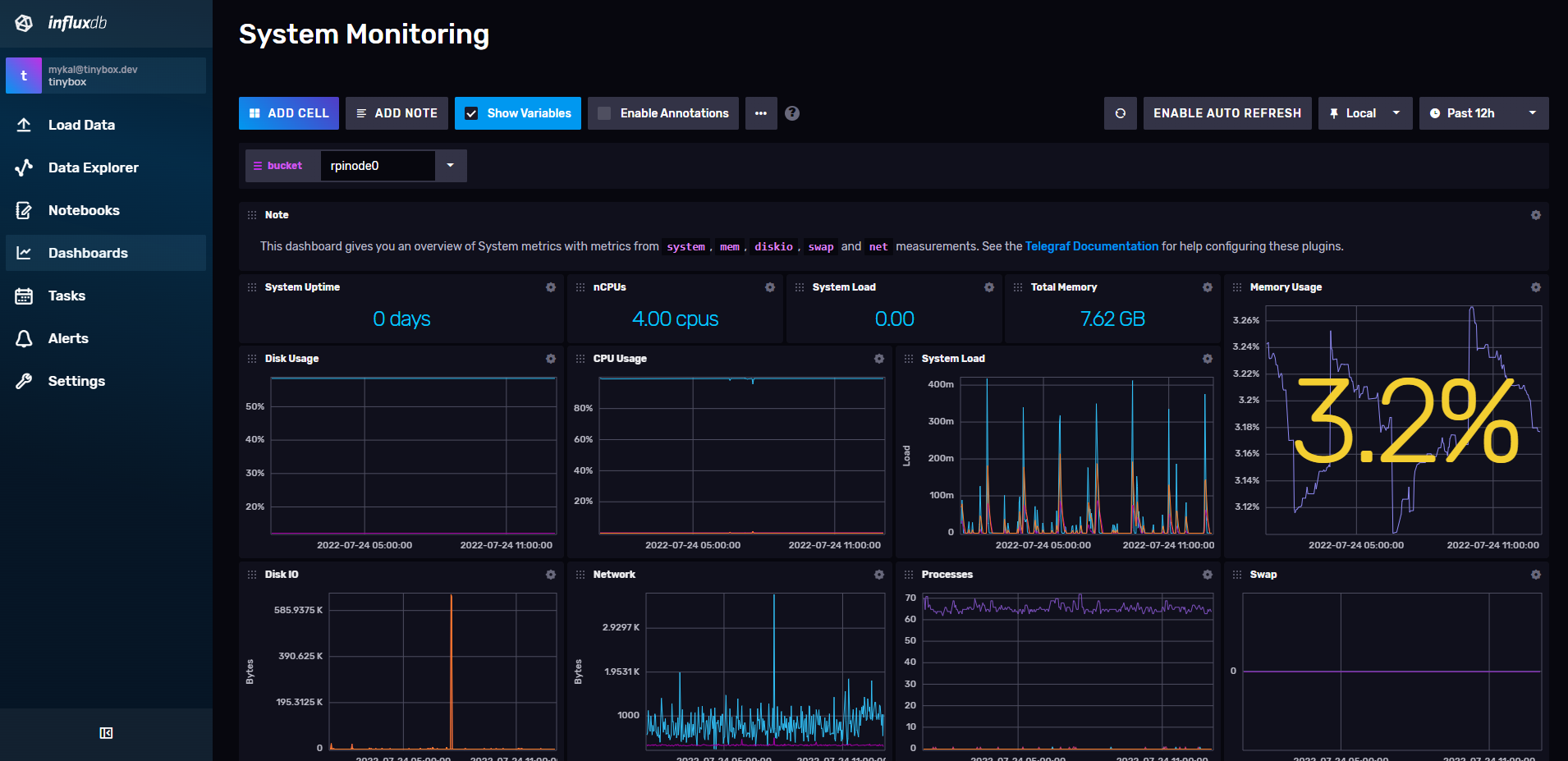\n\n## Next steps\n\nThere's a whole lot more I can do to expand the monitoring capabilities, here are some ideas:\n\n1. **📊 Grafana dashboards:** I brought Grafana up at the beginning of the post, but I haven't actually implemented it yet. Their dashboards are awesome and it would be a good next step.\n2. **⏰ Usage alerting:** InfluxDB (and Grafana actually) lets you create alerts on specific criteria. For example, if your server goes over 80% usage, or goes down, you can get a slack message.\n3. **📚 Keep learning:** There's a whole job around monitoring and reliability of services, so logically there's a whole lot you can learn in the field.\n\nThanks for reading!\n","html":"I've been looking into how to be more pro-active about monitoring my HomeLab lately. With that in mind, I went on a bit of a monitoring dive and setup some basic tools on my raspberry pi's. I wanted to keep track of what I did, so why not write it up in a blog post.
More specifically, this post will give you a quick overview of how I got up and running with InfluxDB and Telegraf for monitoring my servers.
Why InfluxDB and Telegraf?
I've already used Grafana (a dashboarding tool) at work and like how it works; I also know that Grafana is commonly used for system monitoring so I started my search there. After some Googling, I kept seeing a few other tools used alongside Grafana:
- InfluxDB: a database for efficiently storing and accessing time series data (perfect for sensors, system data, etc.). Grafana has a first party integration with InfluxDB as well.
- Telegraf: a server agent that allows you to collect sensor info from your servers and send it back to InfluxDB and other time-series databases like Prometheus.
Sweet! I have a few tools to start experimenting with.
Installing InfluxDB
The logical first step was to install InfluxDB somewhere so my servers could write back to it. InfluxDB has a docker image that you can use and since I have an Unraid server that's already running around 20 docker images, I threw it on there.
I was pleasantly surprised by how easy setting up InfluxDB was!
- Followed the setup guide in the web interface and setup an admin user (should be at http://your-servers-ip:8016/).
- Created a buckets for each pi to write to (basically a database).
- Created a telegraf config for each pi and note the API key, and configuration files (telegraf.conf) InfluxDB provided.
From there, InfluxDB seemed to suggest I could setup Telegraf on my pis.
Installing Telegraf
Now that I had some configurations, I went and did some reading on how to configure telegraf on the docs site. I logged in to both my pi's, and used the commands below:
# install telegrafsudo apt install telegraf -y# paste in the INFLUXDB_KEY provided by InfluxDB# at the bottom of the file.# this will automatically define the variable for# the user you're logged in as on login.vim ~/.bashrc# paste in the telegraf.conf file provided by InfluxDBvim /etc/telegraf/telegraf.conf# start the telegraf service, and enable itsudo systemctl start telegrafsudo systemctl enable telegraf# make sure that the telegraf service has connected to# InfluxDB successfully.sudo systemctl status telegraf# the output of the above command should# NOT include any 401 errors. if it does,# you may need to paste the API key into# your telegraf.conf file manually
Once I got that done I knew that telegraf should be writing back to my InfluxDB database every 10 seconds.
Seeing server data in InfluxDB
To confirm that InfluxDB was actually getting that data, I logged back into the InfluxDB web app and clicked the "dashboards" link on the sidebar.Thankfully, InfluxDB comes with a default "Systems" dashboard that you can use for reviewing your data, I hopped in there and saw that data was getting into InfluxDB, sweet 🎉

Next steps
There's a whole lot more I can do to expand the monitoring capabilities, here are some ideas:
- 📊 Grafana dashboards: I brought Grafana up at the beginning of the post, but I haven't actually implemented it yet. Their dashboards are awesome and it would be a good next step.
- ⏰ Usage alerting: InfluxDB (and Grafana actually) lets you create alerts on specific criteria. For example, if your server goes over 80% usage, or goes down, you can get a slack message.
- 📚 Keep learning: There's a whole job around monitoring and reliability of services, so logically there's a whole lot you can learn in the field.
Thanks for reading!
"}},{"id":"shopify-as-json","url":"https://mykal.codes/posts/shopify-as-json","meta":{"title":"Get any Shopify product as JSON","pubDate":"2022-07-19T00:00:00.000Z","type":"post","draft":false,"tags":["webdev","shopify"],"description":"If you ever need to pull Shopify product info, this tip will be a huge help.","heroImage":{"src":"/_astro/shopify-as-json.LqxdOhhC.avif","width":1200,"height":800,"format":"avif","fsPath":"/app/src/assets/posts/shopify-as-json.avif"}},"content":{"md":"\nI found out that you could get any Shopify product as JSON/XML way too late in my Shopify development game. If there is a public URL for the Shopify product, and the store is using the standard Shopify theme engine, you can grab all the public details as JSON at any time with a quick URL trick.\n\nAll you have to do is add `.json` to the end of the product URL, and it will return the JSON file representation of the object; for XML just add the `.xml` to the end.\n\n## Getting product info in Javascript\n\nHere's a quick demo of how you'd grab a product's info as JSON in Javascript. All you're going to need is the URL where you can find the product, and some way of running javascript (browser, or node.js with `node-fetch`).\n\nLet's use a product from the Allbirds store:\n\n```js\n// product url\nconst productUrl =\n \"https://www.allbirds.com/products/mens-tree-flyers-blizzard\";\n\n// function to grab the data and return a promise\nconst getProductData = async (productUrl) => {\n const productUrlJSON = `${productUrl}.json`;\n const response = await fetch(productUrlJSON);\n const data = await response.json();\n return data;\n};\n\n// get the data and then log it, or do whatever!\ngetProductData(productUrl).then((data) => {\n console.log(data);\n});\n```\n\nThis should log something like this to your console:\n\n```json\n{\n {\n \"product\": {\n \"id\": 6673825890384,\n \"title\": \"Men's Tree Flyers - Blizzard (Blizzard Sole)\",\n \"body_html\": \"The Allbirds Tree Flyers for men are a lightweight, springy distance running shoe—including our new SwiftFoam™ midsole, made of natural and recycled materials.
\",\n \"vendor\": \"Allbirds\",\n \"product_type\": \"Shoes\",\n \"created_at\": \"2022-04-20T14:39:25-07:00\",\n \"handle\": \"mens-tree-flyers-blizzard\",\n \"updated_at\": \"2022-07-19T12:20:43-07:00\",\n \"published_at\": \"2022-05-15T18:56:08-07:00\",\n \"template_suffix\": \"mens-tree-flyers\",\n \"published_scope\": \"global\",\n \"tags\": \"allbirds::cfId => color-mens-tree-flyers-blizzard-blizzard, allbirds::complete => true, allbirds::edition => limited, allbirds::gender => mens, allbirds::hue => white, allbirds::master => mens-tree-flyers, allbirds::material => tree, allbirds::silhouette => dasher, loop::returnable => true, shoprunner, YCRF_mens-perform-shoes, YGroup_ygroup_mens-tree-flyers\",\n \"variants\": [],\n \"options\": [],\n \"images\": [],\n \"image\": {\n \"id\": 30031923576912,\n \"product_id\": 6673825890384,\n \"position\": 1,\n \"created_at\": \"2022-06-02T15:17:26-07:00\",\n \"updated_at\": \"2022-06-02T15:17:26-07:00\",\n \"alt\": null,\n \"width\": 1600,\n \"height\": 1600,\n \"src\": \"https://cdn.shopify.com/s/files/1/1104/4168/products/AA001NM_SHOE_ANGLE_GLOBAL_MENS_TREE_FLYER_BLIZZARD_BLIZZARD_91a3e1d2-f0d0-4649-a8e8-0d556a1a4e51.png?v=1654208246\",\n \"variant_ids\": []\n }\n }\n}\n}\n```\n\nFrom here, you can do whatever you need with that data, including:\n\n- custom CTAs/cards for the product.\n- custom landing pages for the product on marketing sites.\n- simple external product inventories via the sitemap.\n- lots of other things...\n\nSpeaking of, if you've used this API for other weird things, feel free to comment down below with examples. I would love to see what elese people are using these for.\n","html":"I found out that you could get any Shopify product as JSON/XML way too late in my Shopify development game. If there is a public URL for the Shopify product, and the store is using the standard Shopify theme engine, you can grab all the public details as JSON at any time with a quick URL trick.
All you have to do is add .json to the end of the product URL, and it will return the JSON file representation of the object; for XML just add the .xml to the end.
Getting product info in Javascript
Here's a quick demo of how you'd grab a product's info as JSON in Javascript. All you're going to need is the URL where you can find the product, and some way of running javascript (browser, or node.js with node-fetch).
Let's use a product from the Allbirds store:
// product urlconst productUrl = "https://www.allbirds.com/products/mens-tree-flyers-blizzard";// function to grab the data and return a promiseconst getProductData = async (productUrl) => { const productUrlJSON = `${productUrl}.json`; const response = await fetch(productUrlJSON); const data = await response.json(); return data;};// get the data and then log it, or do whatever!getProductData(productUrl).then((data) => { console.log(data);});
This should log something like this to your console:
{ { "product": { "id": 6673825890384, "title": "Men's Tree Flyers - Blizzard (Blizzard Sole)", "body_html": "<p>The Allbirds Tree Flyers for men are a lightweight, springy distance running shoe—including our new SwiftFoam™ midsole, made of natural and recycled materials. </p>", "vendor": "Allbirds", "product_type": "Shoes", "created_at": "2022-04-20T14:39:25-07:00", "handle": "mens-tree-flyers-blizzard", "updated_at": "2022-07-19T12:20:43-07:00", "published_at": "2022-05-15T18:56:08-07:00", "template_suffix": "mens-tree-flyers", "published_scope": "global", "tags": "allbirds::cfId => color-mens-tree-flyers-blizzard-blizzard, allbirds::complete => true, allbirds::edition => limited, allbirds::gender => mens, allbirds::hue => white, allbirds::master => mens-tree-flyers, allbirds::material => tree, allbirds::silhouette => dasher, loop::returnable => true, shoprunner, YCRF_mens-perform-shoes, YGroup_ygroup_mens-tree-flyers", "variants": [], "options": [], "images": [], "image": { "id": 30031923576912, "product_id": 6673825890384, "position": 1, "created_at": "2022-06-02T15:17:26-07:00", "updated_at": "2022-06-02T15:17:26-07:00", "alt": null, "width": 1600, "height": 1600, "src": "https://cdn.shopify.com/s/files/1/1104/4168/products/AA001NM_SHOE_ANGLE_GLOBAL_MENS_TREE_FLYER_BLIZZARD_BLIZZARD_91a3e1d2-f0d0-4649-a8e8-0d556a1a4e51.png?v=1654208246", "variant_ids": [] } }}}
From here, you can do whatever you need with that data, including:
- custom CTAs/cards for the product.
- custom landing pages for the product on marketing sites.
- simple external product inventories via the sitemap.
- lots of other things...
Speaking of, if you've used this API for other weird things, feel free to comment down below with examples. I would love to see what elese people are using these for.
"}},{"id":"aeropress-latte","url":"https://mykal.codes/posts/aeropress-latte","meta":{"title":"My AeroPress Latte","pubDate":"2022-07-15T00:00:00.000Z","type":"post","draft":false,"tags":["recipes","coffee"],"description":"An AeroPress Latte recipe for the AeroPress GO!","heroImage":{"src":"/_astro/aeropress-latte.cwe571bb.avif","width":1200,"height":800,"format":"avif","fsPath":"/app/src/assets/posts/aeropress-latte.avif"}},"content":{"md":"P\n\nA week or so ago I was scrolling around on twitter and came across [a tweet mentioning an \"AeroPress Latte\"](https://twitter.com/TheCodePixi/status/1545476517202894851). I _love_ lattes, but only really have the equipment for pour over or immersion brew coffee at home... or so I thought!\n\nAfter 20-30 minutes of Googling and watching Youtube videos on AeroPress lattes, I was overjoyed to find that they are indeed a thing. You can't actually make espresso with the AeroPress, but you can make a _pseudo espresso_ (concentrated coffee) by using more ground coffee, less water, and a shorter brew time. The rest is just steamed milk + any other goodies you like in your latte.\n\nI've spent the week since this monumental discovery experimenting and I think I've come up with a half-decent recipe.\n\n## Tools and ingredients\n\nBefore we get into the recipe, here's what you'll need:\n\n1. AeroPress: I use the AeroPress GO! but any AeroPress should do.\n2. scale with timer + tare functions: this is for weighing ingredients, and keeping track of your brew-time.\n3. kettle: for hot water. I use filtered water heated to ~95c.\n4. milk frother: preferably a steamer, but all I have is a frother 😅\n5. medium-fine ground coffee: I use some local beans ground between a pour-over medium and espresso fine.\n6. 2% milk or a milk alternative: the milk for your latte.\n\nfor more info on what I use, check out [my coffee setup post](https://mykal.codes/posts/coffee-setup)\n\n## Recipe\n\nThe most involved part of the recipe is the \"espresso\" everything else is pretty easy!\n\n### The \"espresso\"\n\n1. put your paper filter into your AeroPress.\n2. place your AeroPress on a cup, place that cup on a scale, and tare the scale.\n3. pour 14.5g of ground coffee into your AeroPress, even the bed and tare the scale again.\n4. Start the timer on your scale.\n5. pour ~140g of water into your AeroPress and stir immediately until theres no dry coffee.\n6. remove your AeroPress from the scale.\n7. cover the AeroPress with your plunger creating a seal and wait ~20 seconds\n8. push down on the plunger for ~15 seconds or until the AeroPress is finished.\n9. remove the AeroPress from the cup and quickly clean up.\n\n### The milk\n\n1. put your milk into the frother (use as much as you'd like)\n2. froth your milk until it has an even layer of foam on top\n3. pour your \"steamed\" milk into the same cup as your \"espresso\"\n\n### The extras\n\nI like to add 1 small pump of vanilla, or cinnamon to the top of my lattes depending on the day. That said, they're still delicious with nothing but milk + coffee.\n\n## Enjoy your latte!\n\n**If you try the recipe out, let me know what you think!** It's definitely not a traditional coffee-shop-grade latte, but it's a lot better than anything latte adjacent I've made at home previously.","html":"P
A week or so ago I was scrolling around on twitter and came across a tweet mentioning an "AeroPress Latte". I love lattes, but only really have the equipment for pour over or immersion brew coffee at home... or so I thought!
After 20-30 minutes of Googling and watching Youtube videos on AeroPress lattes, I was overjoyed to find that they are indeed a thing. You can't actually make espresso with the AeroPress, but you can make a pseudo espresso (concentrated coffee) by using more ground coffee, less water, and a shorter brew time. The rest is just steamed milk + any other goodies you like in your latte.
I've spent the week since this monumental discovery experimenting and I think I've come up with a half-decent recipe.
Tools and ingredients
Before we get into the recipe, here's what you'll need:
- AeroPress: I use the AeroPress GO! but any AeroPress should do.
- scale with timer + tare functions: this is for weighing ingredients, and keeping track of your brew-time.
- kettle: for hot water. I use filtered water heated to ~95c.
- milk frother: preferably a steamer, but all I have is a frother 😅
- medium-fine ground coffee: I use some local beans ground between a pour-over medium and espresso fine.
- 2% milk or a milk alternative: the milk for your latte.
for more info on what I use, check out my coffee setup post
Recipe
The most involved part of the recipe is the "espresso" everything else is pretty easy!
The "espresso"
- put your paper filter into your AeroPress.
- place your AeroPress on a cup, place that cup on a scale, and tare the scale.
- pour 14.5g of ground coffee into your AeroPress, even the bed and tare the scale again.
- Start the timer on your scale.
- pour ~140g of water into your AeroPress and stir immediately until theres no dry coffee.
- remove your AeroPress from the scale.
- cover the AeroPress with your plunger creating a seal and wait ~20 seconds
- push down on the plunger for ~15 seconds or until the AeroPress is finished.
- remove the AeroPress from the cup and quickly clean up.
The milk
- put your milk into the frother (use as much as you'd like)
- froth your milk until it has an even layer of foam on top
- pour your "steamed" milk into the same cup as your "espresso"
The extras
I like to add 1 small pump of vanilla, or cinnamon to the top of my lattes depending on the day. That said, they're still delicious with nothing but milk + coffee.
Enjoy your latte!
If you try the recipe out, let me know what you think! It's definitely not a traditional coffee-shop-grade latte, but it's a lot better than anything latte adjacent I've made at home previously.
"}},{"id":"why-i-love-self-hosting","url":"https://mykal.codes/posts/why-i-love-self-hosting","meta":{"title":"Why I Love Self-Hosting","pubDate":"2022-07-04T00:00:00.000Z","type":"post","draft":false,"tags":["docker","self-hosting"],"description":"A writeup on why I love self-hosting complete with drawbacks.","heroImage":{"src":"/_astro/why-i-love-self-hosting.MfOuNnXS.avif","width":1024,"height":1024,"format":"avif","fsPath":"/app/src/assets/posts/why-i-love-self-hosting.avif"}},"content":{"md":"If you're unfamiliar with the term, I would define self-hosting as the practice of hosting your own server and services either in your home or place of business. People do this for an array of reasons (which we'll get into in this post). It's become increasingly popular over the last few years for enthusiasts, developers, and nerds, in general, to set up “homelabs” in their basements, under their desks and in their TV cabinets.\n\nI started self-hosting around 2 years ago after I got a touch of some FOMO from friends with servers set up at home. To be honest I expected to be “over it” a few months after I started. To my surprise, I'm still self-hosting now, and having more fun with it than ever. It's been a fun way for me to learn in a safe/forgiving environment, experiment with new tech, and save some money on online services like Google Drive.\n\nThis post is going to outline a few of the reasons I love self-hosting, and why you might love it too.\n\n## Reuse of otherwise unused hardware\n\nMy self-hosted setup is mostly secondhand hardware. The only thing I've purchased from new are things you typically _don't_ want to buy second-hand (e.g. Hard Drives). By re-using older hardware, I saved quite a bit of money and got up and running almost instantly. _I think I only spent around $350 to get a server up and running_, with all of that cost being [IronWolf 4TB hard drives](https://www.amazon.ca/Seagate-IronWolf-5900RPM-Internal-3-5-Inch/dp/B07H289S79) and a compact case for the server.\n\nI started with a full “desktop-grade” server, but you can start with something as simple as an old laptop, or a Raspberry pi you got at a conference that has been collecting dust for a few years.\n\n## Learning in a safe environment\n\nWhen I started self-hosting I had _heard_ of docker but had not used it. Now, I use docker containers at work daily, and they're a big part of how I do development. I would never have learned as much, as fast, unless I was experimenting on the weekend with my self-hosted services.\n\nI've also learned a lot about:\n\n- Network management/structure\n- Proxy software (NGINX in particular)\n- DNS\n- Monitoring and alerts\n- SSL certificates\n- Virtual machines\n- Virtual private networking (VPNs)\n- I'm sure much more\n\nI'd read a lot about all of these things in school and had even dipped my toes in them previously, but being able to sit down and implement these things has solidified concepts in my head. I definitely wouldn't say I'm an expert in these topics, but I'd be confident enough to propose solutions using this tech now that I've used it.\n\nAnother benefit of learning in a self-hosted environment as opposed to on the job is you don't have to worry about taking down production for a whole company, just your personal stuff.\n\n## Privacy and ownership\n\n> If you're not paying for the product, you and your data _**are**_ the product\n>\n> - someone from the internet\n\nPrivacy was one of the biggest reasons I got into self-hosting. I was able to migrate lots of my data off of Amazon, Facebook, and Google's servers by spinning up self-hosted alternatives, for example:\n\n- Google Drive / Google Photos: _replaced by_ [_NextCloud_](https://nextcloud.com/) _+ a nightly encrypted backup to_ [_BackBlaze B2_](https://www.backblaze.com/b2/cloud-storage.html)\n- Amazon S3 buckets: _replaced by_ [_MINIO_](https://min.io/)\n- Notion / Google Keep: _replaced by_ [_Trilium notes_](https://github.com/zadam/trilium)\n- Google Analytics: [_Umami_](https://umami.is/) _+ PostgreSQL_\n- Cloud databases: _local PostgreSQL, MySQL, MariaDB, and Redis containers_\n- Google Home: [_Home Assistant_](https://www.home-assistant.io/) _virtual machine_\n- Nord VPN: [_WireGuard_](https://www.wireguard.com/) _as a personal VPN on my phone, and laptops_\n- a whole bunch of dev stuff\n\nDon't get me wrong, I still use Gmail for personal email, and I keep all my recent photos on Google Photos still. That said, I was able to move a _lot_ of my data back into my control, and that feels good!\n\n## Easier development environments\n\nHaving a server under your desk with every open-source database installed, and the ability to spin up any niche tool you might need in a few seconds can make creating development or staging environments _easy_.\n\nFor example, when working on freelance projects I typically create a new database for the app or site I'm working on and use that as a development database. Then when I want to leave an app running for testing, I'll just spin up a docker container on my server and send over access to the client for testing. All for effectively $0. Before I was self-hosting, a separate test instance (app + database + Redis) could run anywhere from $10-20/month.\n\n## The Unraid operating system\n\nI use [Unraid](https://unraid.net/) as the operating system on my main server, it allows you to easily set up and manage almost anything you'd want for self-hosting through a local web interface, and even a terminal when I need a bit more access:\n\n- Network drives with parity (via Samba / NFS)\n- Docker containers\n- Virtual machines\n- Unraid specific plugins\n- a [whole bunch more](https://unraid.net/product)\n\nAll you need to do to get rolling with Unraid is download the OS, flash it to a hard drive, and boot off it on your machine. To be honest, I don't think I would have got into self-hosting as much as I did if Unraid wasn't so dang easy to get going with.\n\n## Welcoming community\n\nIn general, the community is welcoming and willing to help out. I've asked a few questions online about my setup, and have always gotten honest and helpful communication back. This could be a bit of selection bias, but as a programmer/developer by trade I was really surprised given how toxic Stack Overflow, Linux, and developer help forums can be.\n\nHere's a list of some of my favourite self-hosted spots online:\n\n- [r/SelfHosted](https://www.reddit.com/r/selfhosted/)\n- [r/Unraid](https://www.reddit.com/r/unRAID)\n- [r/HomeLab](https://www.reddit.com/r/homelab)\n- [Unraid Forums](https://forums.unraid.net/)\n\nEven if you don't plan on getting into self-hosting now, but are generally interested in it, I'd suggest checking these out and seeing all the cool stuff people are doing.\n\n## Self-hosting downsides\n\nWhile it's probably pretty obvious that I'm a fan of self-hosting, there are a few notable downsides to messing around with self-hosting Some of them only apply if you're going to be exposing services to the internet, but I'll make that clear.\n\n### Maintenance\n\nGiven that you're running the hardware yourself, there's always the risk that a hard drive could die, RAM can go bad, or a CPU can just give up. When this happens your services will likely be down (unless you're running something high availability; I'm planning to do this with some Raspberry Pi's so stay tuned for that).\n\nBesides hardware, you're going to want to keep your software up to date and check in regularly. There are monitoring tools that can help with this (monitor uptime, usage, and logins, have the service alert you if anything looks off), but you're still going to want to check-in manually at least once a week in my opinion.\n\n### Security\n\nWhen you're exposing your services, virtual machines, and apps to the internet there are some inherent risks. If you don't properly test and secure your system someone _will_ find a way into your network, your machine, and your data. Be careful with how you're doing things, some common advice would be:\n\n- **Stick to the principle of least privilege:** Give out very limited access by default, and regularly audit what you're making available outside of your network.\n- **Stay up to date:** Make sure to monitor the available updates on your containers and virtual machines, and patch whenever possible. While this isn't a catch-all for security (like most things on the list), it helps to always be on the newest version.\n- **Authenticate everything:** This is more of a personal belief, but if you're going to be putting something on the internet, make sure there's a well-tested authentication scheme, preferably with 2FA protecting the service (e.g. NextCloud w/ strict passwords and 2FA)\n- **Only open the ports you need open:** The only ports I have open on my router are 80 (HTTP), 443 (HTTPS), and 51820 (WireGuard VPN). This is a pretty easy one to manage and doesn't mean as much as it used to but it's still a good rule of thumb.\n- **Use VPN access for really sensitive stuff:** for sensitive data and services, straight up don't expose them to the internet. Just don't risk it. Setup a VPN on your network, connect to the network via the VPN and just connect as you would locally. I use WireGuard which is [trivial to set up via Unraid](https://unraid.net/blog/wireguard-on-unraid)\n\n### Time investment\n\nAs I mentioned at the top of this post, self-hosting is a significant time investment. You'll get out what you put in. If you don't have the time to sit down and mess around on a semi-regular basis (at least until you've got things configured and set up) you're going to be more frustrated than it's worth.\n\n### Internet restrictions\n\nThis one doesn't have much to do with self-hosting itself, but depending on the control your internet service provider (ISP) has over your router, you might not be able to port-forward your router, or even use enough data to make self-hosting worth it past local services. Before getting into it, I would recommend making sure your router allows port-forwarding, and your ISP doesn't have restrictive data caps (upload/download).\n\n## Conclusion\n\nIf after reading all of this, you still want to give it a try, I say go for it! Plug in that laptop, raspberry pi, or old desktop and get tinkering. I've spent countless hours tinkering with my setup (probably too many, to be honest).\n\nIf you have any questions about self-hosting or want to share your own setup feel free to comment below or reach out on the contact page!\n","html":"If you're unfamiliar with the term, I would define self-hosting as the practice of hosting your own server and services either in your home or place of business. People do this for an array of reasons (which we'll get into in this post). It's become increasingly popular over the last few years for enthusiasts, developers, and nerds, in general, to set up “homelabs” in their basements, under their desks and in their TV cabinets.
I started self-hosting around 2 years ago after I got a touch of some FOMO from friends with servers set up at home. To be honest I expected to be “over it” a few months after I started. To my surprise, I'm still self-hosting now, and having more fun with it than ever. It's been a fun way for me to learn in a safe/forgiving environment, experiment with new tech, and save some money on online services like Google Drive.
This post is going to outline a few of the reasons I love self-hosting, and why you might love it too.
Reuse of otherwise unused hardware
My self-hosted setup is mostly secondhand hardware. The only thing I've purchased from new are things you typically don't want to buy second-hand (e.g. Hard Drives). By re-using older hardware, I saved quite a bit of money and got up and running almost instantly. I think I only spent around $350 to get a server up and running, with all of that cost being IronWolf 4TB hard drives and a compact case for the server.
I started with a full “desktop-grade” server, but you can start with something as simple as an old laptop, or a Raspberry pi you got at a conference that has been collecting dust for a few years.
Learning in a safe environment
When I started self-hosting I had heard of docker but had not used it. Now, I use docker containers at work daily, and they're a big part of how I do development. I would never have learned as much, as fast, unless I was experimenting on the weekend with my self-hosted services.
I've also learned a lot about:
- Network management/structure
- Proxy software (NGINX in particular)
- DNS
- Monitoring and alerts
- SSL certificates
- Virtual machines
- Virtual private networking (VPNs)
- I'm sure much more
I'd read a lot about all of these things in school and had even dipped my toes in them previously, but being able to sit down and implement these things has solidified concepts in my head. I definitely wouldn't say I'm an expert in these topics, but I'd be confident enough to propose solutions using this tech now that I've used it.
Another benefit of learning in a self-hosted environment as opposed to on the job is you don't have to worry about taking down production for a whole company, just your personal stuff.
Privacy and ownership
If you're not paying for the product, you and your data are the product
- someone from the internet
Privacy was one of the biggest reasons I got into self-hosting. I was able to migrate lots of my data off of Amazon, Facebook, and Google's servers by spinning up self-hosted alternatives, for example:
- Google Drive / Google Photos: replaced by NextCloud + a nightly encrypted backup to BackBlaze B2
- Amazon S3 buckets: replaced by MINIO
- Notion / Google Keep: replaced by Trilium notes
- Google Analytics: Umami + PostgreSQL
- Cloud databases: local PostgreSQL, MySQL, MariaDB, and Redis containers
- Google Home: Home Assistant virtual machine
- Nord VPN: WireGuard as a personal VPN on my phone, and laptops
- a whole bunch of dev stuff
Don't get me wrong, I still use Gmail for personal email, and I keep all my recent photos on Google Photos still. That said, I was able to move a lot of my data back into my control, and that feels good!
Easier development environments
Having a server under your desk with every open-source database installed, and the ability to spin up any niche tool you might need in a few seconds can make creating development or staging environments easy.
For example, when working on freelance projects I typically create a new database for the app or site I'm working on and use that as a development database. Then when I want to leave an app running for testing, I'll just spin up a docker container on my server and send over access to the client for testing. All for effectively $0. Before I was self-hosting, a separate test instance (app + database + Redis) could run anywhere from $10-20/month.
The Unraid operating system
I use Unraid as the operating system on my main server, it allows you to easily set up and manage almost anything you'd want for self-hosting through a local web interface, and even a terminal when I need a bit more access:
- Network drives with parity (via Samba / NFS)
- Docker containers
- Virtual machines
- Unraid specific plugins
- a whole bunch more
All you need to do to get rolling with Unraid is download the OS, flash it to a hard drive, and boot off it on your machine. To be honest, I don't think I would have got into self-hosting as much as I did if Unraid wasn't so dang easy to get going with.
Welcoming community
In general, the community is welcoming and willing to help out. I've asked a few questions online about my setup, and have always gotten honest and helpful communication back. This could be a bit of selection bias, but as a programmer/developer by trade I was really surprised given how toxic Stack Overflow, Linux, and developer help forums can be.
Here's a list of some of my favourite self-hosted spots online:
Even if you don't plan on getting into self-hosting now, but are generally interested in it, I'd suggest checking these out and seeing all the cool stuff people are doing.
Self-hosting downsides
While it's probably pretty obvious that I'm a fan of self-hosting, there are a few notable downsides to messing around with self-hosting Some of them only apply if you're going to be exposing services to the internet, but I'll make that clear.
Maintenance
Given that you're running the hardware yourself, there's always the risk that a hard drive could die, RAM can go bad, or a CPU can just give up. When this happens your services will likely be down (unless you're running something high availability; I'm planning to do this with some Raspberry Pi's so stay tuned for that).
Besides hardware, you're going to want to keep your software up to date and check in regularly. There are monitoring tools that can help with this (monitor uptime, usage, and logins, have the service alert you if anything looks off), but you're still going to want to check-in manually at least once a week in my opinion.
Security
When you're exposing your services, virtual machines, and apps to the internet there are some inherent risks. If you don't properly test and secure your system someone will find a way into your network, your machine, and your data. Be careful with how you're doing things, some common advice would be:
- Stick to the principle of least privilege: Give out very limited access by default, and regularly audit what you're making available outside of your network.
- Stay up to date: Make sure to monitor the available updates on your containers and virtual machines, and patch whenever possible. While this isn't a catch-all for security (like most things on the list), it helps to always be on the newest version.
- Authenticate everything: This is more of a personal belief, but if you're going to be putting something on the internet, make sure there's a well-tested authentication scheme, preferably with 2FA protecting the service (e.g. NextCloud w/ strict passwords and 2FA)
- Only open the ports you need open: The only ports I have open on my router are 80 (HTTP), 443 (HTTPS), and 51820 (WireGuard VPN). This is a pretty easy one to manage and doesn't mean as much as it used to but it's still a good rule of thumb.
- Use VPN access for really sensitive stuff: for sensitive data and services, straight up don't expose them to the internet. Just don't risk it. Setup a VPN on your network, connect to the network via the VPN and just connect as you would locally. I use WireGuard which is trivial to set up via Unraid
Time investment
As I mentioned at the top of this post, self-hosting is a significant time investment. You'll get out what you put in. If you don't have the time to sit down and mess around on a semi-regular basis (at least until you've got things configured and set up) you're going to be more frustrated than it's worth.
Internet restrictions
This one doesn't have much to do with self-hosting itself, but depending on the control your internet service provider (ISP) has over your router, you might not be able to port-forward your router, or even use enough data to make self-hosting worth it past local services. Before getting into it, I would recommend making sure your router allows port-forwarding, and your ISP doesn't have restrictive data caps (upload/download).
Conclusion
If after reading all of this, you still want to give it a try, I say go for it! Plug in that laptop, raspberry pi, or old desktop and get tinkering. I've spent countless hours tinkering with my setup (probably too many, to be honest).
If you have any questions about self-hosting or want to share your own setup feel free to comment below or reach out on the contact page!
"}},{"id":"improving-anchor-links","url":"https://mykal.codes/posts/improving-anchor-links","meta":{"title":"Improving Anchor Links","pubDate":"2022-06-24T00:00:00.000Z","type":"post","draft":false,"tags":["webdev"],"description":"This post outlines a few little tricks you can use with your anchor links","heroImage":{"src":"/_astro/improving-anchor-links.p8SlMwIU.avif","width":1200,"height":747,"format":"avif","fsPath":"/app/src/assets/posts/improving-anchor-links.avif"}},"content":{"md":"\nThis post outlines a few tricks that I've been re-discovering over and over again. To save time, I thought I would do a quick write-up documenting them so I know where to look next time I need them.\n\n## What is an anchor link?\n\nLet's start off by defining what an \"anchor link\" is. I would define an anchor link as a fundamental browser feature, that requires a few things to work:\n\n- an HTML element with a unique id: `Go To Website Stack
`\n- a URL that references that unique id: `https://mykal.codes/posts/whats-your-goto-web-stack/#go-to-website-stack`\n\nWhen someone navigates to that URL, it will scroll to the position of the corresponding HTML element on the page.\n\nI'm sure you've seen these used in a table of contents for an extensive blog post, or to jump to a specific section on a restaurant's menu page. **This post is going to summarize some of the cool things you can do with those anchor links.** I use them in [my coffee post](/posts/coffee-setup) for a table of contents.\n\n### Alternate names\n\nthese anchor links go by a bunch of other names as well, you may know them as:\n\n- ID-based links\n- Tagged links\n- Jump links\n- Inline links\n- On-Page links\n\nShoutout to the [d-d-d-discord](https://www.patreon.com/shoptalkshow) for this list.\n\n## Scroll margin on top of the element\n\nIf you want to use these links on a site that has a sticky header element at the top of the viewport, you'll probably notice things won't go to plan. Typically these links are hidden underneath the sticky header.\n\n\n See the Pen \n Anchor Link: Margin Example (Broken) by Mykal Machon (@mykalmachon)\n on CodePen.\n
\n\n\nDo you see how the heading with the unique ID is below the sticky header?\n\nThere are a few CSS rules we can throw in to add some space between the top of the viewport, and the associated element.\nSee an example of this fixed here:\n\n\n See the Pen \n Anchor Link: Margin Example (Broken) by Mykal Machon (@mykalmachon)\n on CodePen.\n
\n\n\n## Temporary animations on arrival at element\n\nAnother thing you can do to improve the user experience of these anchor links is adding an animation/style to emphasize the part of the document you've linked to.\n\nI tend to do this by adding a quick \"blink\" animation to the heading in question:\n\n```css\n@import 'https://unpkg.com/open-props';\n\n:target {\n animation: var(--animation-blink);\n animation-timing-function: var(--ease-3);\n animation-duration: 0.5s;\n animation-iteration-count: 5;\n}\n```\n\nBut you can also add a background to the element, a border, or anything else you can think of doing in CSS.\n\n```css\n@import 'https://unpkg.com/open-props';\n\n:target {\n background: var(--yellow-6);\n border-bottom: 2px solid var(--yellow-9);\n}\n```\n","html":"This post outlines a few tricks that I've been re-discovering over and over again. To save time, I thought I would do a quick write-up documenting them so I know where to look next time I need them.
What is an anchor link?
Let's start off by defining what an "anchor link" is. I would define an anchor link as a fundamental browser feature, that requires a few things to work:
- an HTML element with a unique id:
<h2 id="go-to-website-stack">Go To Website Stack</h2> - a URL that references that unique id:
https://mykal.codes/posts/whats-your-goto-web-stack/#go-to-website-stack
When someone navigates to that URL, it will scroll to the position of the corresponding HTML element on the page.
I'm sure you've seen these used in a table of contents for an extensive blog post, or to jump to a specific section on a restaurant's menu page. This post is going to summarize some of the cool things you can do with those anchor links. I use them in my coffee post for a table of contents.
Alternate names
these anchor links go by a bunch of other names as well, you may know them as:
- ID-based links
- Tagged links
- Jump links
- Inline links
- On-Page links
Shoutout to the d-d-d-discord for this list.
Scroll margin on top of the element
If you want to use these links on a site that has a sticky header element at the top of the viewport, you'll probably notice things won't go to plan. Typically these links are hidden underneath the sticky header.
<p class="codepen" data-height="300" data-default-tab="result" data-customSlug-hash="RwQXYrj" data-user="mykalmachon" style="height: 300px; box-sizing: border-box; display: flex; align-items: center; justify-content: center; border: 2px solid; margin: 1em 0; padding: 1em;"><span>See the Pen <a href="https://codepen.io/mykalmachon/pen/RwQXYrj">Anchor Link: Margin Example (Broken)</a> by Mykal Machon (<a href="https://codepen.io/mykalmachon">@mykalmachon</a>)on <a href="https://codepen.io">CodePen</a>.</span></p><script async src="https://cpwebassets.codepen.io/assets/embed/ei.js"></script>
Do you see how the heading with the unique ID is below the sticky header?
There are a few CSS rules we can throw in to add some space between the top of the viewport, and the associated element.See an example of this fixed here:
<p class="codepen" data-height="300" data-default-tab="result" data-customSlug-hash="YzemOGr" data-user="mykalmachon" style="height: 300px; box-sizing: border-box; display: flex; align-items: center; justify-content: center; border: 2px solid; margin: 1em 0; padding: 1em;"><span>See the Pen <a href="https://codepen.io/mykalmachon/pen/YzemOGr">Anchor Link: Margin Example (Broken)</a> by Mykal Machon (<a href="https://codepen.io/mykalmachon">@mykalmachon</a>)on <a href="https://codepen.io">CodePen</a>.</span></p><script async src="https://cpwebassets.codepen.io/assets/embed/ei.js"></script>
Temporary animations on arrival at element
Another thing you can do to improve the user experience of these anchor links is adding an animation/style to emphasize the part of the document you've linked to.
I tend to do this by adding a quick "blink" animation to the heading in question:
@import 'https://unpkg.com/open-props';:target { animation: var(--animation-blink); animation-timing-function: var(--ease-3); animation-duration: 0.5s; animation-iteration-count: 5;}
But you can also add a background to the element, a border, or anything else you can think of doing in CSS.
@import 'https://unpkg.com/open-props';:target { background: var(--yellow-6); border-bottom: 2px solid var(--yellow-9);}
"}},{"id":"whats-your-goto-web-stack","url":"https://mykal.codes/posts/whats-your-goto-web-stack","meta":{"title":"What's Your Go-To Web Stack","pubDate":"2022-05-16T00:00:00.000Z","type":"post","draft":false,"tags":["webdev"],"description":"An exercise in exploring the stack I'm currently comfy with.","heroImage":{"src":"/_astro/whats-your-goto-web-stack.fhuEgpIY.avif","width":1100,"height":733,"format":"avif","fsPath":"/app/src/assets/posts/whats-your-goto-web-stack.avif"}},"content":{"md":"\nThis post was inspired by [Andrew Walpole's \"What's Your Go-To Web Stack\" post](https://andrewwalpole.com/blog/whats-your-go-to-web-stack/). It seemed like a fun exercise, so I thought I’d give it a shot.\n\nThe stack I'd use for a website is a little different than what I'd use for a webapp, **so I figured I'd answer this question in two ways: what's my webapp stack, and what's my website stack.**\n\n## Go-To Website Stack\n\nIf I’m working on a site for myself or a client, the tools in my belt are pretty well defined.\n\nThe main piece of the stack here is the Static Site Generator (SSG) / \"meta-framework\" used to build the site. Until recently, my go-to was [Next.js](https://nextjs.org/), but in the last ~6 months, I've moved most of my stuff over to [Astro](https://astro.build/). Next.js is [technically more \"feature rich\"](https://nextjs.org/docs/getting-started), but I really like Astro's [zero-js-by-default approach](https://docs.astro.build/en/core-concepts/partial-hydration/). Astro also gives me more room to experiment with JS / CSS.\n\nI've been using [Netlify's Edge and Serverless Functions](https://www.netlify.com/products/functions/) quite a lot as well. While I've been using Netlify for years now, I've only really started digging into their serverless functions to help supplement Astro's lack of server-side functionality.\n\nFor content management, I'll typically stick to markdown files, but if the site needs to be edited by business users, I'll use [Sanity.io](https://www.sanity.io/). Their free plan is super generous and the level of customization makes it easy enough to tweak the CMS to fit the level of control and visibility needed.\n\n### The Stack / TLDR\n\n- Framework: [Astro](https://astro.build/)\n- Content Management System: Either Markdown or [Sanity.io](https://sanity.io/)\n- Styles: SCSS\n- Javascript: Vanilla JS, or [Svelte](https://svelte.dev/) if it's getting a little complex\n- Hosting: [Netlify](https://www.netlify.com/) (Serverless / edge functions + forms are killer)\n\n## Go-To Webapp Stack\n\nMy go-to webapp stack is a bit more up-in-the-air than my website stack. Depending on what I'm working on / the needs of the project, the stack can change a lot. If I _had_ to choose, the tech below is the closest I could get to a \"go-to\" list.\n\nThe main piece of the pie here is, again, the \"Framework\". I've been using [Flask](https://flask.palletsprojects.com/en/2.1.x/) _a lot_ at work lately and have been really loving the back-to-basics web server approach it takes. There are tonnes of resources out there about integrating it with modern tech and practices, plus Python is just a dream to write. In cases where I need something that has a reactive frontend though, I'll still reach for the tried and true [Next.js](https://nextjs.org/).\n\nWe use mostly MS SQL for databases at work, but that is definitely not my DB of choice. I'll reach for [PostgresSQL](https://www.postgresql.org/) whenever I can; it seems to work with almost everything you'd need it to, and benefits from being one of the \"popular\" databases with lots of tooling and educational content available.\n\nFor hosting, [I've really been digging \"dockerized\" setups lately](https://mykal.codes/posts/docker-rocks/), which, by design, means you can kind of host anywhere. I host some stuff on a server in my house, and use cloud services like [Railway](https://railway.app/) to host most production environments for clients.\n\n### The Stack / TLDR\n\n- Framework: [Flask](https://flask.palletsprojects.com/en/2.1.x/) or [Next.js](https://nextjs.org/)\n- Database: [PostgreSQL](https://www.postgresql.org/)\n- Styles: SCSS\n- Javascript: Vanilla JS or [React](https://reactjs.org/) (the ecosystem still has Svelte beat here)\n- Hosting: [Docker](https://www.docker.com/) + On-Prem / Docker + Cloud ([Railway](https://railway.app/), [Digital Ocean](https://www.digitalocean.com/))\n","html":"This post was inspired by Andrew Walpole's "What's Your Go-To Web Stack" post. It seemed like a fun exercise, so I thought I’d give it a shot.
The stack I'd use for a website is a little different than what I'd use for a webapp, so I figured I'd answer this question in two ways: what's my webapp stack, and what's my website stack.
Go-To Website Stack
If I’m working on a site for myself or a client, the tools in my belt are pretty well defined.
The main piece of the stack here is the Static Site Generator (SSG) / "meta-framework" used to build the site. Until recently, my go-to was Next.js, but in the last ~6 months, I've moved most of my stuff over to Astro. Next.js is technically more "feature rich", but I really like Astro's zero-js-by-default approach. Astro also gives me more room to experiment with JS / CSS.
I've been using Netlify's Edge and Serverless Functions quite a lot as well. While I've been using Netlify for years now, I've only really started digging into their serverless functions to help supplement Astro's lack of server-side functionality.
For content management, I'll typically stick to markdown files, but if the site needs to be edited by business users, I'll use Sanity.io. Their free plan is super generous and the level of customization makes it easy enough to tweak the CMS to fit the level of control and visibility needed.
The Stack / TLDR
- Framework: Astro
- Content Management System: Either Markdown or Sanity.io
- Styles: SCSS
- Javascript: Vanilla JS, or Svelte if it's getting a little complex
- Hosting: Netlify (Serverless / edge functions + forms are killer)
Go-To Webapp Stack
My go-to webapp stack is a bit more up-in-the-air than my website stack. Depending on what I'm working on / the needs of the project, the stack can change a lot. If I had to choose, the tech below is the closest I could get to a "go-to" list.
The main piece of the pie here is, again, the "Framework". I've been using Flask a lot at work lately and have been really loving the back-to-basics web server approach it takes. There are tonnes of resources out there about integrating it with modern tech and practices, plus Python is just a dream to write. In cases where I need something that has a reactive frontend though, I'll still reach for the tried and true Next.js.
We use mostly MS SQL for databases at work, but that is definitely not my DB of choice. I'll reach for PostgresSQL whenever I can; it seems to work with almost everything you'd need it to, and benefits from being one of the "popular" databases with lots of tooling and educational content available.
For hosting, I've really been digging "dockerized" setups lately, which, by design, means you can kind of host anywhere. I host some stuff on a server in my house, and use cloud services like Railway to host most production environments for clients.
The Stack / TLDR
"}},{"id":"coffee-setup","url":"https://mykal.codes/posts/coffee-setup","meta":{"title":"My Coffee Setup","pubDate":"2022-05-10T00:00:00.000Z","type":"post","draft":false,"tags":["recipes","coffee"],"description":"I've gotten into Coffee lately (cliché, I know) and wanted to summarize my coffee setup.","heroImage":{"src":"/_astro/coffee-setup.WqzjFynF.avif","width":1170,"height":780,"format":"avif","fsPath":"/app/src/assets/posts/coffee-setup.avif"}},"content":{"md":"\nI've really gotten into Coffee lately (cliché, I know) and I wanted to summarize my setup in a post.\n\n**If you're one of the people who asked me about my Coffee setup, this is for you!**\n\n> Disclaimer: I am not a Coffee expert. The info I'm sharing in this post is based on my own research and experimentation. Taste is subjective!\n\n## Coffee Beans \n\nI have a pretty standard set of practices for buying and preparing my coffee beans. I typically try to buy beans that are from local specialty shops, and that list their farms / origins explicitly. See [James Hoffman's video on how to buy beans](https://www.youtube.com/watch?v=O9YnLFrM7Fs) for more info here.\n\n### Where I Get My Beans\n\nI typically get beans from one of the following roasters:\n\n1. [Smoking Gun Coffee](https://smokingguncoffee.com/)\n2. [Monogram Coffee Co](https://monogramcoffee.com/)\n\nThey list where their beans are purchased from (even listing the farms at times), and generally support sustainable coffee growing which is a plus!\n\n### How I Grind My Beans\n\nI ended up buying [a budget-priced Bodum burr grinder](https://www.bodum.com/ca/en/11750-01us-bistro). I chose it because it had metal burrs, and decent reviews.\n\nBased on what I've read so far, porcelain burrs tend to get dull and chip; meaning you'll have to replace them relatively frequently. Metal burrs tend to last a bit longer, and be more maintainable over time.\n\nI have the exact grind settings I use in the [Pour Over](#pour-over) and [AeroPress](#aeropress) Sections below.\n\n## Brewing Methods\n\nWith the gear I have at home right now, I can brew either pour over, or aerorpess coffee. That said, I've picked up some things that you'll need regardless of brewing method.\n\n1. [Digital Scale with timer](https://www.amazon.ca/gp/product/B07L2KV94G/ref=ppx_yo_dt_b_asin_title_o02_s00?ie=UTF8&psc=1): any scale with .1g accuracy, and a tare feature should work (a timer is a plus).\n2. [POLIVIAR Electric Gooseneck Kettle](https://www.amazon.ca/POLIVIAR-Electric-Gooseneck-Kettle-JX2020-EKG/dp/B08XGN42YT/?th=1): if you're not doing pour over, you can stick with a cheaper standard kettle\n\n### Pour Over \n\nI started out with Pour Over ~2 months ago, and have kept with it since. That said, I'm pretty meticulous in the steps I take, and I'm sure there are much simpler ways to do things.\n\n#### Equipment\n\n1. HARIO V60 - 02 Acrylic Dripper\n2. HARIO V60 - 02 Filter Papers\n3. HARIO V60 - 01 Glass Range Server\n\n#### Brew Instructions\n\n1. measure out 28g of coffee\n2. measure out 550g of water into your kettle\n3. start boiling water (90 C for light/medium roasts, 95 C for dark roasts)\n4. grind coffee to 1 setting past “pour over” on my grinder\n5. place your V60 dripper onto your server, and place a paper filter inside\n6. with some warm tap water, gently “rinse” the filter in the dripper. when done empty the server\n7. pour your grounds into the setup and level them out, dig a slight hole in the middle with your fingers\n8. place your setup onto the scale and tare it\n9. once your water is to temperature, start the timer and pour in 60g of water; this starts the “resting” phase.\n10. place the kettle down, and “swirl” the setup until you see all of the grounds are wet\n11. let it sit until the timer hits 45 seconds\n12. slowly pour water into the setup in a circular motion until the scale reads ~448g of water\n13. let the dripper work a little bit, and then give the entire setup another swirl to clear some of the grounds of the filter walls\n14. wait until the setup completes draw down (should take around 3, to 3 ½ minutes.\n15. Enjoy your coffee! ☕\n\n### AeroPress\n\nI just got my AeroPress last week, and oh boy! I think it might replace my Pour Over setup for a daily brew. In my experience, a Pour Over brew is super easy to mess up (this could just be a symptom of my inexperience), and I've yet to have a bad cup of coffee with my AeroPress.\n\n#### Equipment\n\n1. AeroPress GO: all in one kit that includes a drinking cup, stir stick, coffee scoop, 350 filters, and an AeroPress!\n\n#### Brew Instructions\n\n1. measure out 11g of coffee\n2. measure out at least 275g of water\n3. start boiling water (90 C for light/medium roasts, 95 C for dark roasts)\n4. grind coffee to 2 settings past pour over on my grinder\n5. place a filter in your AeroPress, pour your coffee in, place your AeroPress on your digital scale, and tare it.\n6. once your water is to temperature, start the timer, and pour in 200g of water in a circular motion.\n7. place the plunger on top of the AeroPress (just enough to get a seal) and take it off the scale\n8. when your timer reaches 1:30, swirl the AeroPress (make sure you're holding the cup and the AeroPress)\n9. when your timer reaches 2:00 slowly push down on the plunger and extract your coffee\n10. Enjoy your coffee! ☕","html":"I've really gotten into Coffee lately (cliché, I know) and I wanted to summarize my setup in a post.
If you're one of the people who asked me about my Coffee setup, this is for you!
Disclaimer: I am not a Coffee expert. The info I'm sharing in this post is based on my own research and experimentation. Taste is subjective!
Coffee Beans
I have a pretty standard set of practices for buying and preparing my coffee beans. I typically try to buy beans that are from local specialty shops, and that list their farms / origins explicitly. See James Hoffman's video on how to buy beans for more info here.
Where I Get My Beans
I typically get beans from one of the following roasters:
- Smoking Gun Coffee
- Monogram Coffee Co
They list where their beans are purchased from (even listing the farms at times), and generally support sustainable coffee growing which is a plus!
How I Grind My Beans
I ended up buying a budget-priced Bodum burr grinder. I chose it because it had metal burrs, and decent reviews.
Based on what I've read so far, porcelain burrs tend to get dull and chip; meaning you'll have to replace them relatively frequently. Metal burrs tend to last a bit longer, and be more maintainable over time.
I have the exact grind settings I use in the Pour Over and AeroPress Sections below.
Brewing Methods
With the gear I have at home right now, I can brew either pour over, or aerorpess coffee. That said, I've picked up some things that you'll need regardless of brewing method.
- Digital Scale with timer: any scale with .1g accuracy, and a tare feature should work (a timer is a plus).
- POLIVIAR Electric Gooseneck Kettle: if you're not doing pour over, you can stick with a cheaper standard kettle
Pour Over
I started out with Pour Over ~2 months ago, and have kept with it since. That said, I'm pretty meticulous in the steps I take, and I'm sure there are much simpler ways to do things.
Equipment
- HARIO V60 - 02 Acrylic Dripper
- HARIO V60 - 02 Filter Papers
- HARIO V60 - 01 Glass Range Server
Brew Instructions
- measure out 28g of coffee
- measure out 550g of water into your kettle
- start boiling water (90 C for light/medium roasts, 95 C for dark roasts)
- grind coffee to 1 setting past “pour over” on my grinder
- place your V60 dripper onto your server, and place a paper filter inside
- with some warm tap water, gently “rinse” the filter in the dripper. when done empty the server
- pour your grounds into the setup and level them out, dig a slight hole in the middle with your fingers
- place your setup onto the scale and tare it
- once your water is to temperature, start the timer and pour in 60g of water; this starts the “resting” phase.
- place the kettle down, and “swirl” the setup until you see all of the grounds are wet
- let it sit until the timer hits 45 seconds
- slowly pour water into the setup in a circular motion until the scale reads ~448g of water
- let the dripper work a little bit, and then give the entire setup another swirl to clear some of the grounds of the filter walls
- wait until the setup completes draw down (should take around 3, to 3 ½ minutes.
- Enjoy your coffee! ☕
AeroPress
I just got my AeroPress last week, and oh boy! I think it might replace my Pour Over setup for a daily brew. In my experience, a Pour Over brew is super easy to mess up (this could just be a symptom of my inexperience), and I've yet to have a bad cup of coffee with my AeroPress.
Equipment
- AeroPress GO: all in one kit that includes a drinking cup, stir stick, coffee scoop, 350 filters, and an AeroPress!
Brew Instructions
- measure out 11g of coffee
- measure out at least 275g of water
- start boiling water (90 C for light/medium roasts, 95 C for dark roasts)
- grind coffee to 2 settings past pour over on my grinder
- place a filter in your AeroPress, pour your coffee in, place your AeroPress on your digital scale, and tare it.
- once your water is to temperature, start the timer, and pour in 200g of water in a circular motion.
- place the plunger on top of the AeroPress (just enough to get a seal) and take it off the scale
- when your timer reaches 1:30, swirl the AeroPress (make sure you're holding the cup and the AeroPress)
- when your timer reaches 2:00 slowly push down on the plunger and extract your coffee
- Enjoy your coffee! ☕
"}},{"id":"docker-rocks","url":"https://mykal.codes/posts/docker-rocks","meta":{"title":"Docker Rocks 🐳","pubDate":"2022-04-27T00:00:00.000Z","type":"post","draft":false,"tags":["devops","docker"],"description":"Once Docker and Docker-compose clicks, it makes dev ➡️ launch so much easier","heroImage":{"src":"/_astro/docker-rocks.EudCEgBk.avif","width":1170,"height":780,"format":"avif","fsPath":"/app/src/assets/posts/docker-rocks.avif"}},"content":{"md":"\nDocker is such an amazing piece of technology.\n\nI’ve been doing a bunch with it at work lately and once things “click” (docker + docker-compose) the pipeline from development, to deployment can feel seamless, and a lot easier to be confident in.\n\nYou can have a local \"dev\" environment (DB, App, Redis, etc) that mirrors your production environment up and running with one command.\nyou can make all your changes, and test them in an environment that is extremely close to production, in _one command_.\n\nFrom there, deploying your app is as simple as commiting your code, merging a pull request, pulling things down on your production server, and restarting the app!\n\n> If you're in a cloud environment that supports git-based CI/CD, this is probably automated for you already! 🎉\n\nWe've even started to \"containerize\" off-the-shelf apps we use at work to simplify deployment. docker-compose is so useful for \"composing\" services that it can take deployments down from multi-hour efforts to a few commands. Previously monolothic all-day-long deploys can literally be as simple as:\n\n```bash\ndocker-compose build && docker-compose up\n```\n\nThe next logical step for me in all of this is Kubernetes, which seems infinitely more daunting somehow.\n\n### What does this look like?\n\nHere's [an, admittedly extremely abstracted, example](https://github.com/MykalMachon/Caeser) based on one of my recent work projects.\n\nDespite the code being a lot simpler, the basic \"docker\" structure we use is on full display here, and could pretty easily be forked out to fit other projects.\n","html":"Docker is such an amazing piece of technology.
I’ve been doing a bunch with it at work lately and once things “click” (docker + docker-compose) the pipeline from development, to deployment can feel seamless, and a lot easier to be confident in.
You can have a local "dev" environment (DB, App, Redis, etc) that mirrors your production environment up and running with one command.you can make all your changes, and test them in an environment that is extremely close to production, in one command.
From there, deploying your app is as simple as commiting your code, merging a pull request, pulling things down on your production server, and restarting the app!
If you're in a cloud environment that supports git-based CI/CD, this is probably automated for you already! 🎉
We've even started to "containerize" off-the-shelf apps we use at work to simplify deployment. docker-compose is so useful for "composing" services that it can take deployments down from multi-hour efforts to a few commands. Previously monolothic all-day-long deploys can literally be as simple as:
docker-compose build && docker-compose up
The next logical step for me in all of this is Kubernetes, which seems infinitely more daunting somehow.
What does this look like?
Here's an, admittedly extremely abstracted, example based on one of my recent work projects.
Despite the code being a lot simpler, the basic "docker" structure we use is on full display here, and could pretty easily be forked out to fit other projects.
"}},{"id":"autosave-forms","url":"https://mykal.codes/posts/autosave-forms","meta":{"title":"Autosave on the Web","pubDate":"2022-02-15T00:00:00.000Z","type":"post","draft":false,"tags":["webdev"],"description":"Using native browser APIs to autosave HTML forms","heroImage":{"src":"/_astro/autosave-forms.n8cMe8gp.avif","width":1171,"height":781,"format":"avif","fsPath":"/app/src/assets/posts/autosave-forms.avif"}},"content":{"md":"\nForms on the web are awesome:\n\nThey're one of the first instances of web interactivity. Before we had Jquery, JavaScript, or Flash, we had forms, and post requests.\n\n> Forms walked, so 1.2MB JavaScript bundles could run\n>\n> _Mykal Machon, 2022_\n\nForms are 100% native to the web and are a tried-and-true way to collect input from users: whether you stick to the originally intended POST-data-to-action on submit, or something javascript _enhanced_ like submitting the data via fetch, they sort of _just work_.\n\nThat said, forms don't have all the bells and whistles out of the box,\n_One of those missing bells and whistles is autosave_\n\n## Do we need Autosave, though?\n\nWell, not always!\n\nUntil recently, it hadn't occurred to me that you really would need autosave in your forms; there are many other ways to persist user input.\n\nTo name a few:\n\n1. Write user data to a database in real-time: similar to how apps like Notion, or Google docs handle things.\n2. Keep forms short: users shouldn't spend a significant amount of time filling a form out\n\nAnd those seem like valid, wholistic strategies until you think about:\n\n### Working Offline\n\nI'm working on a web app for one of my consulting partners. The app is typically used on phones in locations with _less than ideal_ wireless connections.\n\nPicture this:\n\n- You're working on-site, filling out a web-based inspection form.\n- You fill out a few inputs, but you lose signal halfway through; you don't notice.\n- You open your phone 5 minutes later and notice that your browser has reloaded the page in the background.\n- You just lost all the data in your form! 😔\n\nAdmittedly I never even considered this when building the app. I just assumed the best. In cases like these, autosave can be a lifesaver!\n\n## Solving Autosave!\n\nLuckily, browsers and modern JavaScript make autosave pretty easy to implement 🥳\n\nThe solution I ended up going with uses something called [IndexedDB](https://developer.mozilla.org/en-US/docs/Web/API/IndexedDB_API): which is a fancy key-value database, that's designed to be very fast, with lots of data.\n\nI created a little NPM package called [FormStore](https://github.com/MykalMachon/FormStore) to make it easy!\n\n> Hey 👋🏻\n>\n> I'm working on a more technical walk-through of this now; I just wanted to get my thought process out first.\n> If you're seeing this and read the whole way through, thanks!\n","html":"Forms on the web are awesome:
They're one of the first instances of web interactivity. Before we had Jquery, JavaScript, or Flash, we had forms, and post requests.
Forms walked, so 1.2MB JavaScript bundles could run
Mykal Machon, 2022
Forms are 100% native to the web and are a tried-and-true way to collect input from users: whether you stick to the originally intended POST-data-to-action on submit, or something javascript enhanced like submitting the data via fetch, they sort of just work.
That said, forms don't have all the bells and whistles out of the box,One of those missing bells and whistles is autosave
Do we need Autosave, though?
Well, not always!
Until recently, it hadn't occurred to me that you really would need autosave in your forms; there are many other ways to persist user input.
To name a few:
- Write user data to a database in real-time: similar to how apps like Notion, or Google docs handle things.
- Keep forms short: users shouldn't spend a significant amount of time filling a form out
And those seem like valid, wholistic strategies until you think about:
Working Offline
I'm working on a web app for one of my consulting partners. The app is typically used on phones in locations with less than ideal wireless connections.
Picture this:
- You're working on-site, filling out a web-based inspection form.
- You fill out a few inputs, but you lose signal halfway through; you don't notice.
- You open your phone 5 minutes later and notice that your browser has reloaded the page in the background.
- You just lost all the data in your form! 😔
Admittedly I never even considered this when building the app. I just assumed the best. In cases like these, autosave can be a lifesaver!
Solving Autosave!
Luckily, browsers and modern JavaScript make autosave pretty easy to implement 🥳
The solution I ended up going with uses something called IndexedDB: which is a fancy key-value database, that's designed to be very fast, with lots of data.
I created a little NPM package called FormStore to make it easy!
Hey 👋🏻
I'm working on a more technical walk-through of this now; I just wanted to get my thought process out first.If you're seeing this and read the whole way through, thanks!
"}},{"id":"mykal-social","url":"https://mykal.codes/posts/mykal-social","meta":{"title":"mykal.social","pubDate":"2022-01-15T00:00:00.000Z","type":"link","draft":false,"url":"https://mykal.social"},"content":{"md":"\nMy new ActivityPub server setup with [GoToSocial](https://github.com/superseriousbusiness/gotosocial). I'm a fan of it so far.\nI'll probably set up a few experiments there.\n","html":"My new ActivityPub server setup with GoToSocial. I'm a fan of it so far.I'll probably set up a few experiments there.
"}},{"id":"digital-gardens","url":"https://mykal.codes/posts/digital-gardens","meta":{"title":"Digital Gardens","pubDate":"2022-01-01T00:00:00.000Z","type":"note","draft":false,"tags":["thoughts"],"stage":"seed","description":"my thoughts on building digital gardens"},"content":{"md":"\nI've been thinking a lot about owning your own data indie-web style. Digital gardens seem like the best, most mentally friendly way to achieve this.\n","html":"I've been thinking a lot about owning your own data indie-web style. Digital gardens seem like the best, most mentally friendly way to achieve this.
"}},{"id":"web-dev-resources","url":"https://mykal.codes/posts/web-dev-resources","meta":{"title":"Web Dev Resources","pubDate":"2021-08-26T00:00:00.000Z","type":"post","draft":false,"tags":["webdev"],"description":"What I used, and am still using, to learn web dev","heroImage":{"src":"/_astro/web-dev-resources.2gef3lnh.avif","width":900,"height":604,"format":"avif","fsPath":"/app/src/assets/posts/web-dev-resources.avif"}},"content":{"md":"\nI was talking with a friend yesterday about how I learned web dev.\n\nThey're just starting out in University, and were surprised to hear that I don't really attribute a lot of my technical knowledge to university classes.\n\nWith them in mind, I made them a quick list of the most notable web development resources I used to learn.\n\n> ℹ I'm still working on this one- it'll be updated over time.\n>\n> I may re-organize things to be more focused on the level of complexity than the format as it probably makes more sense for quick referencing.\n\n## Video Courses 📺\n\nThis is honestly where I've learned most of what I know in a \"traditional\" sense.\n\n- [Wes Bos's Learn Node](https://learnnode.com): Comprehensive course that goes over what Node is, how it works, HTML templating, basic JS bundling, etc.\n- [Wes Bos's Advanced React & GraphQL](https://advancedreact.com/): If you have some basic React knowledge, this tutorial takes it to the next level with Next.js, GraphQL, and friends!\n- [Level Up Tutorials](https://leveluptutorials.com): React, Svelte, etc: All of Scott's content on Level Up Tuts is great!\n- [Free Code Camp](https://freecodecamp.org): lots of really great courses (mostly on their YouTube channel) and even certificate programs!\n- [Kent C. Dodd's Epic React](https://epicreact.dev/): an extremely comprehensive course on react.js that takes you all the way up from fundamentals to advanced concepts.\n- [Kent C. Dodd's Testing JavaScript](https://testingjavascript.com/): a practical guide on how to test JavaScript applications that takes you all the way from static analysis, to unit and integration tests.\n\n## Podcasts 🎤\n\nI listen to podcasts to keep up on what's new & upcoming in web dev, as well as a way to nerd out about existing tech I haven't used:\n\n- [Shop Talk Show](https://shoptalkshow.com/): Just! build! WEBSITES! Dave Rupert and Chris Coyier talk about web dev stuff from a down-to-earth perspective.\n- [Syntax FM](https://syntax.fm): A relatively beginner oriented podcast hosted by Scott Tolinski, and Wes Bos.\n- [JS Party](https://changelog.com/jsparty): Talking about Javascript and the web with a \"party\" of rotating hosts.\n- [Remotely Interesting](https://www.netlify.com/blog/2020/09/01/announcing-a-remotely-interesting-podcast/): The Netlify devrel team's podcast, they're typically talking about JAMStack and a number of other webdevy things.\n\n## Projects 👩🏻💻\n\nThis is where most of my practical knowledge came from- and where I recommend people spend most of their time!\n\n- [Supastack](https://github.com/MykalMachon/Supastack): A mix between SubStack + Tumblr. It's definitely not complete but gave me time to learn SupaBase & Postgres.\n- [Smolcart.js](https://github.com/TinyboxSoftware/Smolcart.js): A semi-finished library used for adding Shopify products to cart via Javascript\n- [Mykal.codes](https://github.com/MykalMachon/Mykal.Codes): This website! a blog- it's been rebuilt 4-5 times in different frameworks (Next.js, Gatsby, 11ty, now Astro)\n\n## Books 📚\n\nI use books more as a reference, than anything.\n\n- [Flask Web Development](https://www.oreilly.com/library/view/flask-web-development/9781491991725/): I recently read this to learn about flask for work- it's great! Walks you through creating a modern-ish web app with Flask.\n- [Humble Bundle Books](https://www.humblebundle.com/books): Humble bundle usually puts together some sort of developer book bundle. I've got around 60 books from publishers like O'Reilly through their bundles at _amazing_ prices.\n- [Increment Magazine](https://increment.com): A _very_ high quality magazine about software development. Lots of varied, and well done articles from different disciplines of software (edit: rest in peace)\n\n## Miscellaneous ✨\n\nOther stuff I use on a regular basis\n\n- [Mozilla Developer Network](https://mdn.org): have you ever wanted docs for like every web API ever? this is it!\n","html":"I was talking with a friend yesterday about how I learned web dev.
They're just starting out in University, and were surprised to hear that I don't really attribute a lot of my technical knowledge to university classes.
With them in mind, I made them a quick list of the most notable web development resources I used to learn.
ℹ I'm still working on this one- it'll be updated over time.
I may re-organize things to be more focused on the level of complexity than the format as it probably makes more sense for quick referencing.
Video Courses 📺
This is honestly where I've learned most of what I know in a "traditional" sense.
- Wes Bos's Learn Node: Comprehensive course that goes over what Node is, how it works, HTML templating, basic JS bundling, etc.
- Wes Bos's Advanced React & GraphQL: If you have some basic React knowledge, this tutorial takes it to the next level with Next.js, GraphQL, and friends!
- Level Up Tutorials: React, Svelte, etc: All of Scott's content on Level Up Tuts is great!
- Free Code Camp: lots of really great courses (mostly on their YouTube channel) and even certificate programs!
- Kent C. Dodd's Epic React: an extremely comprehensive course on react.js that takes you all the way up from fundamentals to advanced concepts.
- Kent C. Dodd's Testing JavaScript: a practical guide on how to test JavaScript applications that takes you all the way from static analysis, to unit and integration tests.
Podcasts 🎤
I listen to podcasts to keep up on what's new & upcoming in web dev, as well as a way to nerd out about existing tech I haven't used:
- Shop Talk Show: Just! build! WEBSITES! Dave Rupert and Chris Coyier talk about web dev stuff from a down-to-earth perspective.
- Syntax FM: A relatively beginner oriented podcast hosted by Scott Tolinski, and Wes Bos.
- JS Party: Talking about Javascript and the web with a "party" of rotating hosts.
- Remotely Interesting: The Netlify devrel team's podcast, they're typically talking about JAMStack and a number of other webdevy things.
Projects 👩🏻💻
This is where most of my practical knowledge came from- and where I recommend people spend most of their time!
- Supastack: A mix between SubStack + Tumblr. It's definitely not complete but gave me time to learn SupaBase & Postgres.
- Smolcart.js: A semi-finished library used for adding Shopify products to cart via Javascript
- Mykal.codes: This website! a blog- it's been rebuilt 4-5 times in different frameworks (Next.js, Gatsby, 11ty, now Astro)
Books 📚
I use books more as a reference, than anything.
- Flask Web Development: I recently read this to learn about flask for work- it's great! Walks you through creating a modern-ish web app with Flask.
- Humble Bundle Books: Humble bundle usually puts together some sort of developer book bundle. I've got around 60 books from publishers like O'Reilly through their bundles at amazing prices.
- Increment Magazine: A very high quality magazine about software development. Lots of varied, and well done articles from different disciplines of software (edit: rest in peace)
Miscellaneous ✨
Other stuff I use on a regular basis
"}},{"id":"starting-at-ufv","url":"https://mykal.codes/posts/starting-at-ufv","meta":{"title":"New Job at UFV!","pubDate":"2021-05-10T00:00:00.000Z","type":"post","draft":false,"tags":["personal"],"description":"Moving from web developer, to systems analyst","heroImage":{"src":"/_astro/starting-at-ufv.H6TC2tok.avif","width":1200,"height":675,"format":"avif","fsPath":"/app/src/assets/posts/starting-at-ufv.avif"}},"content":{"md":"\nI'm starting as a Systems Analyst at the [University of the Fraser Valley (UFV)!](https://ufv.ca) 🎉\n\nnot-so-coincidentally, I'll also be graduating from UFV this winter with a Bachelor's Degree in Computer Information Systems (BCIS)\n\nI'm looking forward to being part of a team of other developers, hopefully some challenging and interesting problems, and the stability that comes from\na fulltime non-freelancing position!\n\nMore to come on those challenging and interesting problems!\nI'm sure I'll be blogging about them one way or another...\n","html":"I'm starting as a Systems Analyst at the University of the Fraser Valley (UFV)! 🎉
not-so-coincidentally, I'll also be graduating from UFV this winter with a Bachelor's Degree in Computer Information Systems (BCIS)
I'm looking forward to being part of a team of other developers, hopefully some challenging and interesting problems, and the stability that comes froma fulltime non-freelancing position!
More to come on those challenging and interesting problems!I'm sure I'll be blogging about them one way or another...
"}},{"id":"scaling-down","url":"https://mykal.codes/posts/scaling-down","meta":{"title":"Scaling Down","pubDate":"2021-05-01T00:00:00.000Z","type":"post","draft":false,"tags":["personal"],"description":"Why I'm scaling down my freelancing business, Tinybox","heroImage":{"src":"/_astro/scaling-down.u4-x7ela.avif","width":1050,"height":700,"format":"avif","fsPath":"/app/src/assets/posts/scaling-down.avif"}},"content":{"md":"\nIn May of 2019, during the first few months of the Coronavirus pandemic I made the decision to start an e-commerce / web development freelancing business, Tinybox Software Development.\n\nThis was the first time I'd ever been fully self employed. I had a tPonne of fun, launched a bunch of sites, and learned _a lot_ along the way.\n\n### Why Scale Down Then?\n\n1. **Growth:** I want to keep learning and growing technically, and without challenging, weird problems for me to solve I've been feeling stagnant.\n2. **Stability:** It's extremely hard to get approved to rent an appartment without a boss someone can call. Freelancing can pay great, but it's hard to prove stability unless you've been doing it for awhile.\n3. **Burnout & Stress:** This is heavily related to No. 1, and 2 on the list above. That said, Juggling work is hard; On average I was working on 3 projects at the same time, and felt like the pace I was working at wasn't sustainable.\n\n### Is This the End?\n\n**No! I still plan to work on freelance projects, just at a much smaller scale.**\n\nI genuinely enjoy doing the work when it's not something I'm working on 25/8- so I'll likely keep doing it.\n\n[Check out the Tinybox website!](https://tinybox.dev)\n","html":"In May of 2019, during the first few months of the Coronavirus pandemic I made the decision to start an e-commerce / web development freelancing business, Tinybox Software Development.
This was the first time I'd ever been fully self employed. I had a tPonne of fun, launched a bunch of sites, and learned a lot along the way.
Why Scale Down Then?
- Growth: I want to keep learning and growing technically, and without challenging, weird problems for me to solve I've been feeling stagnant.
- Stability: It's extremely hard to get approved to rent an appartment without a boss someone can call. Freelancing can pay great, but it's hard to prove stability unless you've been doing it for awhile.
- Burnout & Stress: This is heavily related to No. 1, and 2 on the list above. That said, Juggling work is hard; On average I was working on 3 projects at the same time, and felt like the pace I was working at wasn't sustainable.
Is This the End?
No! I still plan to work on freelance projects, just at a much smaller scale.
I genuinely enjoy doing the work when it's not something I'm working on 25/8- so I'll likely keep doing it.
Check out the Tinybox website!
"}},{"id":"hidden-content-in-an-unpublished-shopify-theme","url":"https://mykal.codes/posts/hidden-content-in-an-unpublished-shopify-theme","meta":{"title":"Previewing hidden content in an unpublished Shopify theme","pubDate":"2020-07-08T00:00:00.000Z","type":"post","draft":false,"tags":["shopify","webdev"],"description":"When you want to preview a hidden product/post on a hidden theme things get tricky."},"content":{"md":"\n## The Issue\n\nYou're working on a brand new product for your Shopify store, it's set to unavailable and you & the team are working on a launch for it later this month.You're also working on a new theme that will launch alongside your product, **how are you supposed to see how that new product looks with your new theme?**\n\nYou can preview the new product, but it opens in the published theme, not the new theme you're working on...\n\n**So do you have to make your new product available and just hope no one notices?** 😥\n\n## The Solution\n\nThankfully, there's a way we can get around this!\n\n1. Open your Shopify admin to your hidden product, and click \"Preview\" at the top of the page\n2. From the product's preview page, copy the part of the URL that looks like this: `/products_preview?preview_key=your_key_goes_here`\n3. In a new tab, open the new theme you're working on as a preview as well.\n4. In the URL bar, paste the portion of the product URL we copied earlier. your new URL should look something like this `https://mystore.com/products_preview?preview_key=your_key_goes_here`.\n5. Hit enter and you should be able to preview your hidden product in your new theme ✨🎉\n\n## Not just for Products\n\nThis will work for hidden pages, and articles as well! Which is great when you're working on a landing page or a fancy new blog template!\n\nThis has been a huge pain for me when working on themes, and I just recently found this quick fix so I thought I'd share! Hopefully it helped you as well.\n","html":"The Issue
You're working on a brand new product for your Shopify store, it's set to unavailable and you & the team are working on a launch for it later this month.You're also working on a new theme that will launch alongside your product, how are you supposed to see how that new product looks with your new theme?
You can preview the new product, but it opens in the published theme, not the new theme you're working on...
So do you have to make your new product available and just hope no one notices? 😥
The Solution
Thankfully, there's a way we can get around this!
- Open your Shopify admin to your hidden product, and click "Preview" at the top of the page
- From the product's preview page, copy the part of the URL that looks like this:
/products_preview?preview_key=your_key_goes_here - In a new tab, open the new theme you're working on as a preview as well.
- In the URL bar, paste the portion of the product URL we copied earlier. your new URL should look something like this
https://mystore.com/products_preview?preview_key=your_key_goes_here. - Hit enter and you should be able to preview your hidden product in your new theme ✨🎉
Not just for Products
This will work for hidden pages, and articles as well! Which is great when you're working on a landing page or a fancy new blog template!
This has been a huge pain for me when working on themes, and I just recently found this quick fix so I thought I'd share! Hopefully it helped you as well.
"}},{"id":"tech-im-learning-this-summer-2019","url":"https://mykal.codes/posts/tech-im-learning-this-summer-2019","meta":{"title":"Tech I'm learning this summer","pubDate":"2019-05-13T00:00:00.000Z","type":"post","draft":false,"tags":["personal","javascript"],"description":"The tech that I want to learn in the summer of 2019"},"content":{"md":"\nAs of April 28th, 2019, I finished my third year at University! 🎉\n\nWhile I am going back to work full time, I should still have some more time on evenings and weekends. In true student fashion, I'm planning to fill some of this time learning and sharpening my tech skills. I've got a few technologies in particular that I would like to get to know a little better.\n\n## Things I Want To Learn\n\n1. **React Hooks** : While I realize that the traditional component model isn't leaving react anytime soon, I still feel like learning hooks is a good step forward and could benefit my overall understanding of react. Overall, from what I have seen anyways, Hooks likes like a pretty fundamental shift in structure so it should be interesting to see how I adapt to that.\n\n2. **Typescript** : This one has been on the backburner for me _forever_. I work primarily with heavily typed OOP languages in University (Mostly Java) and am interested in how javascript will feel within a more strongly typed environment with interfaces & generics etc. I'll also be interested to see how typescript will end up fitting into React (especially with hooks).\n\n3. **Integration Testing** : I've tried to pick up testing libraries over and over again over the last year but just haven't been able to commit to putting the time in and learning what I need to make testing natural for me. I'm particularly interested in integration testing with jest but I feel that I should probably try and pick something up to test node apps as well.\n\n4. **VIM** : VIM is the tech I'm most nervous to attempt to learn but also the most excited by because it requires _so much buy in_. From what I've heard, to really get the speed gains you need to make vim worth it, you really need to immerse yourself in it. That said, until I get the proficiency I'll need to be faster in VIM, I'll probably be slow and inaccurate which will drive me insane. I'm also concerned about losing my snippets and prettier support that I have in VScode so. I'm not 100% sure on that level either. Maybe there is some way I can get all of those things into VIM but I'm so uneducated at this point I'll just have to see.\n\n5. **CSS Grid :** I feel really behind the curve on this one. I've seen how easy it is to get some really awesome layouts together with CSS grid once you put the time in but I'm really having trouble finding the motivation when I've been using flexbox for so long. however, I hope that I will be able to finally start with grid this summer.\n\n## Strategies For Learning\n\nI learn best by doing so I have a few resources and strategies that I'll be using to make sure I learn this tech the best I can.\n\n1. **Tutorials & Talks :** I usually use tutorials or tech talks as an intro into a subject and go from there. In the past, I've used tutorials from Wes Bos (which are usually more comprehensive and long-form. Good for going in-depth) or Scott Tolinski (Most tutorials can be completed in a day or two and give you a really strong understanding of concepts overall). Scott has some courses on Typescript, Testing and React Hooks that I will most likely be taking on weekends to get a good basic understanding.\n\n2. **Building Things** : As i said, I always learn best by building things so I will probably end up building some sort of basic application using a mixture of the tech listed above (maybe a simple budgeting app? a style guide for my website/projects? either way I'm sure I will post about it here). Honestly, this strategy will probably account for most of my learning; it usually does anyway.\n\nHopefully, between the tutorials and whatever little project I decide to put together, I should be able to master these over the summer. I'll probably do a few updates here throughout the next 4 months to keep track of my progress and be a little bit more accountable for it.\n\nIf any of you have any tips, resources, advice, or just want to talk about the tech mentioned here comment down below! I'd love to talk about any of the topics in this article!\n","html":"As of April 28th, 2019, I finished my third year at University! 🎉
While I am going back to work full time, I should still have some more time on evenings and weekends. In true student fashion, I'm planning to fill some of this time learning and sharpening my tech skills. I've got a few technologies in particular that I would like to get to know a little better.
Things I Want To Learn
React Hooks : While I realize that the traditional component model isn't leaving react anytime soon, I still feel like learning hooks is a good step forward and could benefit my overall understanding of react. Overall, from what I have seen anyways, Hooks likes like a pretty fundamental shift in structure so it should be interesting to see how I adapt to that.
Typescript : This one has been on the backburner for me forever. I work primarily with heavily typed OOP languages in University (Mostly Java) and am interested in how javascript will feel within a more strongly typed environment with interfaces & generics etc. I'll also be interested to see how typescript will end up fitting into React (especially with hooks).
Integration Testing : I've tried to pick up testing libraries over and over again over the last year but just haven't been able to commit to putting the time in and learning what I need to make testing natural for me. I'm particularly interested in integration testing with jest but I feel that I should probably try and pick something up to test node apps as well.
VIM : VIM is the tech I'm most nervous to attempt to learn but also the most excited by because it requires so much buy in. From what I've heard, to really get the speed gains you need to make vim worth it, you really need to immerse yourself in it. That said, until I get the proficiency I'll need to be faster in VIM, I'll probably be slow and inaccurate which will drive me insane. I'm also concerned about losing my snippets and prettier support that I have in VScode so. I'm not 100% sure on that level either. Maybe there is some way I can get all of those things into VIM but I'm so uneducated at this point I'll just have to see.
CSS Grid : I feel really behind the curve on this one. I've seen how easy it is to get some really awesome layouts together with CSS grid once you put the time in but I'm really having trouble finding the motivation when I've been using flexbox for so long. however, I hope that I will be able to finally start with grid this summer.
Strategies For Learning
I learn best by doing so I have a few resources and strategies that I'll be using to make sure I learn this tech the best I can.
Tutorials & Talks : I usually use tutorials or tech talks as an intro into a subject and go from there. In the past, I've used tutorials from Wes Bos (which are usually more comprehensive and long-form. Good for going in-depth) or Scott Tolinski (Most tutorials can be completed in a day or two and give you a really strong understanding of concepts overall). Scott has some courses on Typescript, Testing and React Hooks that I will most likely be taking on weekends to get a good basic understanding.
Building Things : As i said, I always learn best by building things so I will probably end up building some sort of basic application using a mixture of the tech listed above (maybe a simple budgeting app? a style guide for my website/projects? either way I'm sure I will post about it here). Honestly, this strategy will probably account for most of my learning; it usually does anyway.
Hopefully, between the tutorials and whatever little project I decide to put together, I should be able to master these over the summer. I'll probably do a few updates here throughout the next 4 months to keep track of my progress and be a little bit more accountable for it.
If any of you have any tips, resources, advice, or just want to talk about the tech mentioned here comment down below! I'd love to talk about any of the topics in this article!
"}},{"id":"preparing-for-battlesnake","url":"https://mykal.codes/posts/preparing-for-battlesnake","meta":{"title":"Preparing for Battlesnake","pubDate":"2019-02-18T00:00:00.000Z","type":"post","draft":false,"tags":["webdev"],"description":"Lets review my goals for this years Battlesnake competition.","heroImage":{"src":"/_astro/preparing-for-battlesnake.JHCticTk.avif","width":652,"height":653,"format":"avif","fsPath":"/app/src/assets/posts/preparing-for-battlesnake.avif"}},"content":{"md":"\nThis year's Battlesnake competition takes place on March 2nd 2019 at the Victoria Convention Center and I've got quite a bit of preparation to do before then.\n\n## But wait a second... what's Battlesnake?\n\nIn the organizer's words:\n\n> Battlesnake is a fun way to practice programming and learn new skills. Groups and individuals build AI bots to play the game Snake using modern, real-world technology. Read the docs, deploy your snake to a live web server, and join other programmers trying be the last snake slithering.\n>\n> - ([Battlesnake.io](https://battlesnake.io))\n\nIf you've ever played the classic game snake on your phone or computer, you know exactly what a Battlesnake arena looks like.\n\nJust imagine instead of one snake on the screen, there are 4-5 of them. All fighting for the same food and space with the best programmed snake taking home a cash prize and the esteemed title of Battlesnake Champ.\n\nSounds fun right? I thought so! If you're still not convinced, [here's a video](https://www.youtube.com/watch?v=ygvQds0C1X8)\n\n## My goals for Battlesnake this year\n\nSince I've got the fundamentals down, I'm taking Battlesnake as an opportunity to spend some time sharpening my path finding skills and programming a snake that can at least sort of stand on its own two, metaphorical, legs.\n\nWhile, in a perfect world, I'd be spending hours on this a night, I've got midterms the week of and the week after Battlesnake so I'm going to have to prioritize a little bit.\n\n### Priority #1: Self Sustaining\n\nThis is the very bare minimum I'd like to get my snake AI to. At this level my snake should be able to:\n\n1. Not kill itself by running into its own body / other snakes / walls...\n2. Be able to find a route to food in the area and determine whether it can do so before any other snakes.\n3. As a result of 1 + 2, be able to be self-sustaining if it is the only snake in an arena.\n\n### Priority #2: Basic Path finding\n\nThis is where I realistically feel that I should be able to get the snake to before the competition.\nAt this level my snake should be able to:\n\n1. Do everything that a self-sustaining snake could do\n2. Have some sort of intrinsic goal. For example, always be on the move for food, or always be trying to trap other snakes.\n3. Have a basic weighting system where the snake can determine which move would be best and act on that.\n\n### Priority #3: Getting Fancy\n\nThese are the things I think would be really cool to play around with, but doubt I will actually get to implement. At this level my snake should be able to:\n\n1. Do everything a basic path finding snake could do.\n2. Be operating off a trained neural network. Most likely something built through OpenAI or Clarifai\n3. Capability to autonomously improve or \"learn\" after each match through the use of machine learning\n\nI've never used any AI tech beyond using some very simple pre-trained facial recognition models. This would be a tonne of fun to play around with, but may be a little too far out of my wheelhouse to be achievable in two weeks.\n\n## Closing thoughts\n\nThis is actually my second year attending BattleSnake. I first attended in 2017, my first year of university. I don't think my team and I could even get the snake to change directions. We were all pretty inexperienced developers at the time and had never worked with, or even heard of, tools like Node.js or Heroku.\n\nDespite our lack of knowledge, We had a tonne of fun! The event's atmosphere was awesome and I learned more about real-world development in that 5-6 hour event than I had all year in class. I remember feeling so proud that we even got our snake to respond with a 200 to the server.\n\nIt's crazy to think that just two years ago I knew absolutely nothing about any of the technology I use on an almost daily basis today. I sometimes feel like I'm constantly losing a race with technology; Like I can never learn enough, fast enough, to feel caught up and knowledgeable.\n\nThat said, Being able to look back on my skills in 2017 and contrast them to my skills today through the lens of something like Battlesnake has really inspired me to prove to myself just how far I have come in that time. I can't wait to start this years snake!\n\n> Update post-Battlesnake🐍\n>\n> My snake AI went made it into the second round of the beginner's bracket 🎉! I’ve definitely made progress and I’m looking forward to making even more come next year’s Battlesnake.\n","html":"This year's Battlesnake competition takes place on March 2nd 2019 at the Victoria Convention Center and I've got quite a bit of preparation to do before then.
But wait a second... what's Battlesnake?
In the organizer's words:
Battlesnake is a fun way to practice programming and learn new skills. Groups and individuals build AI bots to play the game Snake using modern, real-world technology. Read the docs, deploy your snake to a live web server, and join other programmers trying be the last snake slithering.
If you've ever played the classic game snake on your phone or computer, you know exactly what a Battlesnake arena looks like.
Just imagine instead of one snake on the screen, there are 4-5 of them. All fighting for the same food and space with the best programmed snake taking home a cash prize and the esteemed title of Battlesnake Champ.
Sounds fun right? I thought so! If you're still not convinced, here's a video
My goals for Battlesnake this year
Since I've got the fundamentals down, I'm taking Battlesnake as an opportunity to spend some time sharpening my path finding skills and programming a snake that can at least sort of stand on its own two, metaphorical, legs.
While, in a perfect world, I'd be spending hours on this a night, I've got midterms the week of and the week after Battlesnake so I'm going to have to prioritize a little bit.
Priority #1: Self Sustaining
This is the very bare minimum I'd like to get my snake AI to. At this level my snake should be able to:
- Not kill itself by running into its own body / other snakes / walls...
- Be able to find a route to food in the area and determine whether it can do so before any other snakes.
- As a result of 1 + 2, be able to be self-sustaining if it is the only snake in an arena.
Priority #2: Basic Path finding
This is where I realistically feel that I should be able to get the snake to before the competition.At this level my snake should be able to:
- Do everything that a self-sustaining snake could do
- Have some sort of intrinsic goal. For example, always be on the move for food, or always be trying to trap other snakes.
- Have a basic weighting system where the snake can determine which move would be best and act on that.
Priority #3: Getting Fancy
These are the things I think would be really cool to play around with, but doubt I will actually get to implement. At this level my snake should be able to:
- Do everything a basic path finding snake could do.
- Be operating off a trained neural network. Most likely something built through OpenAI or Clarifai
- Capability to autonomously improve or "learn" after each match through the use of machine learning
I've never used any AI tech beyond using some very simple pre-trained facial recognition models. This would be a tonne of fun to play around with, but may be a little too far out of my wheelhouse to be achievable in two weeks.
Closing thoughts
This is actually my second year attending BattleSnake. I first attended in 2017, my first year of university. I don't think my team and I could even get the snake to change directions. We were all pretty inexperienced developers at the time and had never worked with, or even heard of, tools like Node.js or Heroku.
Despite our lack of knowledge, We had a tonne of fun! The event's atmosphere was awesome and I learned more about real-world development in that 5-6 hour event than I had all year in class. I remember feeling so proud that we even got our snake to respond with a 200 to the server.
It's crazy to think that just two years ago I knew absolutely nothing about any of the technology I use on an almost daily basis today. I sometimes feel like I'm constantly losing a race with technology; Like I can never learn enough, fast enough, to feel caught up and knowledgeable.
That said, Being able to look back on my skills in 2017 and contrast them to my skills today through the lens of something like Battlesnake has really inspired me to prove to myself just how far I have come in that time. I can't wait to start this years snake!
Update post-Battlesnake🐍
My snake AI went made it into the second round of the beginner's bracket 🎉! I’ve definitely made progress and I’m looking forward to making even more come next year’s Battlesnake.
"}}]id === feed.favicon_id)?.data} />\n {feed.title}\n
\n );\n })\n }\n 
